Logo
Why BearVPN
Features
Desktop
Mobile
See All >
Pricing
Blog>
Supports>
Tools>
Log in
Free Download
Toggle Menu
Features
  • VPN Servers
  • VPN for Streaming
  • VPN for Gaming
  • Access Any Websites
Tools
  • What Is My IP
  • IP Lookup
  • IPV6 Lookup
VPN Servers
  • UK VPN
  • USA VPN
  • India VPN
  • Turkey VPN
  • Japan VPN
VPN for Gaming
  • Roblox VPN
  • Steam VPN
  • Geforce Now VPN
  • Fortnite VPN
  • Pokemon Go VPN
VPN for Apps
  • TikTok VPN
  • OmeTV VPN
  • LINE VPN
  • Facebook VPN
  • Reddit VPN
VPN for Streaming
  • Netflix VPN
  • Apple TV+ VPN
  • YouTube TV VPN
  • Hulu VPN
  • Disney Plus VPN
Resources
  • Blog
  • Contact Us
VPN Deals
  • Black Friday Deals
  • Cyber Monday Deals
  • All VPN Deals
About BearVPN
  • Privacy Policy
  • Terms of Service
  • Refund Policy
Windows
Windows
macOS
macOS
Android
Android
iOS
iOS
Follow us
  • X IconX Icon
  • Youtube IconYoutube Icon
  • TikTok IconTikTok Icon
  • Discord IconDiscord Icon
  • Telegram IconTelegram Icon
Payment methods
  • Payment provider icon
  • Payment provider icon
  • Payment provider icon
  • Payment provider icon

© 2026 BearVPN. All Rights Reserved.

 > Features
 > Split Tunneling

Split Tunneling VPN: control traffic and boost speed

Unlock the power of BearVPN’s Split Tunneling—secure your sensitive data while streaming content at blazing speeds. No compromises. Just smart, efficient browsing.
Free DownloadFree Download
Available on:
BearVPN

What is Split Tunneling
Logo
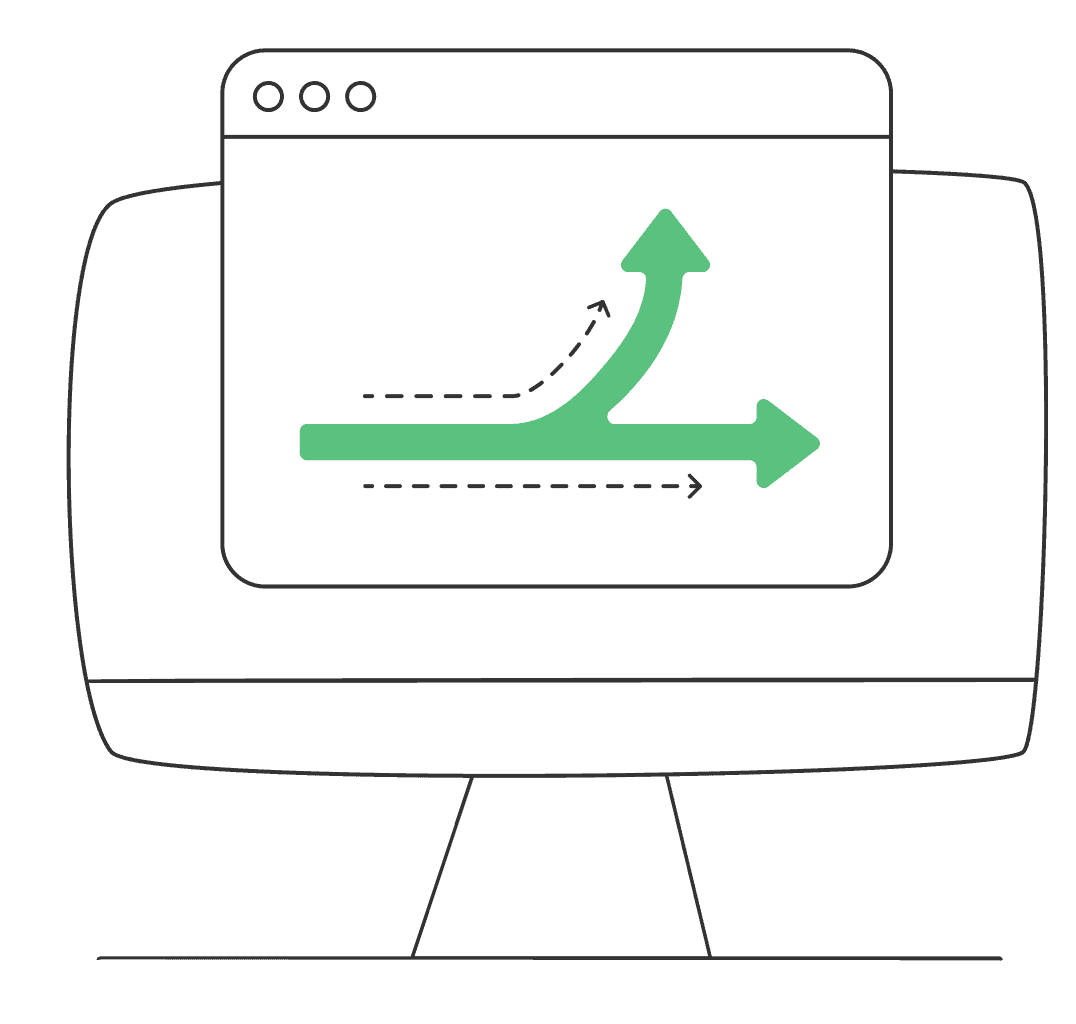
Split Tunneling allows you to direct your internet traffic through two separate paths: one encrypted through the VPN, the other bypassing it for direct access. Think of it like a highway: sensitive data (banking, personal info) takes a secure, encrypted tunnel, while streaming or gaming apps take the open road for faster performance. With Bear VPN, you decide which apps or websites get maximum privacy and which get lightning-fast speeds—no more buffering or slowdowns.

What are benefits of VPN Split Tunneling

Split Tunneling offers several advantages, especially if you use apps that require different levels of security and performance. Here’s why you should consider using Split Tunneling:

Types of Split Tunneling

There are three main types of Split Tunneling, each offering different levels of control over your internet traffic:
Inverse Split Tunneling
IP-Based Split Tunneling
App-Based Split Tunneling

Inverse Split Tunneling

Inverse split tunneling encrypts all your online traffic by default, ensuring your data is secure. If you want certain apps or websites to bypass the VPN, you must manually specify them. For example, your banking or work data will be encrypted, but apps like TikTok can be set to use an unencrypted connection.

IP-Based Split Tunneling

This option allows you to route traffic to specific IP addresses through the VPN. For example, you can secure your connection to a corporate network while allowing other traffic to bypass the VPN.

App-Based Split Tunneling

With app-based tunneling, you can select specific applications (e.g., Zoom, Chrome, Netflix) to route through the VPN, while others bypass it for better speed.
    Inverse split tunneling encrypts all your online traffic by default, ensuring your data is secure. If you want certain apps or websites to bypass the VPN, you must manually specify them. For example, your banking or work data will be encrypted, but apps like TikTok can be set to use an unencrypted connection.
    This option allows you to route traffic to specific IP addresses through the VPN. For example, you can secure your connection to a corporate network while allowing other traffic to bypass the VPN.
    With app-based tunneling, you can select specific applications (e.g., Zoom, Chrome, Netflix) to route through the VPN, while others bypass it for better speed.

How does VPN Split Tunneling work

The technology behind Split Tunneling is simple yet powerful. Here’s how it works:

Traffic analysis

Bear VPN scans your apps and websites to identify which ones you want to route through the VPN.

Encryption

Once identified, sensitive data is encrypted and securely routed through Bear VPN’s global servers, protecting your privacy.

Direct access

Non-sensitive traffic is routed directly through your local internet service provider (ISP), improving speed for non-critical activities like browsing.

Seamless sync

Both paths work together smoothly with no conflicts or slowdowns.

When you should use Split Tunneling

Split Tunneling is ideal in the following situations where you want to balance security with speed:

Works on all your devices

BearVPN works seamlessly on Android, iPhone, Windows, and Mac.
WindowsWindows
macOSmacOS
AndroidAndroid
iOSiOS

How to set up Split Tunneling in 3 steps
Follow the below steps to set up split tunneling for specific apps.
1
Download
Download
Download and install the Bear VPN app on your device.
2
Enable Split Tunneling
Go to Settings > Split Tunneling, then select the apps you want to route through the VPN.
3
Connect
Connect
Choose a server and tap Connect. Only your selected apps will use the VPN.
Free Download

More than a VPN Split Tunneling

It’s not just the Split Tunneling—explore all the powerful features BearVPN has to offer for ultimate online security.
Kill Switch

Kill Switch

Automatically blocks your internet if the VPN disconnects, keeping your data safe from leaks.

Hide IP

Hide IP

Mask your real IP address to protect your identity and prevent online tracking.

Split Tunneling

Split Tunneling

Decide which apps use the VPN while others access the internet directly—balance security and speed effortlessly.

Advanced encryption

Advanced encryption

Shields your data with top-tier encryption, protecting you from hackers, ISPs, and surveillance.

No-logs policy

No-logs policy

Your privacy is our priority—we never track, store, or share your online activity.

Up to 10 devices

Up to 10 devices

Secure up to 10 devices simultaneously with one BearVPN account—perfect for work, travel, and home use.

Dedicated IP

Dedicated IP

Connect with a unique IP address that’s yours alone to reduce CAPTCHA prompts and access trusted services more reliably.
Double VPN

Double VPN

Encrypts your data twice by routing it through two servers to boost anonymity and strengthen your online privacy.

Fastest VPN

Fastest VPN

Optimized for speed with high-performance servers to let you stream, game, and browse without slowdowns or buffering.

Frequently asked questions

    Yes. Split Tunneling allows you to select which traffic is encrypted, ensuring sensitive data is always protected while other activities can bypass the VPN.
    No, in fact, by offloading non-sensitive traffic, Split Tunneling can improve your speeds for activities like streaming or gaming, while still securing important data.
    Absolutely! BearVPN supports Split Tunneling on both Android and iOS devices with a simple, one-click setup.