Key Takeaways
- A VPN with a static IP is best when you need stable access, not when you need frequent IP changes.
- In VPN products, dedicated IP VPN is usually the most reliable choice for IP whitelisting and work logins.
- Shared VPN IPs are often cheaper, but they can trigger more CAPTCHAs or security checks.
- The best VPN with a static IP depends on your use case, location options, pricing, and privacy standards.
- A good choice should balance dedicated IP support, ease of use, and low-risk testing (such as a refund window).
If you keep running into login challenges, repeated verification prompts, or IP whitelist issues, a VPN with a static IP can solve problems that a regular shared-IP VPN often cannot. You get a more consistent online identity, which is especially useful for work platforms, admin dashboards, and remote access tools. In this guide, you’ll learn what a static IP VPN is, how it compares with dedicated and shared IP options, how to choose the best fit, and when a practical option like BearVPN makes sense for your setup.
What Is a VPN With Static IP
Before you choose a provider, it helps to clean up the terminology. People often use static IP VPN, dedicated IP VPN, and even private IP VPN as if they mean exactly the same thing, but they do not always refer to the same setup.
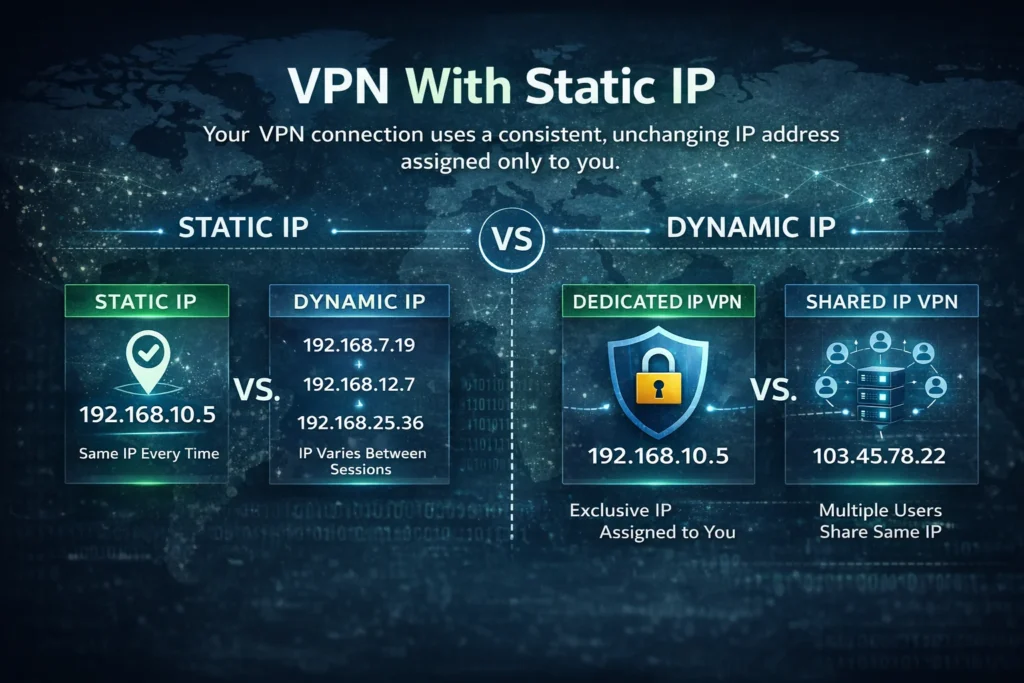
A VPN with a static IP means your VPN connection uses an IP address that stays the same over time. In practice, this is often delivered as a dedicated IP add-on, where the IP is assigned to you rather than shared with many users.
Static IP vs Dynamic IP
A static IP stays the same each time you connect to that server or assigned endpoint. A dynamic IP can change between sessions. If you only care about general privacy, a dynamic IP is usually fine. But if you need stable access for allowlists, remote tools, or account reputation consistency, dynamic IP changes can create friction.
Dedicated IP vs Shared VPN IP
This is the distinction that matters most for your buying decision.
- Shared VPN IP: Many users connect through the same IP address.
- Dedicated IP: Only you use that IP address.
A shared IP can be good for general VPN usage, but it can also inherit the behavior of other users on the same IP. That is one reason shared IPs may trigger more CAPTCHAs or service checks. A dedicated IP gives you more consistency because your traffic history is not mixed with a large pool of unknown users.
Is “Static IP VPN” the Same as “Dedicated IP VPN”?
Not always in technical terms, but in everyday product searches, they are often used interchangeably. When you search for vpn with a static ip, most users actually mean: “I want an IP that stays consistent and is not shared by many strangers.” In most VPN products, this usually points you to a dedicated IP VPN option.
Why Use a VPN With Static IP
Now that the terminology is clear, the next question is simple: when does a static IP VPN actually improve your day-to-day experience? The answer is not “always.” It is most useful when consistency matters more than rotation.
IP Whitelisting for Work and Remote Access
Many business tools, internal dashboards, cloud services, and admin portals use IP whitelisting (also called allowlisting). If your IP changes often, you may need to update the allowlist repeatedly or ask an admin to do it for you. A VPN with a static IP solves that by giving you one stable address to register once and use consistently.
More Stable Logins and Fewer Verification Checks
Security systems often flag sign-ins when they come from changing IPs, unusual locations, or IPs with a poor reputation. Shared VPN IPs can be affected by other users’ behavior. With a dedicated/static IP, your login pattern is more consistent, which can reduce repeated email codes, CAPTCHA loops, and “suspicious login” warnings.
Better Access for Admin Panels and Recurring Tasks
If you regularly access CMS dashboards, ad platforms, analytics tools, remote desktop gateways, or vendor portals, a dedicated IP VPN can make your workflow smoother. You spend less time proving you are really you, and more time actually getting work done.
When a Static IP Helps—and When It Doesn’t
A static IP VPN helps when your pain point is stability: login consistency, whitelist access, or recurring work sessions. It does not help as much if your goal is frequent IP rotation, wide exit-node variety, or blending into a large shared user pool for general browsing.
Static IP VPN Pros and Cons
You should treat a static IP VPN as a tool, not a default upgrade. It solves specific problems well, but it also introduces trade-offs. Understanding both sides will help you avoid paying for a feature you do not need.
Benefits of a Static IP VPN
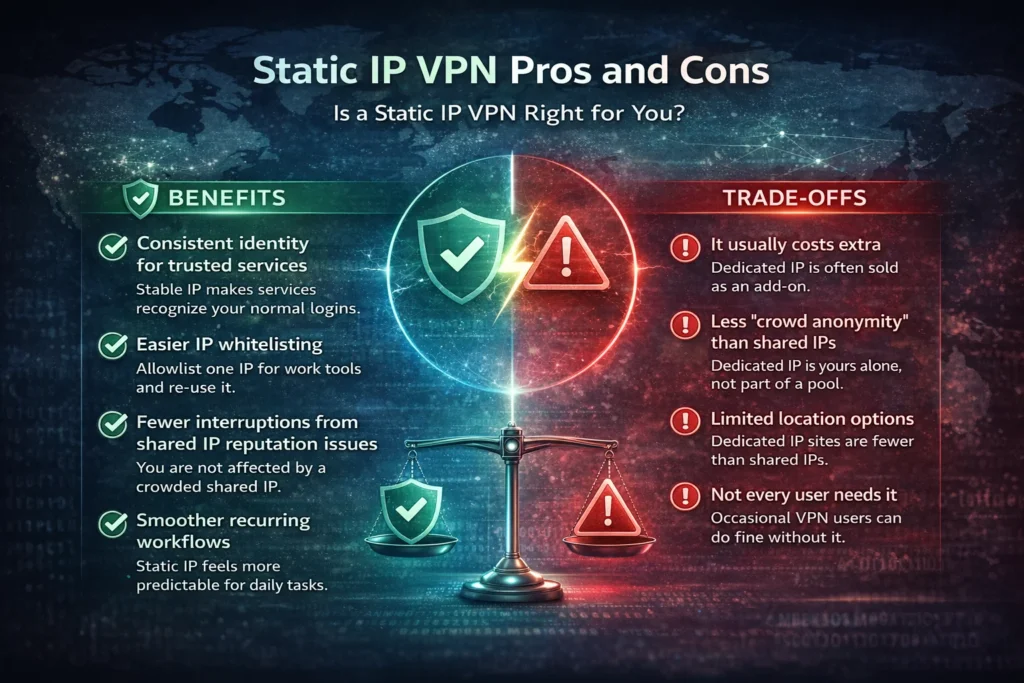
1) Consistent identity for trusted services
Your IP remains stable, which makes it easier for services to recognize your normal login behavior.
2) Easier IP whitelisting
You can add one IP to your allowlist for work tools, cloud resources, or admin systems and keep using it.
3) Fewer interruptions from shared IP reputation issues
You are not affected as much by other users on a crowded shared IP, which may reduce access friction.
4) Smoother recurring workflows
If you do the same tasks every day, a static IP setup often feels more predictable and less annoying.
Trade-Offs You Should Consider
1) It usually costs extra
Many providers sell dedicated IP as an add-on rather than including it in standard plans.
2) Less “crowd anonymity” than shared IPs
A dedicated IP is yours alone, which is great for consistency, but not ideal if your main goal is blending into a large shared traffic pool.
3) Limited location options
Dedicated IP locations may be fewer than the provider’s full shared-server list.
4) Not every user needs it
If you only use a VPN occasionally, a shared IP plan may be more cost-effective.
How to Choose the Best VPN With a Static IP
Once you know you actually need a static IP, the next step is choosing the right provider. This is where many buyers make mistakes: they focus on marketing labels instead of checking whether the dedicated IP option really matches their use case.
Make Sure It Offers a Real Dedicated IP Option
Do not assume every “static IP” mention means a true dedicated IP. Check whether the provider clearly states that the IP is exclusive to you. If your goal is stable account access and fewer flags, exclusivity matters.
Check Location Availability and Pricing
Before you buy, confirm:
- The countries or cities available for a dedicated IP
- whether a dedicated IP is included or sold as an add-on
- renewal pricing (not just the first-term price)
This matters because your ideal server location may be chosen for latency, work policy, or service compatibility—not just convenience.
Evaluate Reliability, Privacy, and App Experience
A good best dedicated IP VPN choice is not just about the IP itself. You also need the basics to be strong:
- stable connections
- usable apps on your devices
- clear privacy policy
- reliable encryption and security standards
- smooth server selection and switching
BearVPN, for example, publicly highlights AES-256 encryption, which is a useful signal when you want to test a provider in your real environment first.
Do Not Skip Support and Refund Policy
Dedicated IP use cases often connect to real workflows. If something goes wrong—such as access issues, whitelist updates, or server selection confusion—you need responsive support. A refund window gives you a practical way to test whether the provider works with your actual tools before you commit long-term.
How to Get a VPN With a Static IP
The setup process is usually easier than people expect. You do not need advanced networking skills for most consumer VPN providers. What matters is choosing the right option and testing it against your real login or access workflow.
Step 1. Choose a VPN That Supports Dedicated IP
Start with a provider that clearly offers a dedicated IP option. If you are considering BearVPN, the dedicated IP feature page confirms this option is available and shows a simple user flow.
Step 2. Enable or Purchase the Dedicated IP Option
Depending on the provider, dedicated IP may be included in a plan, added as an upgrade, or selected from a feature menu. Read the plan details before checkout so you know what you are getting.
Step 3. Connect to the Dedicated IP Server
After setup, choose the Dedicated IP server or location in the app and connect. BearVPN’s published steps describe selecting a Dedicated IP server and then connecting through the app.
Step 4. Verify Your IP Address
After connecting, confirm that your visible IP matches the expected dedicated IP. This step is important before you add the address to any allowlist or rely on it for recurring work access.
Step 5. Add It to Your Allowlist (If Needed)
If you are using the static IP for work systems, admin panels, or cloud tools, add the verified IP to the relevant IP whitelist. Then test your normal login flow for a few days to see whether interruptions decrease.
Best VPN With Static IP for Daily Use Cases: Is BearVPN a Good Fit?
By this point, you know whether you need a static IP and what to check before buying. The next question is practical: will a specific provider actually make your workflow easier, or will it just add another subscription to manage?
If your priority is a low-friction start and stable day-to-day access, BearVPN can be a sensible option to try first. Instead of leaning on a complicated setup, it focuses on practical outcomes you actually notice—privacy you can trust, steadier connections, and a smoother experience across devices.

What BearVPN Offers That Supports This Use Case
BearVPN’s official positioning highlights several strengths that map well to “stable access” needs:
- Free on mobile with unlimited data, so you can start using it right away without worrying about traffic limits.
- Strict no-logs approach, aimed at reducing concerns about data collection and protecting your privacy.
- Real physical servers with multi-region nodes, designed to improve connection stability and reduce random dropouts.
- Streaming unblocking capability (availability can vary by region), which is helpful if your daily use includes geo-restricted platforms.
- Strong security standards, including AES-256 encryption and support for modern proxy protocols.
- Cross-platform compatibility across Android, iOS, Windows, and macOS, so you can keep the same setup on all your devices.
That mix is useful when your “static IP” intent is really about a more predictable routine: fewer interruptions, more consistent access, and an easier day-to-day experience.
How You Should Test It Before Committing
To make a good decision, do not test with random browsing only. Test with your actual use case:
- log into the work platform that currently gives you problems
- check whether verification prompts (like CAPTCHAs or email codes) become less frequent
- try the same workflow on different networks over several days
- if streaming access matters to you, test the specific platform you care about (results may vary by region)
This gives you a much better answer than speed tests alone, because it measures what you really want: stable access that holds up in real life.
Conclusion
A VPN with a static IP is a smart upgrade when your main problem is instability—changing IPs, repeated verification prompts, or IP whitelist headaches. If you need consistent access for work tools, admin panels, or remote systems, a dedicated IP VPN is usually the most practical path. If that sounds like your situation, BearVPN is a solid option to test first because it offers a dedicated IP feature, letting you validate it against your real workflow before making a long-term decision.
FAQs
1. Is a dedicated IP the same as a static IP in VPNs?
Not always, but in most consumer VPN shopping contexts, they are closely related. A dedicated IP is usually static and assigned only to you. When people search for a static IP VPN, they are often looking for a dedicated IP option.
2. Will a VPN with static IP reduce CAPTCHAs and login checks?
It can help, especially if your current issues come from shared IP reputation or constantly changing IP addresses. It is not a guarantee for every service, but many users see fewer interruptions when their IP and login pattern become more consistent.
3. Is a static IP VPN better for work logins and IP whitelisting?
Yes, this is one of the best use cases. If your company’s tools use IP whitelisting, a static or dedicated IP makes access management much easier and reduces repeated approvals.
4. Is a dedicated IP worth paying extra for?
It is worth it if you regularly deal with login friction, allowlist management, or recurring admin access. If you only use a VPN occasionally for general browsing, the extra cost may not bring much value.
5. Can you use a static IP VPN for banking and remote access?
You can use it for many remote access scenarios and for improving login consistency. For banking, the exact experience depends on the bank’s fraud rules and local security policies. A stable IP may help with consistency, but service-specific checks still apply.
6. Do you need port forwarding with a dedicated IP VPN?
Not always. Port forwarding is a separate feature and depends on your use case (such as hosting or inbound connections) and whether your VPN provider supports it. A dedicated IP alone does not automatically mean port forwarding is included.