Key Takeaways
- Torrenting isn’t automatically “unsafe,” but it does expose your IP address to other peers in the swarm, which creates real privacy and legal/ISP risk.
- The biggest dangers come from (1) IP exposure, (2) malware/fake files, and (3) copyright complaints and throttling—especially when you torrent without protection.
- A VPN can reduce your exposure by masking your IP and encrypting traffic, but you still need good “download hygiene” and lawful sources.
- For torrenting safety, prioritize a reliable kill switch, leak protection, modern protocols (like WireGuard), and a clear no-logs policy.
- If you’re choosing a practical option, BearVPN highlights essentials like DNS leak protection, kill switch, and a no-logs policy, which align with what matters for safer P2P use.
If you’re asking “is torrenting safe?” you’re probably weighing convenience against risk—and you want a clear, practical answer. Torrenting itself is just a peer-to-peer way to share files, but the way swarms work can expose your IP address, attract unwanted attention from copyright monitors, and increase your chances of downloading a malicious file if you’re not careful. In this guide, you’ll learn what actually makes torrenting risky, how legality differs from safety, and what changes when you use a VPN with the right protections. You’ll also get simple habits that make P2P downloads safer day to day.
How Torrenting Exposes You (and why safety gets complicated)
Torrenting feels like “just downloading,” but the tech works differently than a normal website download. In a BitTorrent swarm, your client discovers and connects to other peers—so identity and exposure are part of the system. Once you see that, the safety conversation becomes much clearer.
BitTorrent is a peer-to-peer file sharing protocol. Instead of pulling a file from one server, you download pieces from multiple peers while also uploading pieces you already have. In many setups, peers are discovered via trackers or DHT (distributed hash table), and trackers can provide lists of peer addresses so clients can find each other. That’s why, in practice, IP addresses are part of what gets exchanged to make the swarm work.
This doesn’t mean “torrenting = illegal.” It means torrenting = more visible by default than people expect—especially compared with streaming a video from a single site.
Is Torrenting Safe? The Three Risk Buckets You Should Understand
If you’re searching “is torrenting safe,” you probably want a straight answer, not vague warnings. The fastest way to get clarity is to separate risks into three buckets: privacy exposure, malware/fake files, and legal/ISP consequences. Each one has different causes—and different fixes.
1) Privacy risk: your IP can be visible in the swarm
When you join a torrent swarm, other peers may be able to see the IP address you connect from. That can be enough to tie activity back to your household connection, even if your name isn’t shown in the torrent client.
This is the core reason you’ll see questions like “is torrenting safe without a VPN?” and “can my ISP see torrenting?” pop up so often: torrenting is designed for peer discovery and direct connections, not anonymity.
2) Security risk: malware, fake files, and “looks legit” traps
Torrent files can be mislabeled, bundled with unwanted installers, or designed to trick you into running something risky. Some ISPs and security guides explicitly warn that peer-to-peer sharing sources can include trojans, malware, or ransomware.
Even if you never intend to do anything shady, you can still get burned by a bad file. “Safe torrenting” is as much about file safety as it is about privacy.
3) Legal/ISP risk: complaints, notices, throttling, and escalation
If you torrent copyrighted material without authorization, copyright holders (or their monitors) may associate an IP address with activity and send a complaint through the ISP process. Some ISP help pages describe DMCA complaint handling and warn that downloading/sharing copyrighted content can create liability.
Separately, some guides note that ISPs may throttle P2P traffic when they detect it, which turns torrenting into a slow, frustrating experience—especially on large files.
Is Torrenting Illegal? Use This Quick Legality Checklist
This section isn’t legal advice, but it will help you think clearly. Torrenting (the protocol) is a tool; legality usually comes down to what you share and whether you’re authorized to share it. If you keep that framing, you’ll avoid most confusion.
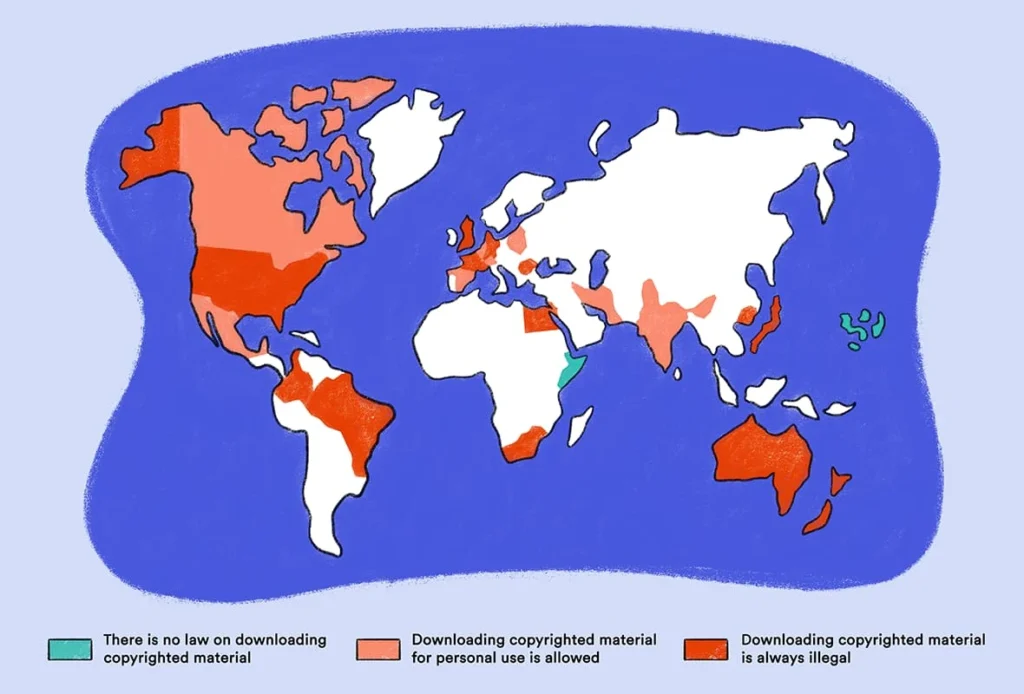
Here’s a practical checklist you can run before you download or seed anything:
- Is the content authorized for sharing? Examples that are often legitimately shared include open-source software distributions, public domain media, or files shared by the copyright holder.
- Are you uploading (seeding) automatically? Many clients share pieces while downloading. If the content is unauthorized, that “sharing” can increase your risk compared to passive downloading.
- Do your local rules treat P2P differently? Enforcement and consequences vary by country and ISP policy, so assume “it’s fine everywhere” is a bad bet. Some legal commentary also notes that the DMCA safe harbor mainly protects the ISP—not necessarily the alleged infringer.
If your goal is “safe torrenting,” the safest baseline is simple: only torrent content you have the right to download and share. Everything else is risk management on top of a shaky foundation.
Torrenting Without a VPN vs with a VPN: What Changes in Practice?
It’s easy to get lost in VPN marketing. A better approach is to ask a narrow question: what changes, concretely, when you add a VPN to torrenting? Think of this as a before/after view of your exposure—not a magic invisibility cloak.
Here’s a practical comparison:
| What you care about | Without a VPN | With a VPN (typical setup) |
| IP visible to other peers | Your real IP may be visible in the swarm | Peers generally see the VPN server IP instead |
| ISP visibility | ISP can see you’re connecting to torrent-related peers/trackers | ISP sees encrypted VPN traffic, not the torrent connections themselves |
| “Oops” moments | If you disconnect/reconnect, exposure can happen instantly | A kill switch can reduce accidental exposure if configured well |
| File safety | Still your responsibility | Still your responsibility (VPN doesn’t sanitize files) |
Two honest caveats:
- A VPN can reduce exposure, but it doesn’t make unlawful activity lawful.
- VPN features vary, and kill switches can fail in edge cases (for example, around reboot events), so you should treat them as risk reduction—not perfection.
The VPN Features that Actually Matter for Safer P2P
If you’re comparing options, you’ll see a lot of “extras.” For torrenting safety, you can ignore most of them. What matters is whether the VPN consistently reduces your exposure, especially during real-world hiccups like dropped connections.
A short, no-hype checklist
- Kill switch that’s easy to enable: This cuts internet access if the VPN drops, helping prevent accidental unprotected traffic.
- Leak protection (DNS/IPv6/WebRTC concepts): The goal is to prevent your device from quietly using a non-VPN path for name lookups or certain traffic. BearVPN lists DNS leak protection as a core feature, which is exactly the kind of item you want on your checklist.
- Modern, well-regarded protocols: WireGuard is widely described as a fast, modern VPN option built with state-of-the-art cryptography, and many users prefer it for performance on large transfers.
- A clear no-logs stance: “No-logs” claims differ across providers, so look for clear policy language and transparency. BearVPN provides a dedicated no-log feature page and states it does not record or store online activities. BearVPN+1
- Stable speeds and enough server choice: Torrenting is mostly about large transfers. If the VPN is unstable, you’ll reconnect more, and reconnections are where accidental exposure can happen.
If you only remember one thing: the best VPN for torrenting isn’t the one with the longest feature list—it’s the one that stays connected reliably and fails safely when it doesn’t.
A Practical VPN Option for Torrenting Safety
At this point, your decision is usually less about “should you use a VPN” and more about “which one matches the checklist without becoming a maintenance project.” You want something easy to keep on, hard to misconfigure, and clear about the protections it offers.
One practical option to look at is BearVPN. On its features pages, BearVPN highlights protections that map closely to torrenting safety needs: DNS leak protection, a kill switch, IP masking, and a no-logs policy.

Here’s how to evaluate it (and any VPN) in a way that stays grounded:
- Confirm the safety basics are present and turned on. BearVPN describes a kill switch that disconnects your internet if the VPN drops, which is exactly the behavior you want during network hiccups.
- Prefer modern protocol options when you care about speed. BearVPN’s materials discuss common protocols (including WireGuard in its protocol content), and WireGuard is broadly positioned as fast and modern.
- Check the provider’s privacy positioning. BearVPN’s no-logs messaging is prominent across its site, including a dedicated no-log feature page.
- Keep expectations realistic. A VPN reduces exposure; it doesn’t make risky files safe. That’s why the next section matters just as much.
If you want the “most practical” outcome, your goal is simple: choose a VPN you’ll actually keep enabled, with leak protection and a kill switch you don’t have to babysit.
Download Hygiene that Reduces Malware Risk (Even with a VPN)
You can do everything right on the privacy side and still lose because of one bad file. VPNs protect the route your traffic takes; they don’t verify whether a download is clean. That’s why safer torrenting always includes a short, boring set of habits that work.
Try this approach:
- Treat executable files as high risk by default. If something requires running an installer to “watch” or “open” it, pause and reassess.
- Prefer well-known, official sources for legitimate torrents. Some organizations distribute large files via BitTorrent precisely because it’s efficient—those are safer than random uploads.
- Scan downloads and keep your system updated. ISP guidance around P2P complaints often recommends scanning for malware and tightening basic network security after suspicious activity.
- Reduce “accidental sharing.” If you’re not sure what your client is uploading, you’re not in control. Learn your client’s seeding behavior and settings so you don’t share more than you intend.
This isn’t glamorous, but it’s what separates “I’ve torrented for years with no issues” from “one download wrecked my machine.”
Conclusion
Torrenting can be safe enough for legitimate file sharing, but it’s not “private by default.” Your IP exposure in the swarm, malware risk from untrusted files, and copyright/ISP consequences are the three issues you need to manage. A VPN helps by masking your IP and encrypting your traffic—especially when it includes leak protection and a reliable kill switch. From there, safer torrenting is mostly about discipline: stick to lawful sources, keep your system protected, and don’t assume one tool can fix everything.
FAQs
1. Is torrenting safe with a VPN?
It can be safer because a VPN typically masks your IP from the swarm and encrypts your traffic to the VPN server. But it doesn’t remove malware risk or make unauthorized sharing legal.
2. Can my ISP see torrenting if I use a VPN?
Your ISP can usually see that you’re using a VPN, but the contents of the traffic and the peer connections are typically encrypted inside the VPN tunnel.
3. Is torrenting safe without a VPN?
It’s riskier because your IP can be visible to other peers in the swarm, and your ISP may detect P2P traffic patterns more easily.
4. Are free VPNs safe for torrenting?
“Free” often comes with tradeoffs: weaker privacy guarantees, limited features, or unstable connections. For torrenting, instability matters because disconnects increase the chance of accidental exposure—so check for leak protection and a kill switch at minimum.
5. What is a kill switch, and do you really need it for torrenting?
A kill switch cuts internet access if the VPN drops, helping prevent traffic from leaking outside the tunnel. It’s one of the most useful safety features for P2P—though no kill switch is perfect in every edge case.