If you’re seeing “This post is age-protected” on TikTok or can’t watch certain videos, you’re not alone. TikTok’s age restriction and Restricted Mode are designed for safety, but they can be confusing—especially if you’re actually over 18. This guide walks you through how to turn off age restrictions on TikTok, fix common errors, and keep your account safer when you use TikTok on public Wi-Fi or while traveling.
What TikTok Age Restriction and Age-Protected Posts Actually Mean
Before you look up how to turn off age restrictions on TikTok, it helps to understand what the app is trying to do. TikTok combines several layers of protection: your date of birth, content filters like Restricted Mode, and extra rules for teens. When you know which layer is causing the problem, you can fix it without breaking the rules or risking your account.
TikTok uses a few key concepts you’ll see in alerts and settings:
- Age restriction / age-protected: TikTok’s way of marking certain videos and features as suitable only for adults.
- Restricted Mode: An optional filter that hides potentially mature or sensitive content, often enabled by parents or by you in the past.
- Family Pairing / parental controls: Settings that give parents extra control over a teen’s account.
Depending on your age, you get different default controls and limits. The exact details can change over time, but it broadly looks like this:
| Account age range | Typical limitations you’ll see |
| 13–15 | Stricter default privacy, limited DMs, fewer interaction tools |
| 16–17 | More features unlocked, but some tools are still restricted |
| 18+ | Full access, but still subject to content policies and region |
You can’t use a VPN or a simple setting to pretend your account is older than it is. TikTok’s servers rely on the birthday you gave and any documents you’ve submitted. That’s why fixing age restrictions on TikTok is mostly about correcting your information and adjusting settings, not about tricking the app.
Can You Turn Off Age Restriction on TikTok? What Actually Works
When you search for how to turn off age restriction on TikTok, you’re usually struggling with two issues at once: you want more control over the content you see, and you want to stop TikTok from treating you like a minor if you’re already 18 or older. The good news is you can change some settings yourself; the bad news is you can’t override everything if your account is genuinely underage.
The first thing to understand is what you can and can’t change:
- If you’re under 18, TikTok will still apply some age-based safety limits, even if you disable Restricted Mode.
- If you’re over 18, you should be able to turn off Restricted Mode and update any incorrect birthday details through TikTok support.
- No app, tool, or VPN can legally or reliably force TikTok to treat a 16-year-old account as 18+.
Once you’re clear on that, you can focus on the setting that most people mean when they say “age restriction” on TikTok: Restricted Mode.
How to Turn Off Restricted Mode on TikTok (iPhone and Android)
These steps are almost the same across platforms, so you can use them whether you’re on iOS or Android:
- Open TikTok and go to your profile.
Tap your profile icon in the bottom-right corner. - Open Settings and privacy.
Tap the three-line menu (☰ or “≡”) in the top-right, then choose Settings and privacy. - Find Content preferences / Restricted Mode.
Look for Content preferences, Content & display, or a similar menu, then tap Restricted Mode. - Turn off Restricted Mode.
Tap Turn off Restricted Mode, then enter your four-digit passcode if prompted. - If you forgot the passcode, use the recovery flow.
Tap Forgot passcode? and follow the instructions, or ask the person who originally set it up (for example, a parent) to unlock it for you.
After you complete these steps and restart the app, you should stop seeing many of the “filtered out” videos. This doesn’t guarantee that every age-protected TikTok video will appear, but it’s the core fix most guides are referring to when they talk about how to turn off age restriction on TikTok.How to Turn Off Restricted Mode on TikTok (iPhone and Android)
These steps are almost the same across platforms, so you can use them whether you’re on iOS or Android:
- Open TikTok and go to your profile.
Tap your profile icon in the bottom-right corner.

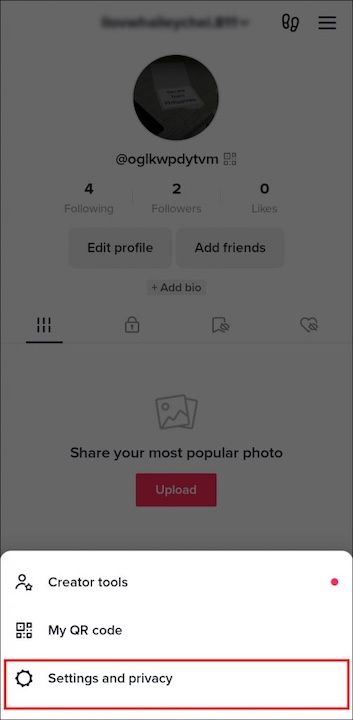
2. Open Settings and privacy.
Tap the three-line menu (☰ or “≡”) in the top-right, then choose Settings and privacy.
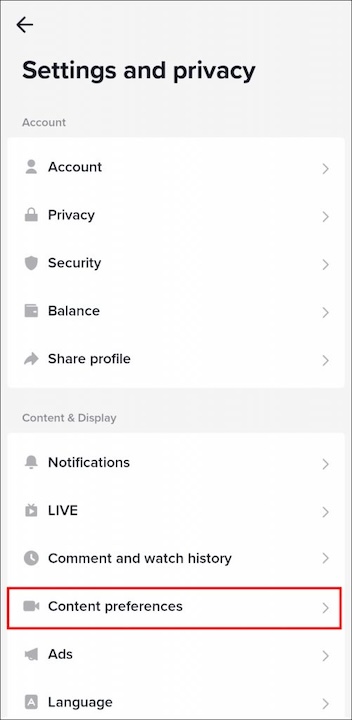
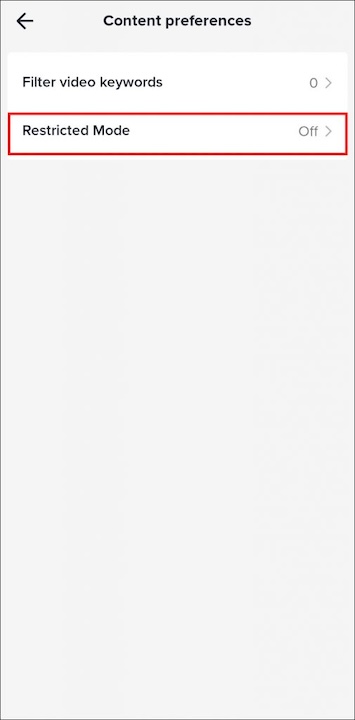
3. Find Content preferences / Restricted Mode.
Look for Content preferences, Content & display, or a similar menu, then tap Restricted Mode.
4. Turn off Restricted Mode.
Tap Turn off Restricted Mode, then enter your four-digit passcode if prompted.
5. If you forgot the passcode, use the recovery flow.
Tap Forgot passcode? and follow the instructions, or ask the person who originally set it up (for example, a parent) to unlock it for you.
After you complete these steps and restart the app, you should stop seeing many of the “filtered out” videos. This doesn’t guarantee that every age-protected TikTok video will appear, but it’s the core fix most guides are referring to when they talk about how to turn off age restriction on TikTok.
Fixing “This Post Is Age-Protected” When You’re Already Over 18
Sometimes, Restricted Mode is off, you’re clearly over 18, and TikTok still tells you “This post is age-protected.” In that case, the problem is usually not your settings but your account details or how TikTok interprets them. You might have entered the wrong birthday when you signed up, or TikTok may have flagged your account as belonging to a younger user.
This situation is annoying, but there are a few practical ways to fix it without resorting to risky tricks or fake documents.
Check and Correct Your Date of Birth
If your date of birth is wrong in TikTok’s system, age-restricted content will keep behaving oddly until you fix it. You can’t always change your birthday in the app directly, but you can contact support:
- Go to Profile → Settings and privacy → Report a problem.
- Choose a category related to Account and profile or Editing profile.
- Use the “Still have a problem?” or Need more help? option to describe your issue.
- Explain that you’re over 18, your date of birth is incorrect, and you’d like to update it.
- Be ready to provide a clear, legitimate photo of your ID if TikTok asks for verification.
Using real information is important. If you upload fake IDs or claim an age you don’t actually have, you risk a permanent ban instead of a quick fix.
Appeal Age-Protected Content or Feature Limits
In some cases, TikTok marks a specific video, feature, or action as age-protected, even when your account is correctly set up. You may see notices in your inbox or on a particular video. When that happens:
- Open the notification related to the restriction.
- Look for an Appeal or Disagree with decision option.
- Briefly explain that you are over 18 and believe the decision is incorrect.
Appeals are not guaranteed to succeed, but if TikTok made an error, this is the cleanest way to get it corrected and restore access to age-restricted TikTok content.
Other Reasons You Still See Age-Protected Posts
Even after you’ve turned off Restricted Mode and corrected your age, you might still see age-protected messages because:
- Algorithms and caches take time to update. TikTok’s feed won’t change instantly; it may need a bit of usage to recognize your updated status.
- Legal and regional rules apply. Certain videos are restricted to specific countries or subject to local regulations. Even adult users may not see them outside those regions.
- Your account history is complicated. If you’ve changed details many times or had previous enforcement actions, TikTok might be more conservative about what it shows you.
As a last-resort option, you can create a new account with your correct date of birth and migrate your activity over time. If you have followers, you can post a short video on your old account to direct them to the new one.
If You’re Under 18: Safer Ways to Use TikTok
If you’re genuinely under 18, there’s no legitimate way to completely remove age restriction on TikTok. The platform has to comply with youth safety standards and local laws, so it will keep some protections in place even if you disable Restricted Mode. That doesn’t mean you’re powerless, though—you still have options to make your experience better and safer.
A good first step is to talk to a parent or guardian about what you want from TikTok. Instead of secretly searching for how to turn off age restriction on TikTok without passcode, you can ask them to review the settings with you and find a balance that fits your age.
Here are some practical, safer choices:
- Use Family Pairing or parental controls. Let your parents connect their account with yours via Family Pairing so they can adjust screen time, messaging, and content filters with you instead of against you.
- Customize your For You feed. Tap and hold on videos you dislike and choose Not interested. Over time, TikTok learns your preferences, even within age-appropriate boundaries.
- Block specific accounts or hashtags. If certain topics bother you, blocking them is healthier than trying to bypass age protections altogether.
- Do not falsify ID or lie about your birthday. It may feel like a shortcut, but it can easily result in account suspension or losing access just when you care about it most.
Using these tools honestly protects you now and builds habits that will still help when you eventually upgrade to a fully adult account.
Protect Your TikTok Privacy on Public Wi-Fi and When Traveling (VPN Tips)
Once you’ve fixed the age restriction inside TikTok, the next question is where you actually use the app. Coffee shop Wi-Fi, school networks, shared apartments, and hotel hotspots all add extra risk. A VPN won’t change your TikTok age settings, but it can change how exposed your connection is.
For TikTok, you need a VPN that feels like part of your daily routine, not another dashboard to manage. BearVPN is designed around that idea: quick to switch on, light on your phone, and focused on privacy features that matter when you’re constantly on mobile data and Wi-Fi.

A few details are especially useful for TikTok users:
- Simple, multi-platform apps. You can tap once to connect on iOS or Android and keep the same account protected on your laptop later.
- Privacy by design. RAM-only servers, a no-logs approach, and DNS leak protection help keep your viewing habits away from curious networks.
- Built for phones first. The apps are tuned for scrolling and short videos, so you’re less likely to notice lag or constant reconnects.
- Per-app control. With split tunneling or per-app routing, you can send TikTok and a few socials through BearVPN without forcing every single app to use the tunnel.
- Global options when you travel. Multiple locations let you choose a route that usually works well for your account, as long as TikTok and VPNs are permitted where you are.
Put together, these pieces don’t unlock restricted content—that still depends on your age and settings—but they do give you a cleaner, more private way to enjoy TikTok once your account is configured correctly.
FAQs
1. Do you need a VPN to turn off the age restriction on TikTok?
No. Age restrictions and Restricted Mode are controlled by TikTok. You turn them off by changing in-app settings and correcting your birthday, not by using a VPN.
2. Is it safe to lie about your age or upload fake ID to TikTok?
No. Faking your age or submitting false documents can get your account restricted or permanently banned. It’s better to fix errors honestly or wait until you meet the age requirements.
3. Can TikTok see what you watch if you use a VPN?
TikTok still sees what you do inside its own app. A VPN mainly hides your traffic from outsiders like your Wi-Fi provider, school network, or other people sharing the same connection.
4. Is it okay to use a VPN while watching TikTok on public Wi-Fi?
In most places, yes. Using a VPN is a common way to protect your accounts and data on open networks. You should still follow TikTok’s rules and any local regulations in the region you’re connecting from.
Conclusion
You now know how to turn off age restriction on TikTok in ways that actually work: disabling Restricted Mode, correcting your birthday, and appealing age-protected mistakes instead of relying on risky shortcuts. If you’re under 18, safer settings and honest limits are the only real option. Once that’s in place, using a VPN like BearVPN on public or shared networks helps keep your TikTok sessions more private, stable, and under your control.