Key Takeaways
- FetLife is a niche social network for BDSM, fetish, and kink communities. It is focused on profiles, groups, events, and messaging among users.
- To delete a FetLife account permanently, you can go to the account settings and choose Deactivate/Delete Account, then confirm Delete Account.
- FetLife typically applies a short grace period (about 7 days) before permanently removing your data from the day you make the deletion.
- Comparison between Deactivation and Deletion: Deactivation hides your profile but keeps your data; deletion is permanent and usually cannot be reversed.
- Things to note before deletion: You should cancel subscriptions, remove sensitive content, review privacy connections and messages if you are deleting your FetLife account permanently.
- Security tip: If you want to stay private and safe on FetLife, using a VPN like BearVPN to keep anonymous and avoid tracking by others.
By 2026, social media platforms have become increasingly diverse. They provide accurate services in accordance with various social requirements. FetLife, as one of the most popular social networking platforms, has attracted millions of young people in recent years. Some of the users also hope to know how to delete a FetLife account safely.
FetLife focuses on highly personal and sensitive content. Deleting or deactivating your account requires careful preparation and a clear understanding of what happens to your profile, media, and messages. This guide walks you through reasons to delete, step‑by‑step instructions, and how to stay private if you continue using FetLife with tools like BearVPN.
You may also like: How to delete OnlyFans account safely
Why Do You Need to Delete Your FetLife Account?
1. Privacy Concerns
People choose to delete their FetLife accounts for a mix of privacy, safety, and lifestyle reasons. Common motivations include fear of being outed, changes in relationships, professional concerns, or simply no longer participating in kink communities. Some users also worry about past posts or photos resurfacing, potential data breaches, and how long the platform keeps their personal information.
2. Platform Security Concerns
Besides the above privacy concerns, other reasons may involve platform‑level issues: disagreements with FetLife’s policies, moderation decisions, or concerns about how reports of abuse and consent violations are handled. Some users prefer platforms with different features or safer‑feeling communities, or they may switch to encrypted messaging for private discussions.
No matter what causes you to delete your FetLife account, it’s necessary to understand how to thoroughly clear your traces on this platform and reduce your digital footprint, especially if your profile contains identifiable photos, local event attendance, or unique usernames reused elsewhere. For parents, partners, or individuals under extra scrutiny, fully deleting an account is often part of a broader strategy to manage online reputation.
How to Delete Your FetLife Account
This section gives a detailed, step‑by‑step walkthrough of how to delete FetLife account safely, plus important preparation steps before you permanently remove your social networking account.
Preparation Before Deletion
Before you start the deletion process, do some basic cleanup and preparation:
- Review and remove sensitive photos or videos you no longer want on the platform.
- Delete old posts, comments, and event listings that reveal personal details or locations.
- Unlink any external accounts or profiles you might have referenced in your bio or posts.
- Save any information you wish to keep, such as long‑form writings or event details, by copying them offline.
- Inform trusted contacts that you are leaving, if you want them to know where else to reach you.
If you have a paid FetLife subscription or supporting membership, cancel it before deletion so you are not charged afterward. This usually involves going into the subscription or membership settings and following the Cancel Subscription prompts on the FetLife website.
Once done, you can follow the methods below to finish deleting your FetLife account easily.
Method 1. Delete FetLife Account in Settings
Step 1. Log in to Your FetLife Account
Go to the official FetLife website and log in to your account.
Step 2. Go to Settings / Account Settings
Once logged in, click your profile and choose Settings from the dropdown menu. This opens your main account settings screen, where you’ll find privacy, notifications, and account status controls.
Step 3. Locate Deactivate/Delete Account
On the Settings or Account page, scroll down until you see the “Deactivate/Delete Account” option. Click this link to move to the account status screen that controls deactivation and deletion.
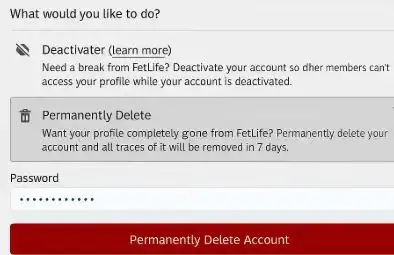
Step 4. Choose Permanent Delete
On the account status page, FetLife typically offers both deactivation and deletion:
- Deactivate: Temporarily hide your profile from others while preserving data.
- Permanent Delete: Schedule your account and associated data for permanent removal.
To proceed with permanent removal:
Select the Permanent Delete option and click the button. Read any warnings explaining that deletion is permanent and may not be reversible.
Step 5. Confirm Account Deletion
FetLife generally requires confirmation to ensure you truly want to delete your account:
Re‑enter your account password if requested. In some cases, FetLife may send a confirmation email to your registered address; if so, open the email and follow the link to finalize deletion.
Step 6. Wait Through the Grace Period
After you confirm deletion, your account is usually marked for removal and becomes inactive. Many guides and safety resources note a grace period of about 7 days:
- During this time, your profile is typically not visible to others.
- If you log back in, you may cancel the deletion and reactivate the account.
- If you do not log in again, the platform proceeds to permanently remove your data after the grace period ends.
- Once the deletion window passes, you should no longer be able to log in, and your profile should no longer appear.
That’s how you can delete your FetLife account in the platform settings. For those who have been banned on FetLife or cannot access their account settings, an alternative way to remove is through the support team.
Method 2. Request Deletion via Support
To remove a FetLife account via the support team, you can prepare your personal information first and follow the steps below:
- Go to the FetLife contact page and find its general support email.
- Write an email to request a permanent deletion of your FetLife account.
- Provide details such as username and the email address associated with the account.
- Wait for support to reply and verify your identity.
- Confirm your account deletion in your email.
What Is FetLife?
FetLife is an adult‑oriented social networking platform based on BDSM, fetish, and kink communities, where users create profiles, share posts, join groups, attend events, and connect with others. It operates more like a community forum and event hub than a mainstream dating app, emphasizing discussions, personal experiences, and local meetups.
Is FetLife Safe to Use?
Generally speaking, FetLife is regarded as a safe platform. It includes reporting tools, blocking features, and community guidelines to limit harassment, non‑consensual content, and abuse. However, because FetLife deals with highly sensitive sexual interests, risks include potential doxxing, screenshots, data leaks, and real‑world consequences if profiles are linked to your identity. According to some user discussions on Quora, there are risks of genuine and identifying information leakage on FetLife. The platform is not end‑to‑end encrypted, and any online service can be compromised or compelled to hand over data under certain legal conditions.
Can you delete FetLife Account Permanently?
Deletion vs. Deactivation
FetLife distinguishes between temporary deactivation and permanent deletion.
| Deactivation | Deletion |
| Hides your profile from public view and search results. Keeps your data stored on FetLife servers, including messages, photos, and connections. It is reversible by simply logging in again. | Schedules your account and associated data to be permanently removed after a grace period, often around 7 days. It is generally irreversible once completed; you cannot restore the same profile, messages, or connections. Requires you to create a completely new account if you later decide to return. |
What Usually Remains After Deletion
Even after you delete your FetLife account, some traces may remain outside your direct control:
- Messages you sent may still be visible in other users’ inboxes, even though your profile is gone.
- Users who saved or screenshotted your content before deletion will still have their copies.
- Backups and legal retention requirements may mean data persists internally for a time, even if no longer accessible via the website.
Practically speaking, deletion is permanent for normal use: your profile and content are removed from the platform’s visible front‑end after the grace period, and you cannot log in or recover the account.
Bonus Tip. How to Protect Privacy without FetLife Account Deletion?
Some users don’t want to delete their FetLife accounts but worry about their online security. In this case, it’s recommended to stay private with a VPN while using the platform. BearVPN is the best choice that encrypts your internet traffic and routes it through another server, masking your real IP address from FetLife and from others who might intercept your connection. For sensitive platforms like FetLife, it reduces the risk of:
- Linking your FetLife use to your home or work IP.
- Network‑level monitoring by ISPs, employers, or public Wi‑Fi operators.
- Some types of targeted attacks rely on knowing your real location or IP.
What Is Provided by BearVPN:
- Encrypted tunnels that shield FetLife traffic from local snooping.
- 2000+ server locations in over 50 regions help reduce geographic tracking.
- An extra layer of privacy when combined with obsfucation and a no-logs policy.

Steps to enhance your FetLife account security with BearVPN:
Step 1. Download and install BearVPN on a supported device. It works on Windows, Mac, Android, and iOS devices.
Step 2. Open the app and register with your email account.
Step 3. Select a server with low ping and connect to it.

Step 4. Open your browser, and clear the cache first. Then go to the FetLife website and start your social life privately.
Final Words
Deleting a FetLife account is one of the security measures of regaining privacy controls and reducing the long‑term risks of exposing intimate sexual information online. By carefully cleaning up your content, canceling subscriptions, and following the step‑by‑step process in Settings to delete your FetLife account, you ensure that your profile is permanently removed after the grace period. Alternatively, you can contact their support team to request account deletion. If you choose to remain on FetLife instead, pairing cautious behavior with privacy tools like BearVPN can significantly improve your safety and reduce data leaks on the platform. Download BearVPN now and enjoy private social networking from today.
FAQs About FetLife Account Deletion
1. How do I delete my account in FetLife permanently?
To permanently delete FetLife account, you can go to Settings > Deactivate/Delete my Account > Permanent Delete > confirm with your password and any required email link, then wait out the 7‑day grace period.
2. Is FetLife safe to use?
FetLife is widely regarded as a safe platform that offers safety tools, reporting, and a blocking mechanism, but it still carries privacy and reputational risks given its sensitive content; your safety depends heavily on how cautiously you use it.
3. Does FetLife use age verification?
FetLife is intended for adults and uses age verification, but users largely self‑attest. It is not designed as a robust, government‑grade identity or age‑verification system.
4. Are there alternatives to FetLife?
Alternatives to FetLife include other kink‑friendly forums, local community websites, and general platforms with kink groups, but each has different rules, privacy practices, and community cultures.
5. Why can’t I delete my FetLife account?
You may be unable to delete your FetLife account due to login issues, technical errors, or missing the Deactivate/Delete Account option. In such cases, reset your password first or contact FetLife support to request the deletion.