![How to Bypass OmeTV Ban [Safe & Workable]](/_next/image/?url=https%3A%2F%2Fcms.bearvpn.com%2Fwp-content%2Fuploads%2F2026%2F02%2Fhow-to-bypass-ometv-ban.webp&w=3840&q=75)
Key Takeaways
- OmeTV bans are primarily IP-based, meaning changing your IP address is the most effective way to bypass the ban and regain access.
- BearVPN is a recommended tool for bypassing bans, with which you can easily mask your digital footprint without triggering OmeTV’s VPN Detected filters.
- Resetting your Device ID is a crucial step for persistent bans that survive simple IP changes, especially on mobile devices.
- OmeTV Bans vary in duration, ranging from temporary 24-hour suspensions to permanent blocks for severe violations like nudity or harassment.
- Troubleshooting common problems after bypassing the OmeTV ban by clearing the browser cache, turning off location services, and updating the associated account.
OmeTV has become one of the most popular alternatives to Omegle, offering a random video chat platform that connects millions of users worldwide. However, its popularity comes with strict moderation. OmeTV uses automated AI algorithms and human moderators to enforce community guidelines. While this keeps the online chatting environment relatively safe, it often leads to false positives where innocent users find themselves unfairly banned.
After being banned on OmeTV, some users appeal for the ban and succeed. However, there are still a large number of users who failed to get unbanned from OmeTV and hope to bypass the ban. Is that possible? Yes, this guide analyzes the top technical methods to provide you with a comprehensive, step-by-step tutorial on how to bypass OmeTV ban. We will cover everything from using a specialized VPN like BearVPN to performing deep device resets. Let’s get started!
Can You Bypass OmeTV Ban?
Yes, you can bypass the OmeTV ban most of the time. But before diving into the solutions, it is essential to understand the mechanics and type of an OmeTV ban.
Types of OmeTV Bans
Based on our analysis of the common user feedback on Reddit and other forums, OmeTV bans generally fall into three categories:
1. IP Address Bans: This is the first line of defense. OmeTV flags the unique IP address assigned to you by your Internet Service Provider. If you try to access the site from the same Wi-Fi or mobile network, the system recognizes the IP and blocks access. This is the easiest ban to bypass because you simply need the best VPN for OmeTV to change your location.
2. Cookie and Cache Bans: OmeTV stores cookies and local data in your browser or app storage. Even if you change your IP address, these files will be recognized by the OmeTV server and added to the block list. Bypassing this requires a thorough cleaning of your browsing history or app data.
3. Device ID / Fingerprint Bans: This is a more stubborn type of ban, often used for repeat offenders or mobile app users. OmeTV can read your device’s unique hardware ID or create a browser fingerprint based on your screen resolution, OS version, and installed fonts. If your device ID is flagged, simple IP changes won’t work. You should also reset the device’s digital identity.
What OmeTV bans can be bypassed? Almost all automated ones. Permanent bans issued for severe illegal activities are harder to circumvent and are ethically non-negotiable, but standard bans for community guideline violations are entirely bypassable using the methods below.
How to Bypass OmeTV Ban
As the OmeTV bans are mostly IP-based, a powerful VPN can help bypass the bans efficiently. Additionally, clearing OmeTV cache or resetting your frequently-used device ID is also a solution to bypass OmeTV ban in 2026.
Method 1. Use BearVPN [No Risks]
According to recent user reports, many standard VPNs are now detected by OmeTV, resulting in a Connection Error or a specific VPN Detected message. Here, we recommend BearVPN, which has emerged as a reliable solution for this specific platform.

Unlike some generic VPNs offering commercial data center IPs, BearVPN is highlighted for providing dedicated IP addresses that look like standard home connections to OmeTV’s filters. It effectively tunnels your traffic through a secure server, replacing your banned IP with a fresh and clean one. In this case, you can easily bypass OmeTV’s IP-based ban by connecting to a BearVPN server.
Step-by-Step Guide to Using BearVPN:
Step 1. Download and install BearVPN on your device. It is compatible with Windows, macOS, Android, and iOS.
Step 2. Clear OmeTV Data before connecting to BearVPN. This is mainly for removing old traces of the ban.
- For Desktop: Open your browser, press Ctrl+Shift+Delete, and clear Cookies and other site data > Cached images and files > All time.
- For Mobile: Go to Settings > Apps > OmeTV > Storage > Clear Data and Clear Cache.
Step 3. Open the BearVPN application and log in. If you don’t have an account, register one with your email address.
Step 4. Connect to a server in BearVPN. It’s recommended to manually select a server location rather than a quick connection.

Step 5. When it is connected, open OmeTV in incognito or private mode. This ensures that no lingering cookies interfere with your virtual IP address. Now the OmeTV ban should have been bypassed successfully.
Method 2. Reset Device ID
If your ban is not just IP-based and persists despite using a VPN on mobile devices, OmeTV has likely flagged your Device ID. You need to reset this ID so it appears as a completely new user. Here are the reset steps for Android and iOS devices:
1. For Android Users: OmeTV on Android links a ban to the Advertising ID or the device’s Android ID.
Step 1. Reset Advertising ID
- Go to Settings > Google > Ads.
- Tap on Reset advertising ID or Delete advertising ID and generate a new one.
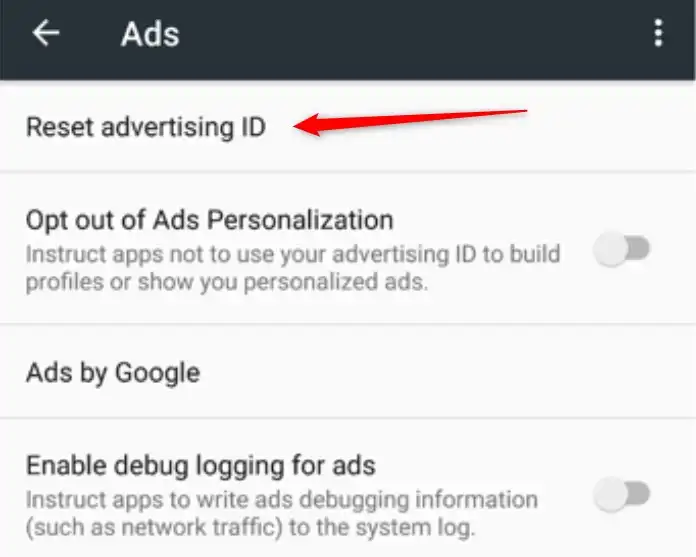
- Restart your phone and try OmeTV again.
Step 2. Factory Reset
If the above steps don’t work, a full factory reset of the device generates a new Android ID. This operation will clear all data on your Android phone or tablet. Make sure you have backed up your device before the factory reset.
- Go to Settings > System > Reset options > Erase all data (factory reset).
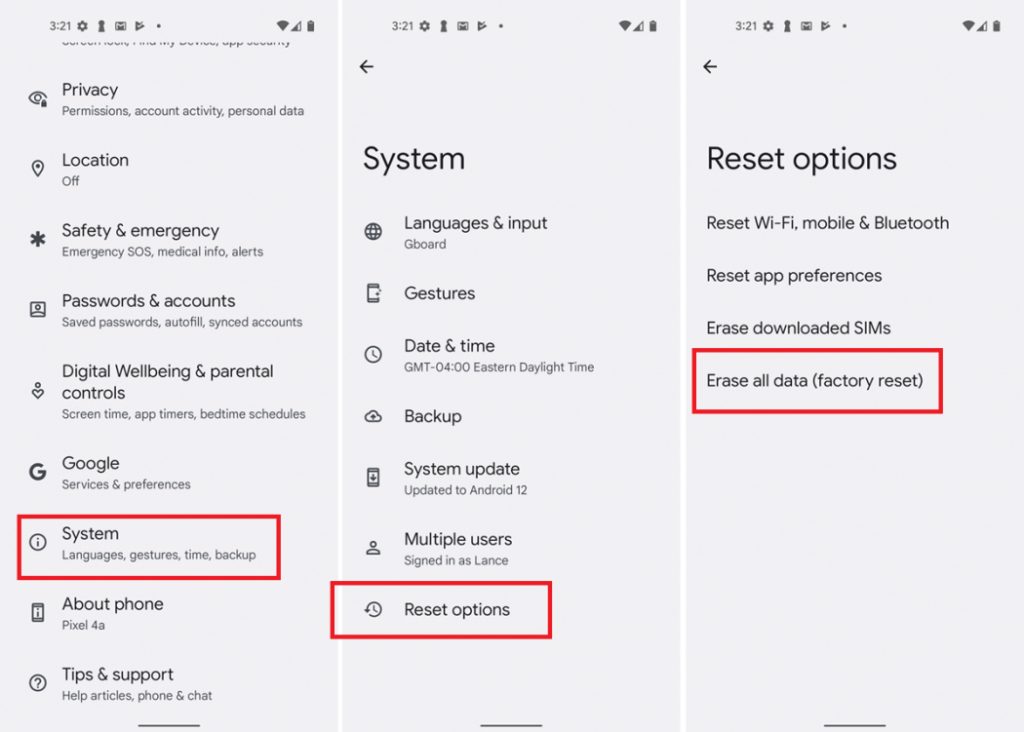
- Once the phone resets, set it up as a new device (do not restore the previous settings immediately if possible).
- Reinstall OmeTV.
2. For iPhone/iPad Users: Apple makes it harder for apps to access hardware IDs, but OmeTV uses the Identifier for Advertisers and Keychain data.
Step1. Uninstall OmeTV: Delete the app immediately.
Step 2. Change Network Settings: Go to Settings > General > Transfer or Reset iPhone > Reset > Reset Network Settings.
Step 3. Offload App Data: Make sure your iCloud isn’t restoring the banned app data.
Step 4. Wait for the Reset: iOS changes certain identifiers if the app has been uninstalled for more than 24 hours. Reinstall OmeTV after 24 hours to ensure a successful reset.
Note: Although you have reset the device ID to bypass OmeTV ban, it’s essential to combine it with BearVPN to avoid potential data leaks or further bans.
You may also like: OmeTV “You have denied access to your device”
Troubleshooting: What if OmeTV Still Shows a Ban?
Even after following the steps above, you might still see the ban screen. This is usually due to digital residue. Here is how to troubleshoot the common failure points.
1. Browser Fingerprinting
If you use a unique browser configuration, OmeTV may still recognize you.
- Fix: Switch browsers entirely. If you use Chrome, try Opera GX or Firefox. Opera GX is particularly good because it has a built-in free VPN and limits trackers, which changes your fingerprint.
2. Geolocation Data
Mobile devices often use GPS data alongside IP addresses. If your VPN location is different from the GPS one, OmeTV may block you.
- Fix: On mobile, turn off Location Services for the OmeTV app specifically. On Desktop, deny OmeTV wants to know your location permission pop-up.
3. Associated Social Accounts
If you log in using Facebook or VK, and that account is linked to a ban, changing your IP may not be enough.
- Fix: You must revoke OmeTV’s access permissions in your social account settings and log in with a completely new account.
Bottom Line
Getting banned on OmeTV is frustrating, but it can be bypassed most of the time. The platform relies heavily on IP addresses and device identifiers to enforce blocks. So a professional VPN service like BearVPN is handy to bypass OmeTV ban and regain access to random online video chats. For those who are banned more than the IP addresses, combining BearVPN with device ID reset is necessary to bypass the ban successfully. Always remember to use BearVPN and browse in private mode to avoid further blocks on OmeTV. Moreover, adhere to community guidelines once you return to ensure your access remains uninterrupted and to keep the platform safe for everyone.
FAQs About Bypassing OmeTV Ban
1. Is the OmeTV ban permanent?
Not always. Most bans for minor infractions are temporary and last from 24 hours to 7 days. However, bans for nudity, harassment, or severe terms of service violations are typically permanent unless you successfully change your digital identity.
2. Why does OmeTV say “VPN Detected” or “Connection Error”?
OmeTV subscribes to lists of known VPN IP addresses. If you see this message, the IP address assigned by your VPN provider is on a blacklist. To fix this, switch to a stealth or obfuscated server in your VPN app, or try a different protocol.
3. Is it illegal to use a VPN to bypass OmeTV bans?
No, it is generally not illegal to use a VPN to access OmeTV in most countries. Bypassing OmeTV ban with a VPN for privacy protection is safe and legal. You can’t use a VPN to engage in criminal activities.
4. Do OmeTV unban codes or generators work?
No, the so-called unban codes, token generators, or hack tools for the OmeTV platform are almost exclusively scams. They often contain malware or are phishing attempts designed to steal your personal data. Do not download or pay for these tools.
5. Do I need to make a new account if I am banned?
Yes, if your ban is linked to your Facebook or VK login credentials. Using a VPN will only unban your IP. You will need to create a fresh Facebook or VK account to log in successfully.