Key Takeaways
- Roblox Chat Filter is Age-Dependent: The strictness of the Roblox chat filter is primarily determined by the age associated with your account.
- No Manual Deletion of the Filter: The filter is server-side code. You cannot remove it entirely, but you can bypass the strictest restrictions by verifying your age.
- 17+ Is the New Standard: The only official way to get unfiltered chat on Roblox is to ID-verify for 17+ experiences.
- VPNs Have a Niche Use: While VPNs like BearVPN protect privacy, they are primarily used to help bypass regional bans on Roblox Voice Chat.
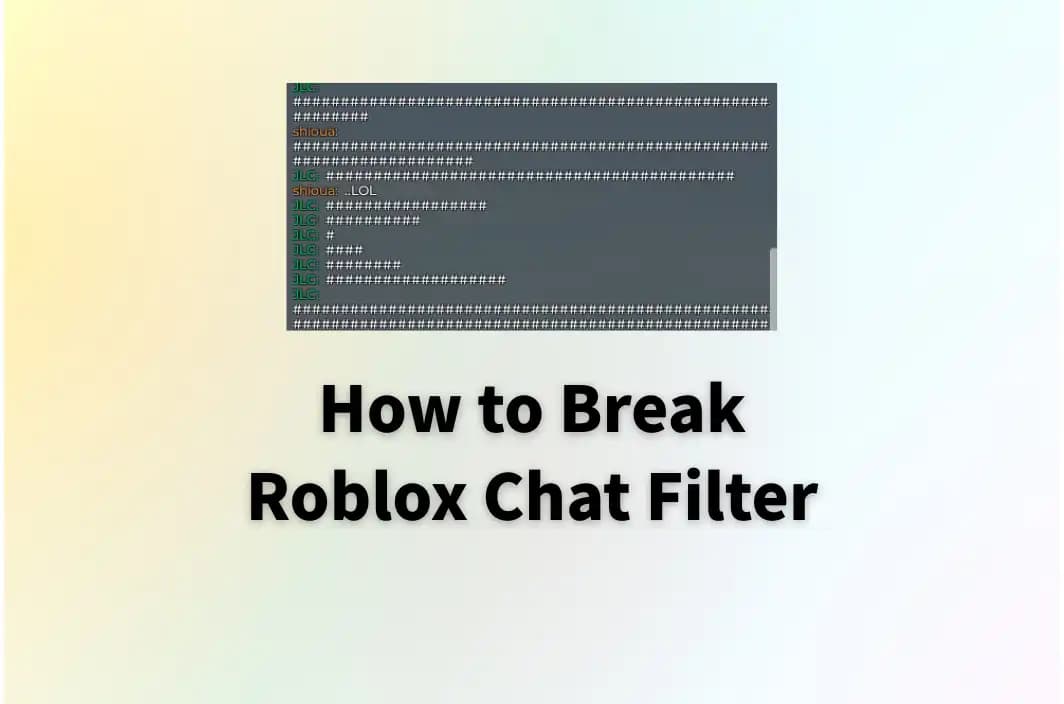
Chatting is an essential feature in online gaming. If you have ever tried to type a simple sentence in Roblox only to see it turn into a string of hashtags (####), you know the frustration of the Roblox chat filter. Designed to protect younger players, the system often aggressively censors harmless phrases, numbers, and slang.
That’s why many players look for ways to bypass the Roblox chat filter without breaking the rules. They hope to communicate normally with friends. In 2026, Roblox updated its safety systems, moving from simple text replacement to AI-driven moderation. This guide analyzes the current mechanics of Roblox and provides three methods to bypass the strictest filters legally and safely.
What Is Roblox Chat Filter?
The Roblox Chat Filter is an automated moderation system known as Community Sift. It runs on Roblox’s servers and intercepts every message sent in-game or on the website before it reaches other players.
The chat filter serves two main purposes:
1. Safety: It blocks personal identifiable information like addresses and phone numbers, as well as profanity, bullying, and sexual content.
2. Compliance: It ensures Roblox complies with COPPA (Children’s Online Privacy Protection Act) by placing extreme restrictions on users under the age of 13.
The filter applies to text chat, asset names, and game descriptions. Importantly, the Roblox chat filter is not a plugin you can delete from your computer; it is a gatekeeper that exists between you and the game server.
Can You Turn Off Roblox Filtering?
No, you cannot turn off the filter in settings. Roblox does not provide a toggle to disable filtering entirely because doing so would expose the platform to liability and safety risks. However, you can turn off the Safe Chat (for Under 13 groups) restrictions if you are age-verified.
By proving you are an adult, you can migrate your account from the strict chat filter (which blocks numbers and most external links) to the standard or 17+ filter. The 17+ filter is the closest thing to disabling it, as it allows for mild profanity and more mature themes in specific 17+ designated experiences.
You may also like: How to get unbanned from Roblox
How to Break Roblox Chat Filter [3 Ways]
While you cannot delete the code, you can use these three methods to bypass the strict filtering that makes communication difficult.
Method 1. Contact Roblox to Update Your Age
If your account age is under 13, but now you are over that, it’s possible to contact Roblox support to change your age. This does not disable the chat filter, but you will be able to say more words rather than excessive hashtags. Here is the step-by-step guide:
Step 1. Go to your web browser and visit the Roblox Support page.
Step 2. Log in to your Roblox account. Then fill the contact form.
Step 3. Under the Issue Details option, choose your device. Then choose Age-based Settings and Accounts with Parental Privileges.
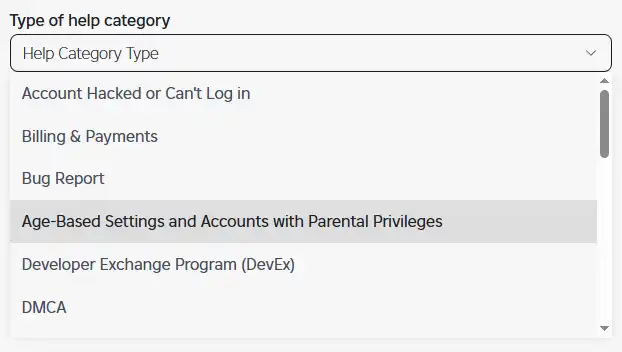
Step 4. Choose Change Child Age.
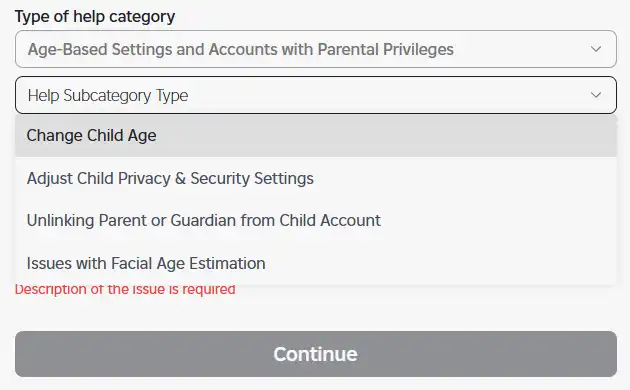
Step 5. Briefly describe your issue and submit the request. Roblox will send you a confirmation email.
Pro Tip: For the least restricted experience, use the Verify My Age button under your birthday. You will need to scan a government-issued ID (like a driver’s license or passport) and take a selfie. This unlocks Voice Chat and 17+ Experiences on Roblox.
Method 2. Turn Off Safe Chat on Roblox
Safe Chat is the older term for Roblox’s privacy settings. Even if you are 13+, your privacy settings might still be restricting who you can talk to, effectively acting as a filter. Here’s how to turn off Safe Mode on Roblox:
Step 1. In your account settings, find the My Roblox option.
Step 2. Select My Account in the drop-down menu.
Step 3. Choose “Updated Parent’s Email Address” on the “Update Email Address” option. It will send you an email.
Step 4. In your email, click the Activation message to verify.
Step 5. Click Privacy Mode, and you’ll be able to turn off Safe Chat there.
Step 6. Click Finish Verification to update the changes. You have broken the Roblox chat filter for groups under 13.
Method 3. Bypass the Filter with Special Symbols
If you can’t change your age or turn off Safe Chat on Roblox, the only way to bypass the chat filter is by using some special characters or symbols in gameplay. This is more recommended for playing games with friends. If you pair someone randomly online, it may not work for effective chats.
Method 4. Use BearVPN
Besides the age-based chat filter on Roblox, some regions, such as parts of the Middle East, have tighter restrictions on Roblox features, sometimes disabling Voice Chat entirely. To unlock full chat freedom, it’s recommended to use a service like BearVPN.
With this VPN, you can easily chat in text or voice on Roblox. BearVPN helps break the voice chat filter so that you can have better cooperation with your teammates.

Why choose BearVPN?
2000+ Servers: You can easily connect to the servers from more than 50 locations around the world.
Fast & Stable Connection: Your connection will be secured with the advanced SCProxy and SLProxy protocols, allowing you to enjoy fast speeds for gaming.
No-logs Privacy: It doesn’t record or store your browsing histories and online activities. There is no worry about privacy tracking.
Stealth Mode: The obfuscation ensures your online data is encrypted, making your VPN traffic difficult to detect and block.
How to enable Roblox voice chat and enhance security with BearVPN:
Step 1. Download and install BearVPN on your device. It works on Windows, Mac, iOS, and Android devices.
Step 2. Open the BearVPN app and sign in with your email address.
Step 3. If Voice Chat is blocked in your country, you can connect to a server with relaxed gaming restrictions, such as the United States or Canada.

Step 4. When it is connected, open the Roblox player and enable voice chat in the privacy settings (provided that you are age-verified).
Note: A VPN does not disable the text filter script itself, but it can bypass regional restrictions that force stricter censorship.
Is It Safe to Break the Roblox Chat Filter?
The safety of breaking the Roblox chat filter depends on how you try to do so. You can check the details and potential risks below:
- Safe Methods: Using special symbols or characters, changing your age settings, verifying your ID, and using a VPN to access Voice Chat are 100% safe and part of the platform’s intended features.
- Unsafe Methods: Using bypass scripts, unicode glitches, or copy-pasting special characters to force profanity into the chat is not safe.
- Ban Risk: Roblox’s automod bans users instantly for using bypassed text.
- Account Termination: Repeated violations will lead to the permanent deletion of your account and all your Robux.
Conclusion
Learning how to break roblox chat filter is nothing about hacking the system. It’s more about understanding how Roblox categorizes its users. The filter is a safety feature that prevents minors from text abuse. By verifying your age to reach 17+ status, turning off Safe Mode in your Privacy Settings, and using known characters with your friends, you can unlock more freedom in Roblox chatting.
Moreover, you can potentially use tools like BearVPN to unlock Voice Chat in restricted regions, thus communicating freely without risking a ban. Always remember that bypassing the filter to harass others or use hate speech is never allowed and will result in account termination. Enjoy your gameplay on Roblox with unblocked fun today.
FAQs About Roblox Chat Filter
1. Is there a way to uncensor Roblox chat?
You cannot fully uncensor Roblox chats as the filter is server-side. However, verifying your age to 13+ removes the ultra-safe child filter, and verifying to 17+ allows for milder profanity in specific 17-plus experiences.
2. How to enable 18+ on Roblox?
Roblox has a 17+ category rather than an 18+ one. To enable it, go to your Settings > Account Info. Click “Verify My Age” and upload a photo of your government ID and a selfie. Once verified, you can access experiences labeled 17+ that allow mature themes.
3. How to get unfiltered chats on Roblox?
There is no 100% unfiltered chat on Roblox. Its safety mechanism will always check how you chat on this platform and avoid inappropriate remarks. The most recommended way is to verify your age to 17+ and unlock more chat freedom, or use third-party communication apps like Discord while playing.
4. Is voice chat 18+ on Roblox?
Voice chat is available for users aged 13+ who have verified their phone number or ID. It is not exclusively 18+, but it is much less restricted than text chat because it relies on user reporting rather than automated text filtering.
5. Will Roblox ban you for bypassing the chat filter?
Yes, if you use exploits, scripts, or special characters to type banned words, you risk an immediate ban. However, adjusting your age settings or using BearVPN to access Voice Chat is allowed and will not result in a ban.

![How to Break ChatGPT Filters in 2026 [Ultimate Guide]](/_next/image/?url=https%3A%2F%2Fcms.bearvpn.com%2Fwp-content%2Fuploads%2F2026%2F01%2Fhow-to-break-chatgpt-filters.webp&w=640&q=75)