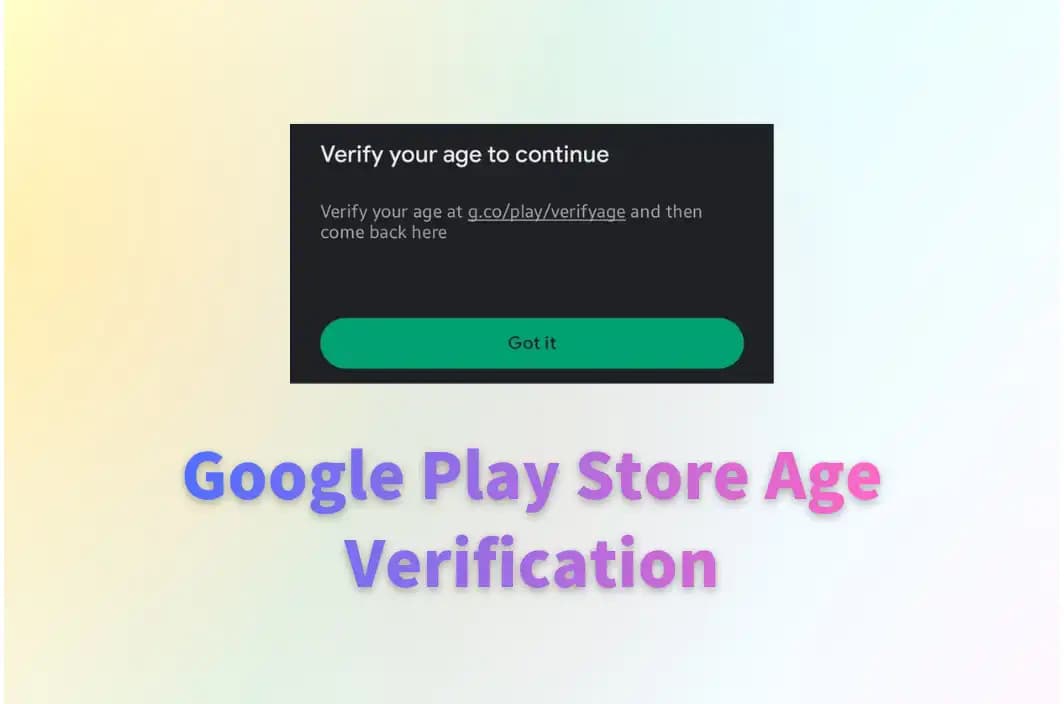
Key Takeaways
- Google Play Store age verification is a mandatory system implemented by Google to confirm users are over 18 before allowing them to download age-restricted applications.
- The age verification prompts users to prove their age through one of several methods: uploading a government-issued ID, scanning a credit card, taking a selfie for AI facial age estimation, or using a third-party verification service.
- You can bypass Google Play Store age verification with a reliable VPN because it is tied to specific regional laws. BearVPN is recommended to mask your IP address and connect to servers in countries with less strict data retention laws.
- When bypassing the system, always use BearVPN to protect your data. Clear your device’s cache and location services before connecting, and avoid using fake ID generators, as these can lead to permanent account bans.
Many Android users are now encountering age verification prompts when downloading apps on Google Play. This shift stems from new global laws requiring tech companies to verify users’ ages, rather than from Google’s desire to collect more data. These measures are claimed to improve online safety and protect minors. However, being asked to provide government ID, credit card details, or a selfie can feel intrusive, especially for age-qualified users.
Can you bypass Google Play Store age verification? Is it safe to do that? In this article, we will explain why checks are becoming common, what information is required to verify, and the safety of age verification. There are also practical solutions, including how to complete the official verification and how to bypass it using tools like BearVPN, to help you regain access to your apps.
What Is Google Play Store Age Verification?
Google Play Store age verification is a digital checkpoint. It is a system designed to prevent minors from accessing, downloading, or purchasing mature content, age-restricted apps, and games not suitable for children. If an app developer sets their target audience to 18+, or if the app contains mature themes like dating, gambling, or extreme violence, Google’s systems will automatically trigger a prompt asking you to verify that you are legally an adult.
Why does Google set the age verification for Android users?
The direct reason is that many regions have passed stringent digital safety and age-verification laws recently. For example, laws in Texas and Louisiana take effect on January 1, 2026, requiring app stores to verify user ages, obtain parental approvals for minors, and pass these age signals back to app developers. Beyond the US, countries like the UK and Australia have enacted similar legislation. To avoid massive fines and legal penalties, Google is rolling out this system geographically to comply with these local mandates.
What Information Is Required for Google Play Store Age Verification?
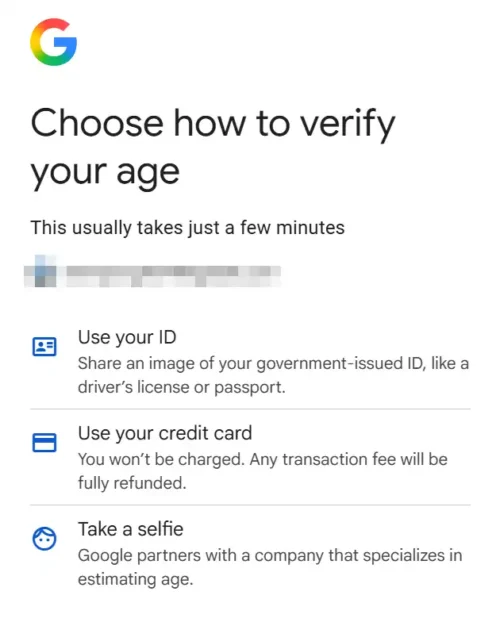
According to Google Help, there are several methods you can use to verify your age, then access age-restricted content and features, typically including:
- Government-Issued ID: You will need to upload a clear photo of a valid identification document. This can include a driver’s license, a passport, or a national ID card. It must show your full name, your date of birth, and the document’s expiration date.
- Credit Card Authorization: You can choose to enter your credit card details. Google performs a temporary authorization check to confirm the card is valid and belongs to an adult. There is no transaction fee for this, and the temporary pending charge is automatically refunded within a few days.
- Selfie (Facial Age Estimation): Google allows you to take a live selfie using your device’s camera. This image is then processed by an AI-driven facial age-estimation tool to determine whether you are over 18 based on your facial features.
- Third-Party Email Estimation: In certain regions, Google has partnered with third-party providers like VerifyMy to verify your age. It estimates your age by reviewing sites and apps where you have previously used this email address, without requiring biometric data or physical IDs.
The above 4 types of personal information are mainly used for Google Play Store age verification. Please note that not all age verification options are available in all countries. Depending on your country and local laws, you may see all, some, or none of these options.
How to Verify Your Age on a Google Account
If you want to verify your age on Google to use all Google services without future interruptions, you can simply go to the official website and submit the required information. Here are the detailed steps to verify your age directly through your Google Account management portal:
Step 1. Access the Verification Portal
Open your preferred mobile or desktop web browser and navigate directly to myaccount.google.com/age-verification. Ensure you are logged into the specific Google account that is being blocked on the Play Store.
Step 2. Review the Prompt
You will see a screen explaining that Google needs to confirm you are old enough to access certain content. Click the button to verify.
Step 3. Choose Your Verification Method
There are several verification options you can choose from. Select any of them and finish the age verification on your Google account.
Step 4. Wait for Confirmation
AI-based methods like the selfie and the credit card are usually verified instantly. If you submit a physical ID, it may take a few hours to a couple of days for Google’s systems to process and approve the document. Once approved, your Google Play Store restrictions will be lifted immediately.
Is Google Play Store Age Verification Safe?
Verifying your age with required information is generally regarded as safe, but there are some security concerns you may need to know:
- Data Breaches: Despite strong security measures, databases containing sensitive personal information remain high-value targets for hackers.
- Privacy Concerns: Providing an ID ties your real-world identity more closely to your Google account, expanding your digital footprint.
- Processing Risks: While Google states they securely delete your ID after verification, there is always a theoretical risk of data mishandling during the processing window.
Although Google employs some of the most robust, enterprise-grade security infrastructure in the world, there are still some users seeking ways to bypass age verification on the Google Play Store.
How to Bypass Google Play Store Age Verification
Can you bypass Google Play Store age verification? Yes, if you want to avoid submitting your personal identification to Google, the most reliable method is to bypass the regional restrictions with a VPN. Because the age-verification rollout is tied to local IP addresses and regional laws, changing your digital location to a region that does not enforce these laws will usually stop the prompt from appearing.
BearVPN is a fast, secure, and privacy-focused VPN that masks your real IP address and routes your internet traffic through a server in a different country. By connecting to a server in a privacy-friendly country, such as Switzerland, the Netherlands, or Canada, you can bypass Google Play Store age verification easily.

Why Choose BearVPN?
- All-round data protection when verifying your age online, including the Google Play Store.
- 2000+ servers in more than 50 countries to ensure a successful age verification bypass.
- Strict no-logs privacy and the stealth mode guarantee a traceless online browsing.
- One of the best VPNs for age verification in 2026.
Step-by-step guide to bypass Google Play Store verification with BearVPN:
Step 1. Prepare BearVPN on Android
Download and install BearVPN on your Android phone or tablet. Open the app and register an account with your email address.
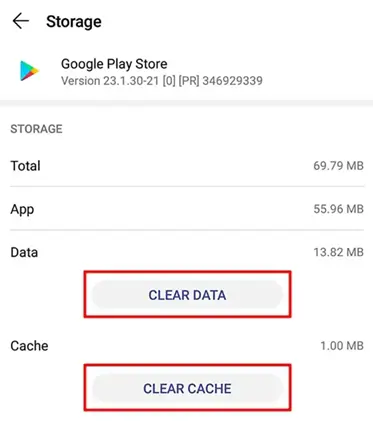
Step 2. Clear Google Play Store Cache and Data
Before connecting to a server, you’d better wipe the location data your Play Store app has already saved.
Go to your Android device’s Settings > Apps > See all apps. Scroll down and tap on Google Play Store. Tap on Storage & cache, then select Clear Cache and Clear Data (or Clear Storage).
Step 3. Disable Device Location Services
Swipe down from the top of your screen to access your quick settings and ensure your GPS/Location toggle is turned off.
Step 4. Connect to a Verification-free Region via BearVPN
Open the BearVPN app and select a country that is known for lacking strict age-verification mandates. Good options typically include Switzerland, Belgium, or Canada.

Step 5. Access Age-restricted Content & Features in Google Play Store
Open the Play Store app. It may take a few seconds longer to load as it registers your new digital location. Search for your desired app to download. It should now be available without triggering the age-verification prompt.
A Quick Warning: Never try to bypass the system by uploading a digitally altered or fake ID. Google’s automated systems are highly sophisticated at detecting fraudulent documents. If you are caught using a fake ID, Google may permanently suspend or terminate your entire Google account. Sticking to a location bypass with BearVPN is vastly safer and more effective.
The Bottom Line
The new updates of Google Play Store age verification can be frustrating, especially for users who are age-qualified. To verify your age on the Google Play Store, you can upload required IDs, credit cards, or selfies to your Google account. It is a mandatory, legally-driven system aimed at restricting minors from accessing mature content. While Google insists the process is secure, privacy concerns still exist. If you prefer to keep your personal documents private, using a premium service like BearVPN to mask your digital location and bypass the age verification with a restriction-free IP address. Always remember not to use a fake ID to verify your age on Google. Try BearVPN now to stay informed, protect your data, and take control of your digital footprint.
FAQs About Google Play Store Age Verification
1. How to verify 18+ on Google Play?
To verify you are over 18, open the Google Play Store or visit myaccount.google.com/age-verification. Choose an available verification method and follow the on-screen prompts to submit your details securely.
2. Is it safe to bypass Google Play Store age verification?
Yes, it is safe if you use a legitimate method like a premium VPN. By using BearVPN to change your IP address to a region without age laws, you protect your privacy safely. However, never use fake IDs for verification, or you may violate Google’s terms and risk permanent account suspension.
3. Why does Google require age verification now?
Google is implementing age verification to comply with new, strict online safety and child protection laws passed by various governments worldwide. States like Texas and Utah, alongside countries like the UK and Australia, now legally require app stores to verify user ages before distributing mature content.
4. How do I turn off Google age verification?
You cannot turn off Google age verification directly within your account settings. It is legal to mandate compliance measures. The only way to stop the prompts is to complete the verification process once or use a VPN to bypass it and access blocked content from an unrestricted country.
5. What happens if you don’t verify your age on Google?
If you refuse to verify your age, you will be blocked from downloading age-restricted apps, games, and media on the Google Play Store. Furthermore, you may lose access to mature content on other connected Google services, such as age-restricted YouTube videos and specific Google Search features.