Key Takeaways
- In the USA, “blocked websites” usually means network-level filtering (school/work/public Wi-Fi), state-level age gates, or platform/site restrictions—not a single national blacklist.
- Schools and libraries that receive certain federal funding commonly use filters that must block specific categories of images (obscenity, child pornography, and content deemed harmful to minors).
- A growing number of states require age verification for some adult content sites, and some large sites respond by restricting access in those states.
- If you’re trying to access a restricted site, start by identifying who is blocking it (the network, the website, or your device), then choose a policy-safe solution.
Web pages can feel surprisingly inconsistent in the United States: a site loads fine on mobile data, then fails on a café’s Wi-Fi; it opens at home, but not at school, work, or a hotel network. That’s because “blocked websites” in the USA is usually driven by network filters, state-level rules, or website policies, so the same URL can behave differently depending on where and how you connect. This guide breaks down what “blocked” typically means in the US, the categories and examples you’ll most often see restricted, the common reasons behind those blocks, and practical ways to regain access without creating new privacy or policy problems.
Blocked Websites in the USA: What “Blocked” Usually Means
In the US, “blocked” rarely means a single nationwide ban. More often, it’s a mix of institutional filtering (schools/workplaces), state-based access rules, and platform decisions. Understanding which layer is responsible is the fastest way to stop guessing and fix the issue.
Most of the time, one of these is happening:
- Network filtering: A school district, employer, or public hotspot uses category-based filtering (social media, streaming, gambling, adult content, etc.).
- State-level gating: A site restricts access in certain states to comply with age verification laws or similar rules.
- Website/platform restrictions: The site itself blocks traffic from certain IP ranges, blocks VPN IPs, or requires extra verification.
- Security blocks: Browsers or security tools block domains flagged for malware/phishing. (This can look like “the site is blocked,” even though it’s a safety warning.)
So when someone asks for a “list of blocked websites in the USA,” the most accurate answer is: it depends on your network, your state, and the site’s own rules.

Blocked Website Categories You’ll See on US Networks
Instead of chasing a mythical “US-banned-websites list,” it’s more useful to think in categories. Schools and workplaces typically block by content type, not by a single site-by-site national policy. The table below helps you map what you’re seeing to the most likely cause.
Below is a practical category view you can use to diagnose your situation. “Status” is intentionally phrased as “often restricted,” because these blocks vary by network and policy.
| Website / App (examples) | Status | Type of Restriction | Notes |
| Social platforms (e.g., Instagram, TikTok, Reddit, Discord) | Often restricted on school/work Wi-Fi | Partial or Network-only | Commonly blocked to reduce distractions, prevent harassment, or meet policy requirements. |
| News & media sites (varies) | Sometimes restricted on managed networks | Partial or Network-only | Restrictions may be policy-based (workplace productivity) or security-based (malware/ad risk). |
| Gaming & entertainment (e.g., Roblox, Steam, Netflix, Twitch) | Often restricted on school/work Wi-Fi | Partial or Network-only | Bandwidth control is a common reason; some schools block categories broadly. |
| Adult content sites | Restricted in some states and many managed networks | Full or Partial | Some states require age verification for certain sites; some sites restrict access rather than implement checks. |
| Gambling sites/apps | Often restricted on managed networks; legality varies by state | Partial or Full | Employers/schools frequently block “gambling” categories; state laws vary on gambling access. |
| File-sharing/torrent index sites | Often restricted to managed networks | Network-only | Many organizations block “P2P/file sharing” categories due to legal/security risk. |
| Financial & crypto platforms | Sometimes restricted on managed networks | Network-only | Some workplaces block “trading/crypto” to reduce risk; some services are also restricted by state compliance. |
Popular Websites Commonly Restricted in the USA (By Network or State)
When you’re looking for “blocked sites in the United States,” you’re usually trying to confirm whether your issue is unique—or part of a common pattern. The examples below are framed the way people encounter them in real life: blocked at school, blocked at work, blocked on public Wi-Fi, or restricted by state-level rules.
This isn’t a “national ban list.” It’s a short list of frequently restricted targets and the conditions that typically trigger the restriction.
| Website / App | Status | Type of Restriction | Notes |
| TikTok/Instagram/Reddit | Often restricted on school Wi-Fi | Network-only | Commonly blocked as “social media” on managed networks. |
| Discord | Often restricted on school/work Wi-Fi | Network-only | Can be blocked under “chat/messaging” due to moderation and distraction concerns. |
| Roblox/Steam | Often restricted on school Wi-Fi | Network-only | Frequently blocked under “games” categories or bandwidth controls. |
| Netflix/Twitch | Often restricted to work/school networks | Network-only | Sometimes blocked for bandwidth management and productivity policies. |
| Major adult sites (varies by state) | Restricted in some states | Full or Partial | Some states enforce age verification requirements; some sites respond by restricting access in those states. |
| Gambling sites/apps | Often restricted to managed networks | Network-only | Commonly blocked under “gambling” categories regardless of local legality. |
| Torrent index sites | Often restricted to managed networks | Network-only | Frequently blocked under “P2P/file sharing,” partly due to copyright risk. |
If your situation doesn’t match any of these, don’t assume it’s a “USA block.” Many problems are simpler: a DNS issue, a temporary site outage, or a browser security warning.
Why Websites Are Blocked in the USA
The same website can be accessible on your phone’s data plan and blocked on a café’s Wi-Fi—because different gatekeepers are making different decisions. Once you know the most common reasons, you can stop trying random fixes and pick the one that actually matches the cause.
Here are the main buckets you’ll run into:
1) School and library filtering (policy + funding requirements)
Schools/libraries that receive certain federal support often implement filtering that must block specific categories of images, including obscenity and content deemed harmful to minors.
2) Workplace controls (compliance, security, productivity, bandwidth)
Many organizations use category-based web filtering tools to block or audit certain URL categories across managed devices or device groups.
3) State-level age verification and “age-gated” access
In 2025, the U.S. Supreme Court upheld Texas’s age verification law for certain adult sites, which accelerated broader state-level enforcement and changes in how some sites handle access.
4) Security blocks (malware, phishing, fraud prevention)
A block can be a safety decision, not a policy one—especially if the domain is flagged or the certificate is suspicious. Consumer protection agencies also warn that privacy/security claims (including in VPN apps) can be misleading, so it’s worth treating “quick fix” tools cautiously.
5) Copyright and access-control rules
Some restrictions are designed to prevent circumvention of access controls around copyrighted works, which can raise different legal issues than “a site is blocked on Wi-Fi.”
Is Visiting Blocked Websites Illegal in the USA?
A blocked website isn’t automatically an illegal website. In the US, you need to separate law from policy: a school or employer can restrict access on its own network even when the content itself is legal for adults. That difference matters for how you respond.
A simple way to think about it:
- Policy issue: You’re on school/work Wi-Fi, and a filter blocks a category (social media, games, streaming). Accessing it may violate rules, even if the site is legal.
- Legal issue: You’re dealing with illegal content, fraud, or certain kinds of circumvention tied to protected works and access controls. (DMCA Section 1201 is one reason “circumventing access controls” can become a legal topic in some contexts.)
- Mixed issue: State-level age-gating can be legally enforceable, but it also raises privacy concerns because it pushes people toward handing over sensitive data to prove age.
If you’re unsure where your case falls, treat it as a policy situation first: change networks, confirm the error message, and avoid “workarounds” that could put you on the wrong side of school or workplace rules.
How to Access Blocked Websites in the USA Safely
Most ways to access blocked websites in the USA advise skipping the step that actually saves you time: identifying whether the block is coming from the network, the website, or your device. Once you pinpoint the layer, you can choose a fix that’s both effective and less likely to create privacy or policy problems.
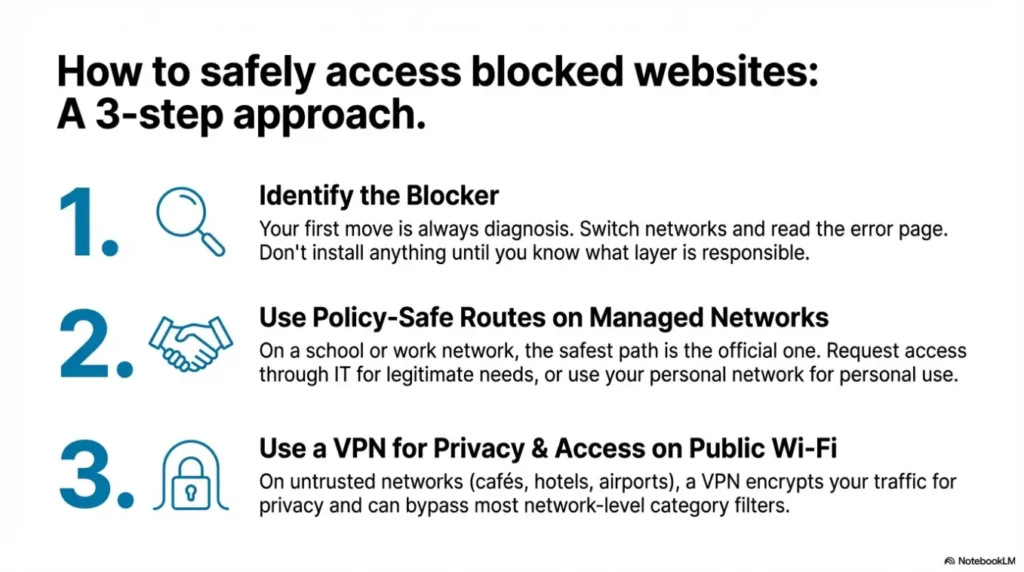
Start with a quick, practical flow:
Step 1. Identify what’s doing the blocking
Before you change settings or install anything, run two fast checks:
- Switch networks: Try mobile data (or a different Wi-Fi). If it works elsewhere, the restriction is probably network-based.
- Read the error page: School/work filters often show a category block message. Sites that are state-gated may show an age verification prompt or a region notice.
Step 2. Use a policy-safe route when you’re on managed networks
If you’re on school or workplace internet, the safest path is usually the boring one: use approved channels.
- If the content is needed for class or work, request access through IT or your administrator. (Some policies explicitly allow exceptions for lawful research in controlled settings.)
- If it’s not required, use your personal network instead of trying to fight a managed filter.
Step 3. Use a VPN when privacy and network restrictions are the real problem
On public Wi-Fi, hotels, cafés, airports, and travel networks, a VPN can serve two legitimate needs at once:
- Privacy: A VPN creates an encrypted tunnel between you and a VPN server, which helps protect your traffic on untrusted networks.
- Access: If a site is blocked by the local network’s category filter, a VPN often restores normal access—because the network sees an encrypted connection rather than the destination domain.
If you want a straightforward option, BearVPN focuses on the practical basics you should care about for blocked websites: AES-256 encryption, a no-logs policy, DNS leak protection, and a kill switch (especially important when you move between Wi-Fi networks and connections briefly drop).
A good habit is to verify your setup the same day you install any VPN—don’t assume it’s working just because the app says “Connected.” BearVPN’s own checklist guides you through confirming your IP address change and running leak tests (DNS/WebRTC/IPv6) to ensure a safe and secure unblocking experience without leaving any accidental gaps.

Step 4. Run a 5-minute “works or doesn’t” check
This is the easiest way to avoid placebo fixes:
- Baseline: open the site without a VPN and note what fails (loads partially, blocked page, verification wall, etc.).
- VPN on: connect, refresh, and see if the behavior changes.
- Leak check: confirm that your DNS requests aren’t leaking outside the tunnel.
If nothing changes, the restriction may be site-level (some sites block known VPN IPs) or account-level (the site flags unusual activity). In that case, switching networks—or using the site’s official verification route—is often the only stable solution.
VPN vs Proxy for Blocked Websites in the USA
A lot of people try a proxy first because it sounds lighter than a VPN. The problem is that “lighter” often means less protection. If you’re dealing with blocked websites in the USA on public Wi-Fi, the difference between the two matters for both privacy and reliability.
Here’s a quick comparison you can keep in your head:
| Tool | What it usually changes | What it usually doesn’t do | Best use |
| Proxy | Masks your IP for a specific app/browser session | Typically lacks full-device encryption and robust protections | Low-stakes use cases where privacy isn’t the main concern |
| VPN | Encrypts traffic between you and a VPN server (system-wide, depending on setup) | Doesn’t make you invisible; sites can still detect VPN IPs | Public Wi-Fi privacy + many network-level blocks |
If you’re choosing based on privacy alone, consumer guidance emphasizes being careful with VPN apps too—especially “free” tools—by checking policies and claims rather than trusting marketing lines.
Conclusion
“Blocked websites in the USA” is almost always about context: the network you’re on, the policies behind that network, and the rules a site follows in your state. If you start by identifying whether the block is network-based, state-gated, or site-level, you can avoid random fixes and pick the cleanest solution. On managed networks, staying within policy is usually the safest move. On public Wi-Fi and travel connections, a VPN is often the most practical way to protect your privacy and restore normal access—especially when you also run quick leak checks to confirm your connection is actually protected.
FAQs
1. Why does a website work on mobile data but not on Wi-Fi?
That usually points to a Wi-Fi network filter (category blocking, security policy, or bandwidth controls). Switching networks is the fastest way to confirm it.
2. Are adult websites blocked in the USA?
They can be restricted depending on state rules and how the site responds (age verification prompts, or access limited in certain states).
3. Is it legal to use a VPN in the USA?
In general, yes—VPNs are widely used for privacy and security. What can get you into trouble is what you do with a VPN (or violating workplace/school policies on managed networks).
4. Can my school or employer see what I do online?
On managed networks and devices, organizations can enforce filtering and monitor access categories or URLs depending on their security tooling and policies.
5. What should I do first if a site is blocked?
Switch networks, read the error page, and decide whether the restriction is policy-based, state-gated, or a security warning. Only then choose tools like a VPN or an official verification route.
References
- Federal Communications Commission (FCC) — Children’s Internet Protection Act (CIPA).
- Supreme Court of the United States — Free Speech Coalition, Inc. v. Paxton (June 27, 2025) (opinion PDF).
- U.S. Copyright Office — Section 1201 (DMCA) policy overview/study page.
- Federal Trade Commission (FTC) — In the market for a VPN app? (guidance on evaluating VPN claims and permissions).