Key Takeaways
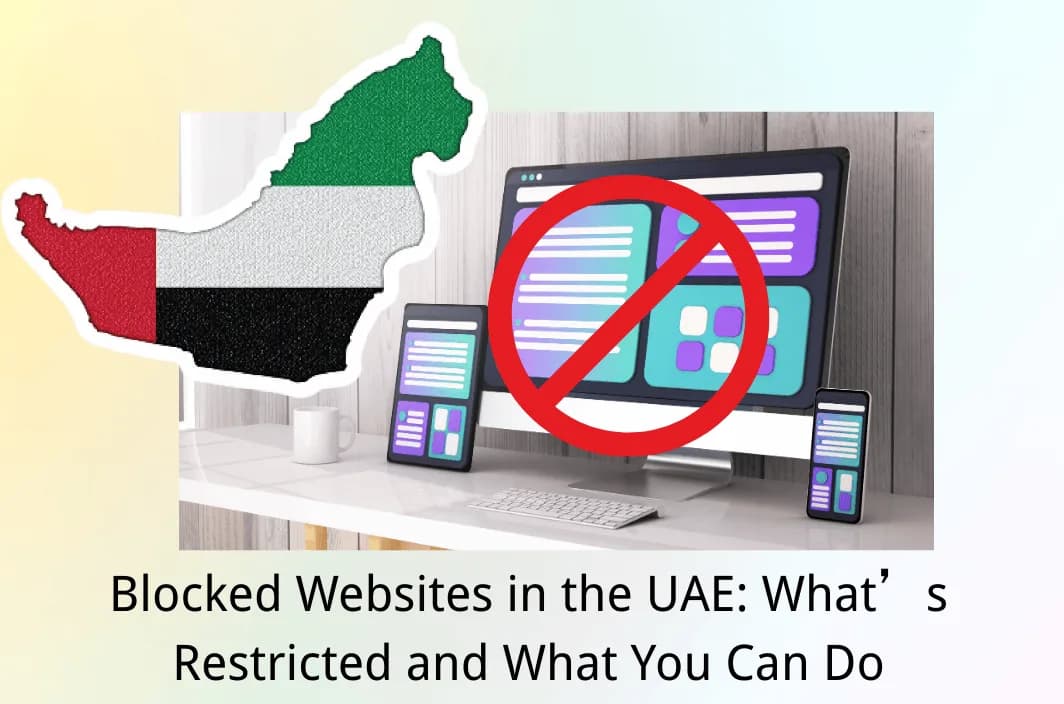
- The UAE uses formal content-filtering rules that require local internet providers to block webpages that fall under prohibited content categories.
- “Blocked websites in UAE” usually means category-based restrictions (adult content, gambling, piracy, some communications services), not just random sites going down.
- If WhatsApp calls don’t work in the UAE, it often relates to VoIP rules: providers are required to block non-compliant VoIP apps under “illegal communication services.”
- Before you assume censorship, confirm whether it’s a local-network block, a DNS issue, or a site outage. Tools like OONI Explorer can help you verify blocking signals.
- VPN use is widely described as not inherently illegal, but using it for unlawful activity or to access prohibited content can create legal risk—so your intent and actions matter.
In the UAE, it’s not unusual to run into a site that won’t load, a page that redirects to a warning screen, or an app feature that suddenly stops working—especially in Dubai and Abu Dhabi. Sometimes it’s a straightforward network issue. Other times, it’s the result of regulated content filtering or VoIP policies.
In this guide, you’ll learn what blocked websites are in the UAE, which categories are most commonly restricted, and how to confirm whether a site is actually blocked. You’ll also get practical, responsible options to stay connected while keeping privacy and local compliance in mind.
Overview of Internet Restrictions in the UAE
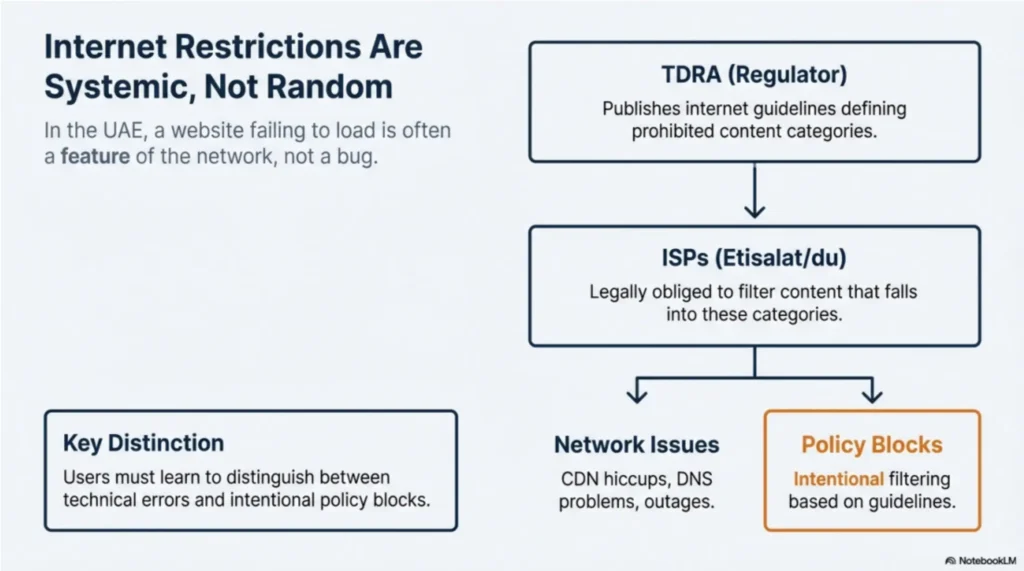
Formal policies and enforcement shape Internet access rules in the UAE through local service providers. In practice, you may see nationwide filtering, but the experience can also differ by network type (mobile data vs. office Wi-Fi) and by specific service features. The key is to treat “restricted websites in UAE” as a spectrum—some sites are fully blocked, while others are partially limited or feature-restricted.
UAE regulators publish internet guidelines that define prohibited content categories and require ISPs to block webpages that fall into those categories. That’s why restrictions often look consistent across providers and persist over time for certain content types.
At the same time, not every “blocked” experience is censorship. Geo-restrictions, CDN hiccups, DNS problems, or temporary outages can look identical on your screen—so verification matters before you change settings or assume the cause.
Check the Blocked Website Categories in the UAE
Most people searching for a list of blocked websites in the UAE are really trying to understand patterns: what types of content or services are commonly restricted, and why. UAE guidance describes prohibited content categories and frames filtering as an ISP obligation, which is why restrictions usually follow recognizable buckets.
Use the categories below as a map. They’ll help you quickly classify what you’re seeing (a full block, a partial restriction, or a feature-level limitation), and they’ll also help you choose a compliant solution—sometimes the best move is switching to an officially available alternative rather than forcing access.
| Category | What’s commonly affected | What it feels like |
| Social & community platforms | Specific pages, media embeds, and certain domains | Some links won’t load; app works but the content doesn’t |
| News & media | Selected sites/pages or specific topics | Page loads elsewhere but not on local networks |
| Gaming & entertainment | Store pages, community features, voice chat | Login issues; voice features fail |
| Adult & gambling | Adult content, gambling domains, and related ad networks | Full block or redirect to a warning page |
| Piracy & copyright-infringing sources | Streaming mirrors, torrent indexes, file lockers | Full blocks; repeated domain takedowns/rotations |
| Communications/VoIP services | Unlicensed or non-compliant VoIP apps/features | Messaging works; calling features fail |
| “Bypass” tools and proxy pages | Some proxy/VPN-related pages (category-level) | Tool sites blocked; setup pages won’t load |
Popular Websites Blocked in the UAE
A true blocked websites in Dubai list is hard to keep perfectly current because blocks can be applied at different layers (DNS, IP, URL) and may change by provider or over time. The most reliable way to present this is to focus on representative examples and be explicit about the status: blocked, partially restricted, or feature-restricted.
The table below uses that approach. Treat it as a practical reference, not a promise that every item behaves the same on every network at every moment. If you need proof for a specific domain, you can validate it with measurement data (more on that later).
| Website / App | Status | Type of restriction | Notes |
| WhatsApp voice/video calling | Feature-restricted (often) | VoIP traffic restriction | VoIP apps not in compliance may be blocked under “illegal communication services.” |
| Skype (VoIP features/service access) | Often restricted/blocked | VoIP licensing policy | Regulator statements have historically emphasized licensed VoIP provision (Etisalat/du). |
| Pornography/explicit adult sites | Blocked | Category filtering | Falls under prohibited content categories in TDRA guidance. |
| Online gambling sites | Blocked | Category filtering | Commonly listed among blocked categories in UAE guidance and reporting. |
| Torrent index sites/piracy sources | Blocked | Category filtering | Often associated with copyright/piracy enforcement. |
| Proxy “unblock” pages | Often blocked | Category filtering | Some guidance and reporting list bypassing-blocked-content tools/pages as prohibited. |
Why Are Websites Blocked in the UAE?
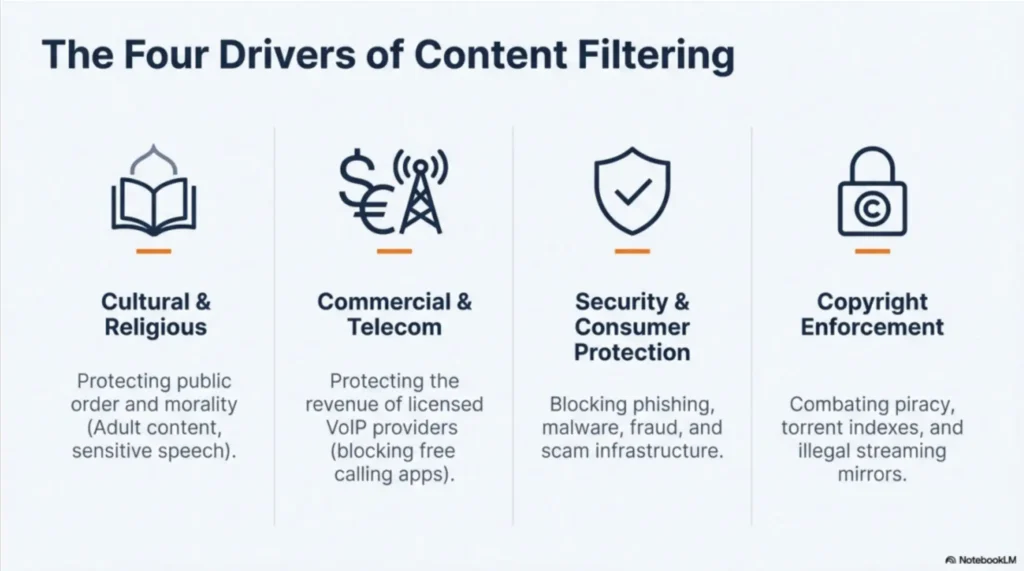
If you want a clear explanation of internet censorship in the UAE, start with incentives and categories rather than individual domains. UAE internet guidelines define prohibited content categories and place responsibility on ISPs to filter content that falls into those categories. That’s the structural reason restrictions can feel systematic.
In day-to-day browsing, you’ll usually see one (or more) of these drivers:
1. Legal and cultural content classification
Some material is blocked because it’s considered contrary to public order, public morality, or other regulated standards described in the UAE guidance.
2. Consumer protection and security
Fraud, phishing, malware distribution, impersonation, and scam infrastructure are common targets in many countries’ filtering regimes—and UAE reporting also highlights these categories.
3. Copyright and piracy enforcement
Torrent indexes, piracy streaming mirrors, and related link hubs often get blocked in markets where rights enforcement is active. Freedom House reporting also references blocking around piracy-related content categories.
4. Telecom policy and VoIP licensing
“Why can’t I use WhatsApp calling in the UAE?” is a classic example: VoIP services are regulated, and TDRA guidance notes that providers are obliged to block non-compliant VoIP apps.
5. Political or sensitive speech controls (in some cases)
Independent assessments describe broader restrictions and enforcement around online expression and content considered threatening to the ruling order.
Is Visiting Banned Sites Illegal in the UAE?
When people ask “is visiting banned sites illegal,” they usually mean two different things: (1) is the site blocked by policy, and (2) could accessing it create legal risk. Those aren’t identical. In general discussions by legal and compliance commentators, VPNs are often described as not fully illegal, but your usage can be unlawful if it violates UAE law or is tied to prohibited activity.
A practical way to think about it is this: the more your actions look like routine security (protecting accounts on public Wi-Fi, securing business access, encrypting traffic), the easier it is to justify. The more your actions look like accessing prohibited content or committing an offense, the higher the risk. When in doubt, prioritize official guidance and professional legal advice over forum anecdotes.
Also remember: even if something “works,” that doesn’t automatically mean it’s permitted. Treat compliance as part of your internet hygiene in the UAE, not an afterthought.
How to Access Blocked Websites in the UAE Safely and Responsibly
In the UAE, the most reliable way to regain access starts with clarity and caution. First, confirm whether the problem is a real network restriction or a temporary technical issue. Then choose options that protect your privacy and keep you within local rules, instead of relying on fragile workarounds.
Here are practical paths you can follow, starting with the least disruptive checks and moving toward stronger privacy and access options when needed.
1. Verify whether it’s actually blocked (not just broken)
Before you change anything, do two quick checks: test the same site on another network (for example, mobile data vs. Wi-Fi), and try a different browser/device. If it only fails on one network, that’s a clue. If it fails everywhere, it may be the site itself.
If you want stronger evidence, OONI Explorer publishes measurement results and explains how its web connectivity test detects DNS, HTTP, and TCP/IP interference.
2. Prefer officially available alternatives for VoIP and communications
If your pain point is “WhatsApp call not working in UAE,” it’s often a VoIP policy issue rather than a glitch. TDRA guidance explicitly references a VoIP policy and notes that licensed providers are obliged to block non-compliant VoIP applications.
In that scenario, switching to an officially available calling option is usually the most stable fix.
3. Use a VPN for privacy and safer browsing (where lawful)
A VPN can be useful in the UAE for everyday privacy and security: encrypting your traffic on hotel Wi-Fi, reducing profiling, and keeping sensitive logins safer. But choose a provider that treats privacy as a product feature, not a slogan.
What to look for in a VPN for the UAE
- Strong encryption and modern protocols (for performance and stability)
- Leak protections (DNS leak protection, and a kill switch to avoid accidental exposure)
- Clear privacy policy and transparent handling of logs
- Fast, consistent servers for the locations you actually need
A practical option to consider: BearVPN
If you want something designed for daily use (especially on mobile), BearVPN is a strong fit to evaluate. It supports modern VPN protocols (including WireGuard), uses strong encryption, includes a kill switch and DNS leak protection, and states a no-logs approach—useful when your goal is safer browsing and more consistent access without complicated setup. In the UAE context, that “easy-to-use but security-complete” balance matters because you’re often switching networks (hotel, café, office, roaming) and want your protections to stay on.

Troubleshooting When a Site (or VPN) Still Won’t Work
Even with a clear plan, you’ll sometimes hit the frustrating case where a site still won’t load—or your VPN connects but feels unstable. That doesn’t automatically mean the UAE blocked your VPN. It can be congestion, routing, server load, or a site’s own anti-abuse protections. Start with simple diagnostics that reduce guesswork.
The goal is to separate three scenarios: (1) the site is down, (2) the site is blocking certain traffic, or (3) your route is unstable. Once you know which bucket you’re in, fixes become obvious instead of random.
Try these responsible steps:
- Switch networks (Wi-Fi ↔ mobile data). Network differences are often the fastest signal.
- Change server location (if you’re using a VPN). Pick a location close to your target service region to reduce latency.
- Update the app (VPN and browser). Outdated clients break more often on modern networks.
- Check for leaks and “accidental disconnects.” A kill switch helps prevent your real IP/DNS from being exposed if the tunnel drops.
- Consider the site’s own restrictions. Streaming and financial services sometimes block VPN IP ranges regardless of country policy.
Conclusion
In the UAE, blocked websites usually reflect structured content filtering and regulated communications rules, not random internet instability. You’ll save time by confirming whether a failure is a real block, a DNS/network problem, or a site outage. If the issue is VoIP, officially available alternatives are often the most reliable path, since non-compliant VoIP apps can be restricted by policy. When your goal is privacy and safer browsing across changing networks, a security-focused VPN such as BearVPN can be a practical tool—provided you use it responsibly and within local law. Treat compliance and privacy as a package deal.
FAQs
1. What websites are blocked in the UAE?
Many restrictions are category-based (adult content, gambling, piracy, certain proxy pages), and some services are limited at the feature level—especially non-compliant VoIP.
2. Why don’t WhatsApp calls work in the UAE?
VoIP apps may be restricted under telecom policy. TDRA guidance notes that providers are obliged to block VoIP applications that are not in compliance, under “illegal communication services.”
3. What should I do if my VPN stops working in the UAE?
Rule out basic causes first (network congestion, server overload, outdated app). Switch server locations, update your client, and ensure leak protections are enabled to avoid accidental exposure.
4. Are torrent websites blocked in the UAE?
Piracy-related sources are commonly restricted in many markets, and independent reporting on UAE internet restrictions includes piracy and other prohibited categories.
References
- TDRA — Internet Guidelines (Prohibited Content Categories & ISP obligations)
- TDRA — VoIP policy note in Internet Guidelines (non-compliant VoIP blocking)
- Freedom House — Freedom on the Net: United Arab Emirates (context on restrictions)
- OONI Explorer — UAE country page (how to verify blocking signals)