Key Takeaways
- Restrictions in Pakistan can be temporary or uneven—a site may work on one ISP but fail on another, or come and go with events.
- Social platforms and messaging apps are the most affected in day-to-day browsing, with major cases like X reported as blocked on national security grounds.
- PTA oversight matters: Pakistan uses VPN-related controls (registration/whitelisting and, more recently, licensing), which can affect whether a VPN works reliably.
- Don’t treat every outage as censorship—confirm across Wi-Fi/mobile data and check credible measurement/news before changing settings.
- If you use a VPN, pick one built for privacy and stability (modern protocols, kill switch, clear no-logs policy); BearVPN is a practical option to consider.
You notice it when a site won’t load, a social app suddenly “disconnects,” or a page works on one network but fails on another. In Pakistan, those glitches can sometimes be normal outages—but they can also reflect internet restrictions that change with time, policy, and events.
This guide walks you through the main categories of blocked websites in Pakistan, the most commonly affected platforms, and the reasons restrictions occur. You’ll also learn how to think about legality and personal risk, and what “safe and legal” options look like when you need reliable access and stronger privacy online.
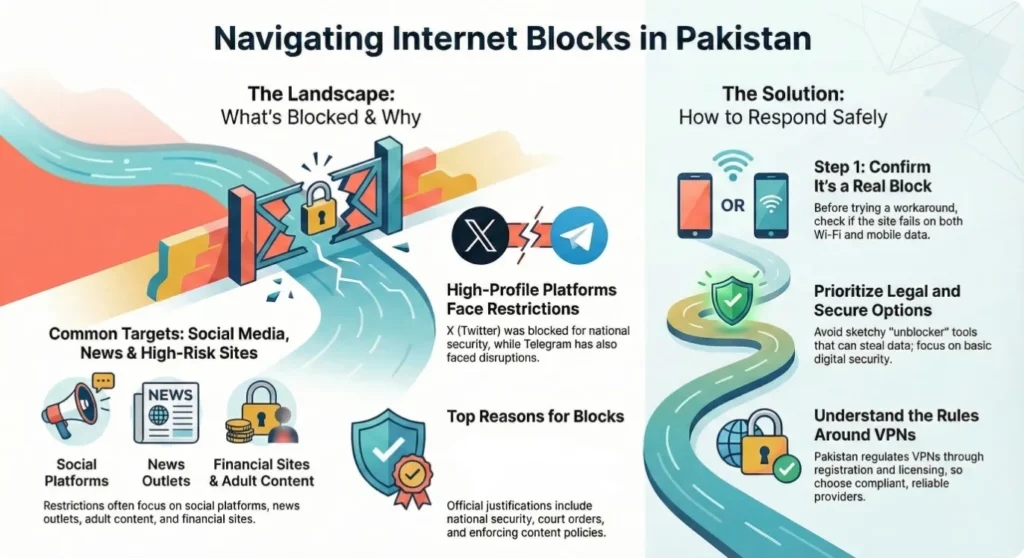
Overview of Internet Restrictions in Pakistan
Internet controls in Pakistan aren’t always a simple yes/no block. You may see full blocking, partial access, throttling, or intermittent availability—sometimes varying by ISP or region. Understanding who regulates access and how restrictions are applied helps you interpret what you’re seeing on your devices.
Pakistan’s internet governance involves regulatory and governmental decisions that can affect platforms and websites at scale. In 2024, for example, Pakistan’s interior ministry told a court that X was blocked on national security grounds, with major outlets reporting the government’s position and timing around the election period.
At the same time, not every “blocked” experience is censorship. Network congestion, DNS issues, server outages, and app-specific disruptions can look identical from your perspective. That’s why it’s useful to confirm whether a problem appears across multiple networks and whether independent measurement sources report similar patterns.
What Are the Categories of Blocked Website in Pakistan
When you look across PTA actions, news coverage, and measurement reports, restrictions tend to cluster into a few repeat categories. Thinking in categories helps you avoid overgeneralizing from one blocked app to the whole internet, and it makes it easier to interpret why certain sites are targeted more often than others.
Below is a practical way to group restricted websites in Pakistan. These categories are broad on purpose: a single site can fall into more than one bucket, and the underlying reason can shift over time.
| Blocked Website Category | What this usually includes | Why this category is often restricted (high-level) |
| Social Media Platforms | Major social networks, messaging, video-sharing | Public order concerns, misinformation, political sensitivity, moderation disputes |
| News & Media | Domestic and international news sites, political commentary | Content disputes, court orders, election-related volatility |
| Gaming & Entertainment | Gaming portals, streaming-related sites | Licensing, policy enforcement, or targeted disruptions (varies) |
| Adult & Gambling | Adult sites, betting/casino domains | Legal restrictions, public morality policy, fraud prevention (varies) |
| Financial & Crypto | Exchanges, high-risk finance sites/apps | Fraud prevention, consumer protection, policy compliance (varies) |
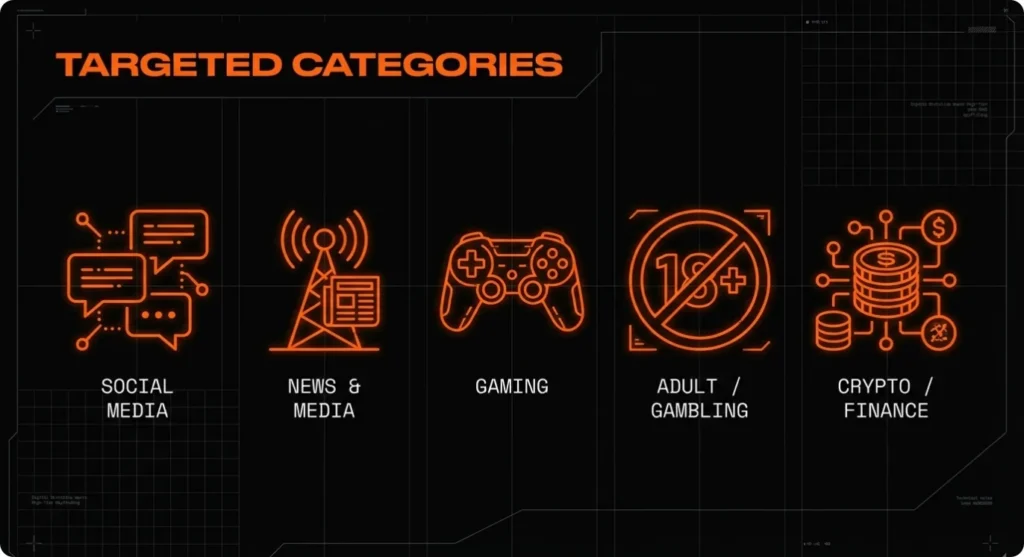
If your goal is to find a list of blocked websites in Pakistan, category thinking also helps you scan more intelligently: social platforms may change status quickly, while adult/gambling domains are more often subject to long-running restrictions.
Popular Websites Blocked in Pakistan (Examples and Status)
Any list you find online can be outdated within weeks—especially when restrictions are linked to current events. The most useful lists tell you how something is restricted (full block vs intermittent) and when the status was observed. That context matters more than a long, unverified catalog.
The table below uses widely reported examples and measurement references to illustrate the kinds of restrictions people run into. “Status” is intentionally cautious because access can vary by network and over time.
| Website/App | Status | Type of Restriction | Notes |
| X (Twitter) | Largely restricted (reported in 2024) | Access disruption/platform restriction | Pakistan’s interior ministry said it blocked X on national security grounds; restrictions were widely reported around the Feb 2024 election period. |
| Telegram | Reported blocked (observed since Dec 2023, per OONI) | Blocking observed in measurements | OONI published findings indicating Telegram blocking in Pakistan starting Dec 2023 and continuing at least into its reporting period. |
| YouTube | Previously blocked (historical) | Past platform restriction | Pakistan has a history of YouTube restrictions in earlier periods; current access can differ from historic blocks. |
| TikTok | Intermittent/periodically restricted (historical pattern) | Targeted restrictions/policy enforcement | TikTok has seen periodic restrictions in Pakistan historically; status can shift quickly. |
| WhatsApp Web (interface) | Previously restricted (historical measurement) | Temporary blocking observed | Earlier OONI reporting documented temporary censorship events including WhatsApp’s web interface during a specific period. |
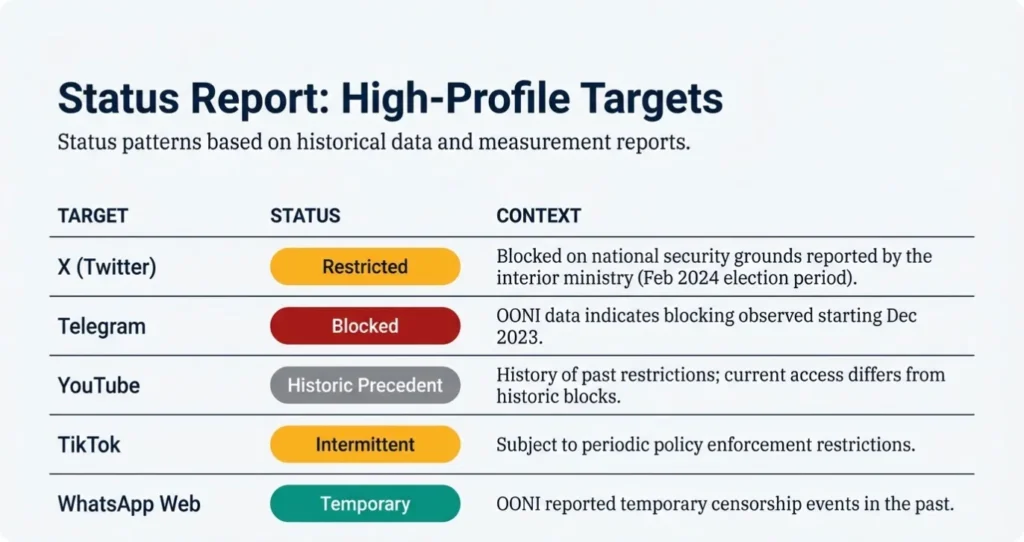
How to use this table: treat it as a pattern guide, not a promise. If a service is essential for work or security updates, verify its current status using multiple sources and your own cross-network checks.
Why Are Websites Blocked in Pakistan?
If you want to figure out the reason why websites are blocked in Pakistan, you’re usually looking for more than a vague answer like “censorship.” In practice, restrictions are justified through a mix of security claims, legal enforcement, and policy choices—sometimes triggered by major events and sometimes by longer-term regulation.
Here are the most common explanation buckets you’ll see, with real-world examples of how they show up:
1) National security and public order concerns
During politically sensitive periods, access to social platforms can become a flashpoint. Reuters reported that Pakistan’s interior ministry cited national security and confidential agency reports as reasons for blocking X. That’s a clear example of a “public order” rationale being applied to a major platform.
2) Court orders and legal compliance
Some restrictions are tied to judicial processes or complaints that lead to takedown or blocking decisions. Even when the public doesn’t see every detail, the operational reality is that ISPs can be instructed to restrict access based on legal demands.
3) Content policy enforcement (adult, gambling, or harmful content)
Adult and gambling sites are common targets in many countries, including Pakistan, where policy and legal standards may restrict these categories. These blocks are often less “newsworthy,” but they can be more stable over time.
4) Fraud, consumer protection, and high-risk finance
Financial scams, fake investment schemes, and risky online services can drive enforcement actions. Even if you personally view a site as harmless, regulators may treat whole categories as high-risk.
5) Technical and regulatory measures around VPN use
Sometimes the “block” you feel isn’t a website ban—it’s a disruption to the tool you’re using to connect securely. Pakistan’s PTA has maintained processes like IP whitelisting/VPN registration and has discussed or implemented steps toward controlling unauthorized VPN use.
The key point: the same user experience (a site not loading) can come from very different policy motivations. That’s why confirming the type of restriction is often the fastest path to a safe response.
Is Visiting Banned Sites Illegal in Pakistan?
When you’re searching “is visiting banned sites illegal,” you’re really asking two questions: what the law and regulators say, and how risk shows up in day-to-day life. Pakistan’s approach is notable because it includes regulatory processes specifically for VPN access—meaning your risk isn’t only about what you visit, but also how you connect.
Here’s a practical way to think about it:
- Regulators focus on control and compliance mechanisms. The PTA operates an IP whitelisting and VPN registration framework, and it has publicly discussed registration deadlines and enforcement distinctions (for example, business use vs individual use).
- Licensed pathways are becoming more prominent. In late 2025, Dawn reported that PTA commenced licensing of VPN service providers and said users could obtain VPN services directly from licensed providers without separate registration steps for IPs/mobile numbers.
- Enforcement and practical risk vary by context. Accessing content that is explicitly illegal (fraud, exploitation, etc.) carries much higher risk than simply encountering a restricted social platform during a volatile period.
If you’re unsure where the boundary sits, it helps to clarify is a VPN legal in Pakistan? in the specific context you’re in—personal use, business compliance, and the type of content you’re accessing can all change the risk profile.
Not legal advice: For anything high-stakes (work compliance, regulated industries, or travel situations), consult qualified counsel or your organization’s compliance team.
How to Access Blocked Websites in Pakistan Safely and Legally
You don’t need a hacky mindset to handle restricted websites—you need a risk-aware one. The safest strategy is to first confirm whether you’re dealing with an actual block, then choose options that minimize legal exposure and protect your privacy, especially if you’re on shared or public networks.
1) Confirm what’s actually happening before you change anything
Start with basic reality checks. Does the site fail on both mobile data and Wi-Fi? Does it work for a friend on another ISP? Are multiple sites failing at once? If the issue disappears after a few hours, it may have been congestion or a temporary restriction rather than a permanent ban.
2) Prioritize legal, low-risk alternatives first
Sometimes the best “access” is simply a legitimate substitute: an official mirror, a verified app update, or an alternative channel for the same information (for example, an outlet’s newsletter or RSS). This is especially important for news and emergency updates, where phishing clones are common.
3) Treat privacy and security as part of access—not a separate topic
If you’re trying to reach blocked or sensitive content, you’re also more exposed to risky intermediaries: fake download sites, malware-laced “helpers,” and insecure Wi-Fi. Use strong passwords, keep your device updated, and avoid installing unknown tools from random pages just to get around a temporary disruption.
4) If you decide to use a VPN, choose one with compliance and reliability in mind
In Pakistan, VPN use can be affected by regulatory controls like registration or licensing frameworks. That means reliability isn’t only about speed—it’s also about whether the service is built for lawful use and stable connectivity under local conditions. PTA’s VPN registration/whitelisting context and recent moves toward licensing providers are exactly why you should avoid sketchy, opaque apps.
For everyday privacy—especially on public Wi-Fi—look for modern protocols, a dependable kill switch, and a clear no-logs policy. If you want a straightforward option to consider under those criteria, BearVPN is worth a look for privacy-focused browsing and more consistent access when common platforms are unstable.

5) Know what not to do
Avoid “one-click unblocker” browser extensions from unknown publishers, pirated VPN APKs, and random proxy lists shared on social media. They often trade your access problem for a bigger one: data theft, account takeovers, or device compromise.
If your connection is critical for work, you can also check other available servers for Pakistan based on distance and network load—nearby locations often provide more stable latency than far-away routes, even when bandwidth is similar.
Conclusion
Blocked websites in Pakistan can feel unpredictable, but you can respond calmly when you understand the pattern: restrictions may be temporary, partial, or network-specific, and they often cluster around social platforms, media, and higher-risk content categories. Your best move is to confirm whether you’re facing a true block, then choose low-risk alternatives and tighten your privacy basics before trying any workaround. If you decide a VPN is appropriate, prioritize reliability, transparency, and lawful use—especially given Pakistan’s registration and licensing direction. That way, you stay connected without trading safety for short-term access.
FAQs
1. Is a VPN legal in Pakistan for personal use?
In practice, VPNs aren’t automatically “illegal” for personal use, but they’re regulated. What matters is how you use it (lawful vs unlawful content) and whether local rules or enforcement actions affect availability. If you rely on a VPN for work or sensitive communications, treat compliance as part of the decision, not an afterthought.
2. Does the PTA block all unregistered VPNs?
Not necessarily. Users often see uneven behavior: some VPNs work normally, some work only on certain networks, and others fail intermittently. Restrictions can target specific VPN protocols, IP ranges, domains, or traffic patterns, and enforcement can change over time. For businesses, PTA registration/whitelisting exists precisely because the approach isn’t always “block everything,” but rather control and allow by policy.
3. Why is X (Twitter) still not working with my VPN?
This usually comes down to routing, detection, or DNS, not just “your VPN is broken.” Try these practical checks (without doing anything risky):
- Switch server location: a nearby region can be faster, but another region may be less congested or less flagged.
- Change protocol (if your VPN supports it): some networks interfere with certain protocols more than others.
- Refresh DNS: use secure DNS inside the VPN app if available; DNS mismatches can make a site look blocked even when the tunnel is up.
- App-level fixes: log out/in, clear app cache, update the app, or try the web version—app caching can keep failing even after your network path changes.
- Check for leaks: if your real DNS or IP leaks, the platform may still see you as “in Pakistan” even with a VPN connected.
If it works on mobile data but not Wi-Fi (or vice versa), that’s a strong hint the issue is ISP/network-specific.
4. Can I access Pakistani bank apps while using BearVPN?
Sometimes yes, but don’t be surprised if a bank app blocks or challenges logins when it sees an unfamiliar IP or location. Many banking systems flag VPN traffic as potential fraud protection.
- If your bank app refuses to load, try a Pakistan-based server (if available) or a nearby location with stable latency.
- If it still fails, the most reliable option is often to exclude the bank app from the VPN (split tunneling) or temporarily turn the VPN off only for the banking session.
- Always keep 2FA enabled and avoid logging into banking apps on public Wi-Fi, VPN, or not.
5. How do I register my VPN IP with the PTA if I’m a business user?
The exact steps can change, so use PTA’s official VPN registration/IP whitelisting channel as your source of truth. In general, businesses should prepare:
- Company identification details (registered entity info)
- A clear business justification (remote work, secure access to corporate systems, etc.)
- The VPN endpoint IPs that need whitelisting (often provided by your VPN provider or your IT team)
- A responsible contact person for follow-up
Then submit the requested details through the PTA process and keep records for internal compliance. If you’re unsure which IPs to submit or whether your setup is compatible with whitelisting, your IT admin (or your VPN provider’s support) should help you compile the correct endpoint information.