Key Takeaways
- Current Network Status (2026): Iran is currently experiencing a severe nationwide internet blackout (started Jan 8, 2026), with connectivity dropping to 1% in many areas.
- Why VPNs Fail: The government uses Deep Packet Inspection and has recently begun jamming satellite signals like Starlink, alongside blocking standard VPN protocols (OpenVPN, IKEv2).
- Best Solution: BearVPN is highly recommended for its obfuscation capabilities. Other fixes include switching to stealth protocols, changing DNS settings, and updating apps.
- VPN Status: Unlicensed VPNs are officially banned, but they are widely used to access restricted content in Iran. You should always avoid using a VPN for criminal purposes.
If you are trying to access the internet from Tehran, Mashhad, or anywhere else in Iran these days, you are likely facing a connection problem. As of early 2026, the question “why is my vpn not working in Iran” has become the most critical query for millions of citizens and travelers. According to a Cybernews report, the Iranian government has implemented one of the most sophisticated internet censorship architectures in the world, often referred to as the digital wall or the National Information Network.
During periods of unrest, authorities throttle bandwidth and block encryption protocols, rendering standard VPNs useless. However, maintaining a connection is vital for communication and safety. This guide analyzes the current network status in Iran and provides some proven ways to bypass these restrictions using advanced tools like BearVPN and specific configuration tweaks.
Iran’s Internet Blackout 2026 – Latest Update
The internet situation in Iran has deteriorated significantly in the first month of 2026. According to the latest network data and reports, Iran experienced a near-total internet blackout beginning on January 8, 2026. During this period, National connectivity levels have flatlined at approximately 1% to 3% of ordinary levels. Unlike previous years when DSL might remain active while mobile data was cut, the 2026 blackout targets both fixed-line and mobile networks simultaneously.
Ynet global news report indicates that the government has deployed military-grade jammers in major cities to disrupt satellite internet signals, including Starlink, which was previously a reliable backup for activists.
Why is the Internet blackout happening in Iran?
This severe crackdown is attributed to a new wave of nationwide protests triggered by economic instability and inflation. To prevent the organization of gatherings and the spread of footage to the outside world, the Supreme Council of Cyberspace has enacted a so-called “security shield,” effectively isolating the Iranian intranet from the World Wide Web.
Common VPN Issues in Iran
When your VPN fails in Iran, it is not the server being down in the traditional sense. Most of the time, a VPN not working in Iran is due to active interference. Here are the technical reasons why you are seeing “Connection Failed” errors:
1. Deep Packet Inspection (DPI): The Telecommunication Company of Iran uses DPI to analyze the shape of your data traffic. If it recognizes the handshake of a standard VPN protocol, it drops the connection immediately.
2. DNS Poisoning: When you search for some social media platforms like Instagram, your ISP intentionally redirects your request to a dead end or a government warning page, preventing the VPN from resolving the host address.
3. Port Blocking: Standard ports used by VPNs are often throttled or completely closed for encrypted traffic, making it look like the internet is down.
4. IP Whitelisting: In extreme blackout phases (like the current Jan 2026 event), the internet effectively operates on a whitelist system, where only approved domestic sites are accessible, and all foreign IP addresses are blocked by default.
Is VPN Banned in Iran?
Yes, as of 2026, VPNs are banned in Iran by the government. In February 2024, the Supreme Council for Cyberspace officially criminalized the use of unauthorized VPNs. This law was reinforced in late 2025, imposing stricter penalties for anyone selling or distributing circumvention tools.
Technically, the state infrastructure uses automated systems to identify VPN server IPs and block them in batches. At the same time, the government has proposed legal VPNs that grant access to a slightly wider version of the internet for specific professions, like professors or bankers. However, these VPN traffics are heavily monitored and do not provide privacy or access to social media like Telegram or WhatsApp.
How to Fix VPN Not Working in Iran
If you are stuck inside the digital blackout, standard “Connect” buttons will not work. You need to use specific tools and configurations designed to look like normal web traffic.
Method 1. BearVPN – Best VPN for Iran
Based on current performance metrics in high-censorship zones, BearVPN has emerged as a robust solution for navigating the 2026 blackout. Unlike generic VPN providers, BearVPN focuses more on obfuscation, thus disguising VPN traffic as regular HTTPS browsing.

Why BearVPN Works in Iran:
- Advanced Protocols: Unlike common protocols (WireGuard and OpenVPN) that can be easily detected and blocked by Iranian ISPs, BearVPN uses SLProxy and SCProxy protocols to bypass filters effectively.
- Stealth Technology: BearVPN utilizes advanced tunneling that wraps your VPN data in a layer that mimics standard web traffic. This helps it bypass the DPI filters used by Irancell and MCI.
- Resilient Network: It frequently rotates IP addresses. If one server is flagged and blocked by the Iranian firewall, BearVPN quickly spins up new routes to restore access.
- Kill Switch: An essential feature for network safety in Iran. If the connection drops, BearVPN cuts all internet traffic to prevent your real IP from being exposed to the ISP and reconnects to another server.
How to connect to a VPN server with BearVPN:
Step 1. Download and install the BearVPN app on your device. If you are using a mobile phone, you can also visit the App Store or Google Play Store to download and install it.
Step 2. Open the app and navigate to its server list page, where you can select a server to connect to.
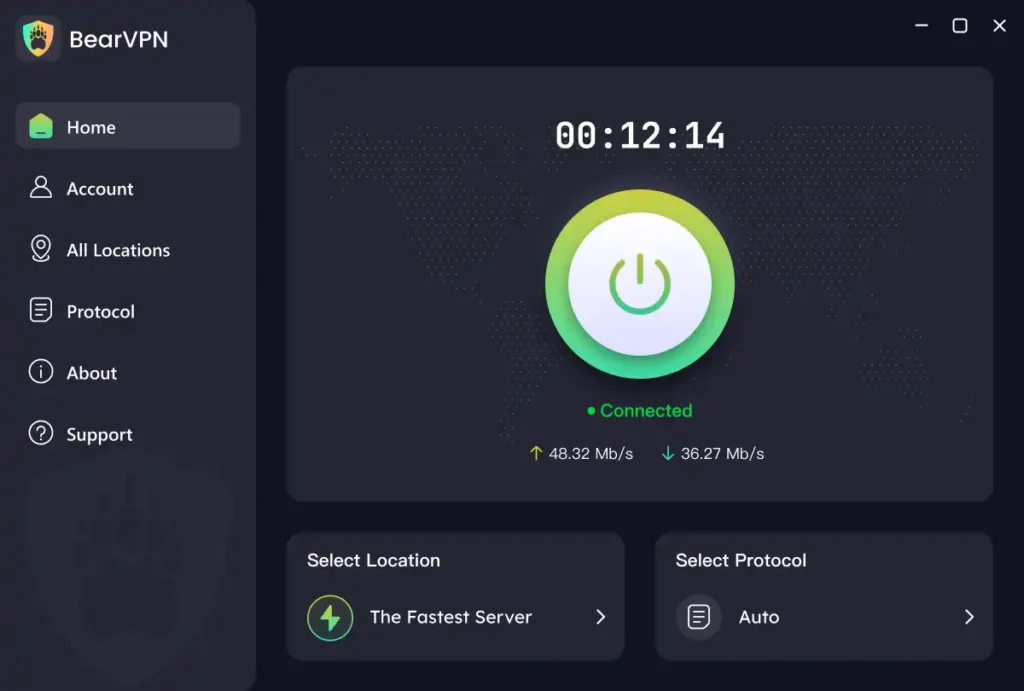
Note: It may take several seconds to perform the handshake in a high-censorship environment.
Step 3. When connected, open your browser and clear the history first. Then go to your desired website and start browsing.
Method 2. Enable Obfuscation/Stealth Mode
Most VPNs allow obfuscation for connections. While standard VPN traffic is easily identifiable, obfuscation scrambles the metadata of your packets so they look like you are just visiting a secure website rather than using a VPN.
In BearVPN, you can just go to the settings and toggle on the stealth mode. Then your browsing will be obfuscated.
Method 3. Change the Protocols & Servers
The protocol is the language your VPN uses to talk to the server. The Iranian government silences common languages. In this case, you can try to switch the protocols or servers to fix a VPN not working in Iran.
Option 1. Switch Protocols:
- Avoid: PPTP, L2TP, and standard OpenVPN UDP (these are easily blocked).
- Use: SLProxy, SCProxy, IKEv2 (sometimes works on mobile).
Option 2. Change Ports:
- Manually configure your VPN to use Port 443. This port is used for all secure web traffic (HTTPS). Blocking Port 443 would break the entire banking and commerce system of Iran, so the government rarely blocks it completely.
Option 3. Server Selection:
- Do not connect to popular locations like the USA – New York or the UK – London. These can be the first to be blacklisted.
- Try connecting to nearby or neutral locations like the UAE, Turkey, or Switzerland. Sometimes, obscure servers in places like Romania or Sweden have not yet been flagged by the Iranian firewall.
Method 4. Update Your VPN App
The network environment changes fast in Iran, so most VPN providers update their apps to patch the loopholes the Iranian government has closed. An outdated app attempts to connect to IP addresses that were blocked weeks ago. You can just go to the app store and see if there is a new version available.
Note: If you cannot access the Google Play Store on Android, try to find a sideload version or an APK file from a trusted third-party repository. Many VPNs host their APKs on GitHub or mirror sites specifically for users in restrictive regions. iOS users can only update outdated apps in the App Store.
Method 5. Change DNS Settings
Sometimes the tunnel is created, but the DNS requests fail, making it seem like the VPN isn’t working. Here’s how to change:
Step 1. Ensure any Smart DNS features are off, as they are unencrypted.
Step 2. In your device’s network settings (or within the VPN app), force the use of secure DNS providers.
- Google DNS: 8.8.8.8 / 8.8.4.4
- Cloudflare DNS: 1.1.1.1 / 1.0.0.1
- OpenDNS: 208.67.222.222
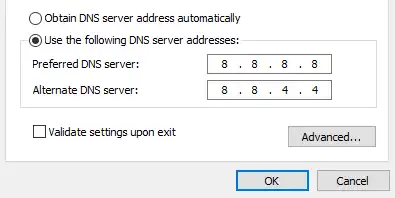
This helps prevent your ISP from seeing the domain names you are trying to visit, reducing the chance of a connection reset.
Is It Illegal to Use a VPN in Iran?
The legality of using a VPN in Iran is severe. The User Protection Bill and subsequent decrees by the Supreme Council have made the unauthorized use of VPNs illegal. However, by using the authorized VPNs, your data will be tracked. Simultaneously, approved VPN services are filtered and ineffective for accessing blocked sites. That’s why residents are still using common VPNs to access restricted content in Iran and protect their online privacy.
Important Note: You should never use a VPN for criminal purposes, or you will get arrested and fined.
Conclusion
The VPN not working in Iran is common, especially during the blackout days. The digital curtain imposed on Iran in 2026 presents a massive challenge for anyone trying to stay connected. If you find your vpn not working in Iran, it is likely due to the intensified DPI filtering and the jamming of satellite signals during the current blackout.
To restore access to VPN servers, you must move beyond standard settings. Using specialized tools like BearVPN, enabling obfuscation protocols, and keeping your software updated are reliable ways to breach the firewall. Most importantly, you should always prioritize your safety and avoid using a VPN for crime. Try BearVPN now and reconnect to the network privately in Iran.
FAQs About VPN Not Working in Iran
1. Is VPN blocked in Iran?
Yes, the government uses DPI and port blocking to ban most commercial VPNs. Only VPNs with advanced obfuscation (stealth modes) can successfully bypass the 2026 firewall restrictions.
2. Which VPN currently works in Iran?
BearVPN still works in Iran and is highly recommended for its stealth capabilities. Other resilient options include those supporting V2Ray, Shadowsocks, or proprietary obfuscated protocols designed to look like normal HTTPS traffic.
3. How to connect to VPN in Iran?
To get connected in Iran, you can go to the BearVPN website and install its VPN app. Then enable the Stealth/Obfuscation mode in settings, select a server in a nearby region, and use TCP Port 443.
4. Why is there no internet in Iran?
Iran implemented a nationwide internet blackout on January 8, 2026, to suppress anti-government protests. Authorities jammed Starlink signals and cut mobile data to prevent communication and information flow.
5. Is WhatsApp blocked in Iran?
Yes, WhatsApp was blocked in Iran in September 2022. The government has labeled it a tool for foreign espionage. Now it is only accessible via a robust VPN connection.