Key Takeaways
- Identify the Cause: Your VPN is not working in Bangladesh is mainly caused by government restrictions, ISP blocks, and server maintenance of the VPN services.
- Technical Solutions: Quickly getting connected to a VPN server in Bangladesh with BearVPN. You can also troubleshoot the VPN issues by updating the VPN app, using obfuscation, switching protocols, and changing DNS settings.
- Legal Status: Clarify that while VPNs are legal to use in Bangladesh, certain online activities remain subject to local regulations.
In recent years, operating a VPN in Bangladesh can often feel like navigating a digital obstacle course as the government occasionally implements strict internet controls. During periods of political unrest or for security reasons, popular social platforms like WhatsApp, Facebook, and TikTok may become inaccessible. This has made VPNs essential tools for accessing restricted content in Bangladesh.
However, many users find their VPN not working in Bangladesh just when they need them most. Whether you are a resident trying to access social media during localized outages or a traveler attempting to stream home content, the frustration of a failed connection is common. No worries, this guide provides a comprehensive analysis of why your connection might be failing and offers actionable, step-by-step solutions to fix VPN not working in Bangladesh.
Common VPN Issues in Bangladesh
The VPN not working in Bangladesh varies from different case. Some common issues are shown below:
1. The Infinite Connecting Loop
When you want to establish a tunnel in the app, it keeps loading but never succeeds. Then you fall into the infinite connecting loop. This often indicates that the VPN’s entry IP or port is blocked at the ISP level.
2. Sudden Disconnections
Sometimes you have connected to a server successfully, but the tunnel collapses after a few seconds to minutes. This is usually the result of Deep Packet Inspection (DPI) identifying the trace of your VPN protocol and terminating the session directly.
3. Extremely Slow Speeds
Another issue with VPNs not working in Bangladesh is that you get connected to your VPN app, but the internet speed is extremely slow. This can be due to bandwidth throttling by ISPs or overcrowded servers in nearby regions, such as India or Singapore.
4. App Store Inaccessibility
For several users, they may encounter the VPN app inaccessibility in the App Store or Google Play Store. There are no VPN downloads available because the official website or the app store listing is restricted within the country.
Causes of VPN Not Working in Bangladesh
Why is your VPN not working in Bangladesh? One of the most common reasons is that the ISPs implement specific blocks on VPN usage to comply with the government’s restrictions on social media platforms, according to the Freedom House report. Generally, they use some advanced technology to achieve the restrictions:
- DPI (Deep Packet Inspection): Bangladeshi ISPs use advanced firewall technology to monitor inside data packets. If they see the headers of standard VPN protocols, they can drop the connection.
- IP Blacklisting: Government regulators often maintain a list of known IP addresses owned by major VPN providers. Once an IP is flagged, it is blocked all around the country.
- DNS Tampering: ISPs may redirect your DNS queries. If your VPN doesn’t have DNS Leak Protection, the ISP can see where you are trying to go and block the request before it reaches the VPN server.
- Server Maintenance: During times of high demand, VPN servers can become overloaded and crash. So they will maintain the servers to ensure the connections.
Is VPN Banned in Bangladesh?
As of 2026, VPNs are not banned in Bangladesh. No law prohibits an individual from installing or using a VPN on their personal device. In fact, many corporate employees use them for secure remote work, and some individuals also use a VPN to access restricted content in Bangladesh.
However, the government does engage in tactical blocking during your connection to VPN servers. This means they block the websites of VPN providers to prevent people from downloading the software, and they block the servers used by the apps.
How to Fix VPN Not Working in Bangladesh – 5 Ways
To resolve common VPN issues in Bangladesh, consider the following 5 proven methods in 2026.
Method 1. BearVPN – Get a Bangladeshi IP address From Anywhere
The most efficient and straightforward way is to use BearVPN. Unlike some common VPN providers, it allows users to enable stealth mode when connecting to a server in Bangladesh, which is helpful to avoid tracking by ISPs. Additionally, BearVPN is convenient to access Bangladeshi banking apps or local streaming services while abroad. Users can easily get a Bangladeshi IP address inside the app.
Why Choose BearVPN?
- Global Servers: It offers 2000+ servers from around 50 locations.
- Advanced Protocols: Your online security and privacy will be enhanced by the SCProxy and SLProxy protocols.
- Bypass Filters: The dedicated IP address helps bypass traffic filters and ensure a smooth connection.
Steps to restore your connection in Bangladesh with BearVPN:
Step 1: Download and install BearVPN on your Android, iOS, Windows, or Mac device.
Step 2: Open the app and go to the server list.

Step 3: If you want to connect to a Bangladesh IP address, choose a server in one of its cities (like Dhaka). If you want to access restricted content in Bangladesh, connect to a server in neighboring countries.
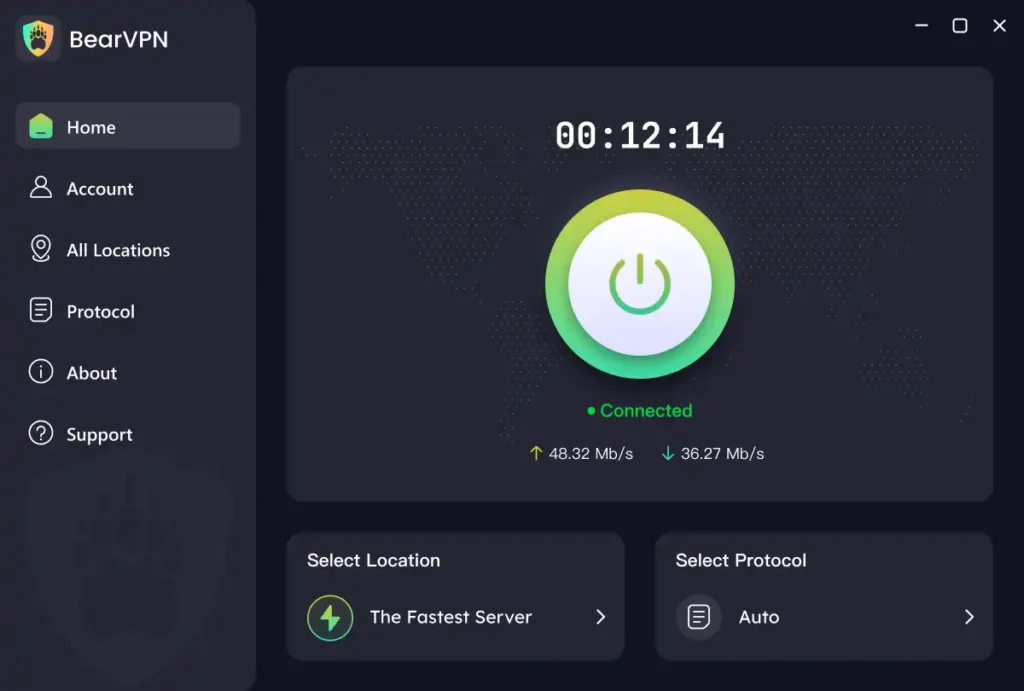
Step 4: Once connected, you can go to your desired pages on a browser or app.
Note: It’s better to clear the cache in the app before using it. Deleting recent history is also necessary if you use browsers.
Method 2. Update Your VPN App
As the VPN providers frequently update their apps to keep pace with network changes, some old versions of VPN apps use outdated methods to bypass blocks. Then you should update to the latest version and ensure a successful connection.
Step 1: Check if there is an update in the Google Play Store or Apple App Store.
Step 2: If the stores are blocked, use a browser to visit the VPN provider’s mirror site (a secondary URL not yet blocked) to download the latest APK or installer.
Note: You should always download from a trusted source to avoid malware.
Step 3: Restart your device after installation to clear old network configurations.
Method 3. Use Obfuscation/Stealth Mode
Standard VPN encryption looks like gibberish to a firewall, which makes it suspicious. Obfuscation wraps your VPN traffic in an outer layer that makes it look like regular HTTPS web browsing. Here’s how to enable it:
- Step 1: Go to your VPN app Settings.
- Step 2: Look for a feature called “Obfuscation,” “Stealth,” “Scramble,” or “Camouflage Mode.”
- Step 3: Toggle it on. Note that this might slightly decrease your speed, but it significantly increases your chances of connecting in a restricted environment.
Method 4. Change the Protocols
Standard protocols like OpenVPN or WireGuard can be easily detected by ISPs. In this case, you can switch your VPN protocol to less obvious ones like SCProxy and SLProxy. Here’s how:
- Step 1: Open VPN Settings and find Protocol.
- Step 2: If you are on WireGuard and it’s not working, switch to another one.
- Step 3: If available, try proprietary protocols like SCProxy and SLProxy, which are designed to be more resilient.
Method 5. Change DNS Settings
Sometimes the VPN tunnel is established, but DNS requests fail, preventing websites from loading. Follow the steps to prevent DNS hijacking by your ISP:
- In your VPN settings, ensure Custom DNS is disabled.
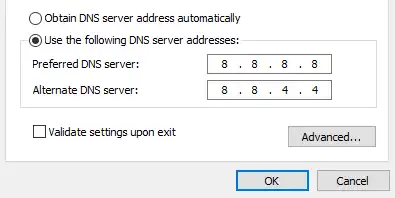
- Alternatively, if you are not using the VPN app but a manual setup, set your device’s DNS to Cloudflare (1.1.1.1) or Google (8.8.8.8) to bypass ISP DNS blocks.
- Restart your browser to apply the settings effectively.
Is It Illegal to Use a VPN in Bangladesh?
No, it is not illegal to use a VPN in Bangladesh for privacy and security. No law indicates that using a VPN in Bangladesh is criminal. However, using a VPN to commit a crime, such as spreading prohibited content under the Digital Security Act, remains illegal. For the average user looking to access Facebook or protect their data on public Wi-Fi, there are no legal concerns.
Conclusion
The VPN not working in Bangladesh frustrates users who want to protect their browsing online or access restricted content directly. But no worries, by understanding that the issue usually stems from ISP-level filtering or DNS hijacking, you can take control by updating the VPN app, switching protocols, using obfuscation, or changing DNS settings.
Most importantly, you can always use BearVPN to restore your connection in Bangladesh without being detected and restricted by ISPs. Whether you need a local IP for banking or a global tunnel for social media, following the steps in this guide will ensure a stable connection. Try BearVPN now and get connected immediately in Bangladesh without effort.
FAQs About VPN Not Working in Bangladesh
1. Is VPN blocked in Bangladesh?
While not legally banned, the government often blocks VPN websites and specific server IP addresses to restrict access to social media during periods of political tension or national exams.
2. Which VPN works in Bangladesh?
BearVPN works smoothly in Bangladesh. It offers 2000+ servers you can choose from more than 50 locations. It also provides dedicated IP addresses, with which you can bypass traffic filters and stay ahead of ISP-level blocks.
3. How to connect to the Bangladesh VPN?
Open your VPN app, search for Bangladesh in the server list, and tap connect. If it fails, enable Stealth or Obfuscation mode in the application settings and try again.
4. Which VPN is best for Free Fire Bangladesh?
BearVPN is highly recommended for Free Fire in Bangladesh. It offers low-latency servers in nearby regions like Singapore, ensuring a stable connection and minimal ping during gameplay.
5. Can I use WhatsApp with a VPN in Bangladesh?
Yes. When WhatsApp is throttled or blocked, a VPN with stealth mode enabled will allow you to send messages and make calls seamlessly.