Choosing a VPN shouldn’t feel like a leap of faith. You’re installing an app that sits between your device and the internet, so a vague promise like “secure” isn’t enough—you need to know what it protects, what it might collect, and what could still go wrong. With X-VPN, the conversation usually comes down to a few practical questions: does it prevent leaks on shaky networks, is its logging policy clear, and can you trust the company behind it?
This guide walks you through a simple, real-world way to judge X-VPN’s safety—without drowning you in jargon. You’ll learn what “safe” actually means for public Wi-Fi, streaming, and P2P use, how to spot common red flags in privacy policies, and how to compare safer VPN alternatives if you want more confidence.
Quick Answer: Is X-VPN Safe to Use?
Most people don’t want a long review—they want a decision. So here’s the simplest honest framing: X-VPN appears good enough for low-risk use (basic privacy on public Wi-Fi, casual browsing, some streaming), but it’s not the easiest VPN to fully “verify” at a glance because third-party reviewers disagree on transparency and features.
A quick “fit check” (choose the line that sounds like you):
- Usually fine: streaming, light browsing, travel Wi-Fi, basic IP masking.
- Think twice / choose a stricter option: journalism, activism, sensitive work, or you need maximum confidence in policy + implementation.
How to Judge Whether a VPN Is “Safe” (Without Getting Technical)
Before you look at any one brand, it helps to know what matters most. A VPN can use strong encryption and still be a bad choice if it collects too much data, is unclear about how it works, or fails in real-world leak scenarios. The goal is simple: minimize what can be exposed if something goes wrong.
Use these 5 criteria (and don’t overcomplicate it):
- Activity logs: Does it store browsing history, DNS queries, traffic destinations, or your real IP?
- Leak protection: Does it help prevent DNS/IP leaks when the connection drops?
- Protocols & encryption: Does it use modern, reputable protocols and encryption?
- Transparency signals: Are policies clear, updated, and consistent with third-party testing?
- Trust factors: Who runs it, where it is based, and does it publish transparency reporting?
Fast red flags (if you see these, slow down):
- “No logs” claims with vague exceptions you can’t interpret
- No clear protocol information or proprietary names, with little documentation
- Features that exist on the website but are missing on your platform/version
X-VPN Security Features: Encryption, Leak Protection, Kill Switch
This is the part most VPN reviews start with, but you’ll get more value if you treat it like a checklist, not a sales pitch. X-VPN states it uses AES-256 encryption and includes features like a kill switch and split tunneling, and it lists multiple supported protocols in its official materials.
Feature snapshot (what you should verify in-app)
| What matters | What you want to see | What to check in X-VPN |
| Encryption | Strong modern encryption | Look for AES-256 claims + protocol options |
| Kill switch | Stops traffic if VPN drops | Confirm it’s enabled and what mode it uses |
| Leak protection | DNS/IP leak protection | Run a quick DNS leak test after connecting |
| Split tunneling | Choose which apps use VPN | Confirm it exists on your device/version |
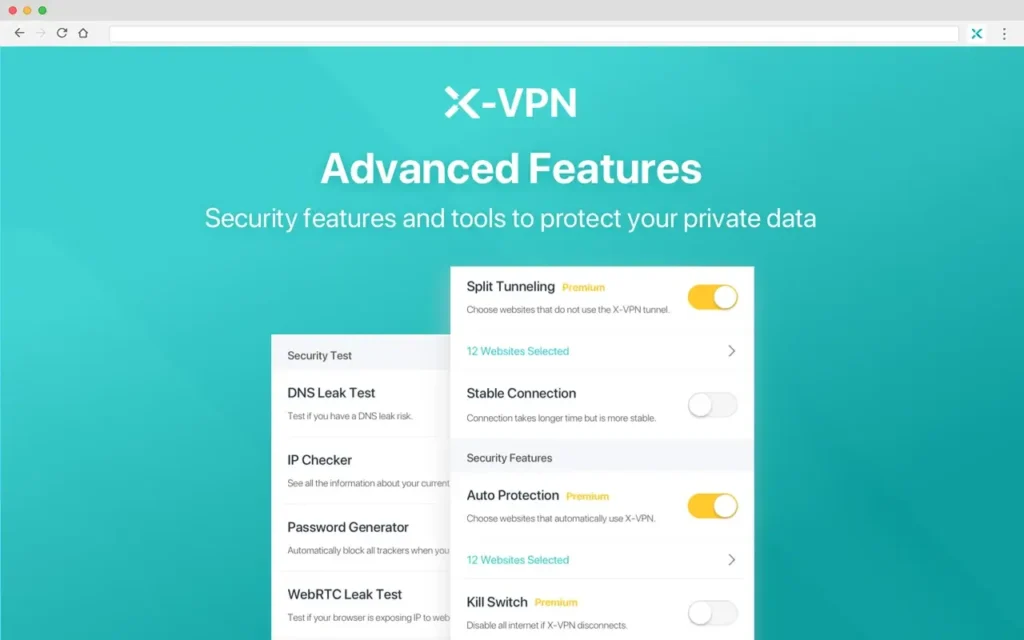
Important nuance: reviewers have reported feature gaps depending on platform or test period (for example, Security.org noted missing “advanced features like split tunneling” in their testing), while X-VPN also publishes guides describing split tunneling and kill switch options. Treat that as a signal to verify on your own device, not as proof either way.
X-VPN Privacy & Logging: What “No Logs” Can (and Can’t) Mean
“Does X-VPN keep logs?” is usually the real question behind “Is X-VPN safe?” X-VPN states it does not log traffic data such as browsing history and DNS queries, and it links users to its privacy policy for what it does collect. That’s a good start—but you still want to understand what operational data can exist (support, diagnostics, payment, device info).
What X-VPN claims it does not log (high-value items):
- Browsing history / visited websites
- DNS queries
- Traffic data (activity content/destinations)
How to read the privacy policy like a pro (in 3 minutes):
- Search for keywords: “log,” “DNS,” “IP address,” “device,” “diagnostic,” “third parties.”
- Look for “we may collect…” sections and identify whether anything is identifiable or persistent.
- Check the last updated date and whether claims match what major reviewers observed.
If your threat level is higher than average (work secrets, sensitive sources), don’t settle for “sounds fine.” Look for consistency across policy, product behavior, and independent testing—because “no logs” is a promise, not a feature you can toggle on.
Trust Signals: Transparency, Protocol Clarity, and Consistency
Even if a VPN uses strong encryption, trust still matters. When reviewers disagree, your job isn’t to pick a side—it’s to identify why they disagree and what that means for you. In X-VPN’s case, there’s a recurring theme: questions about transparency and protocol clarity in some third-party reviews, alongside more confident claims from X-VPN’s own materials.
What increases confidence
- A clear list of supported protocols (e.g., WireGuard/OpenVPN) and how they’re used
- A “trust center” / transparency reporting approach (data requests and outcomes)
- Consistency: policy language aligns with reputable reviewers’ observations
What lowers confidence
- “Yes and no” conclusions based on unclear protocol details (even if encryption is standard)
- Strong disagreement among reviewers on security posture (some calling it a hard pass)
Your takeaway: if you’re using X-VPN mainly for convenience (streaming, travel, hotel Wi-Fi), the risk tolerance is different than if you need maximum assurance. That difference should drive your decision more than a single review quote.
Is X-VPN Safe for Public Wi-Fi, Streaming, and Torrenting?
Safety isn’t abstract—it’s situational. A VPN that’s “fine” at home can still fail you on public Wi-Fi if the connection drops and your traffic leaks. Likewise, a VPN that unblocks streaming might still be a poor choice for P2P if you care about leak protection and stability.
Scenario cards (use the one that matches you)
1) Public Wi-Fi (airports, cafés, hotels)
- Main risk: interception and tracking on hostile networks
- What to do: enable kill switch, avoid split tunneling for sensitive apps, and reconnect if you see drops
- Verdict: generally acceptable if you confirm kill switch + leak protection on your device
2) Streaming (Netflix, sports, geo-content)
- Main risk: less about privacy, more about reliability and blocks
- What to do: use stable servers, switch regions when blocked, avoid “free VPN browser extensions” look-alikes
- Verdict: many reviewers consider it usable for streaming, but speed/feature tradeoffs vary
3) Torrenting / P2P
- Main risk: accidental exposure if VPN disconnects + policy ambiguity
- What to do: kill switch on, test for leaks, and avoid mixed routing configurations unless you understand them
- Verdict: only proceed if you’re confident in kill switch behavior and your risk tolerance (and follow local laws)
5-Minute Decision Guide: Keep X-VPN or Switch?
You don’t need perfection—you need clarity. The fastest way to decide is to treat your VPN like safety equipment: if you can’t confirm the basics, you switch. This decision guide is built to keep you out of “analysis paralysis” while still being practical.
Pick the first statement that matches you:
- A) “I just want safer browsing on public Wi-Fi.”
Keep X-VPN if you can enable the kill switch, and you don’t see disconnects; otherwise, switch. - B) “I care most about privacy and minimal data collection.”
Switch if the privacy policy feels too hard to interpret or if you can’t confirm what’s collected. - C) “I need transparency and high confidence in protocols.”
Switch if you’re uneasy about protocol clarity in reviews, even if the VPN “works.” - D) “I’m using it for sensitive work.”
Don’t gamble—choose a provider with clearer trust signals and fewer question marks.
One practical rule: if you wouldn’t trust it for your password manager sync on café Wi-Fi, you shouldn’t trust it for anything sensitive.
Safer VPN Alternatives to X-VPN (If You Want More Confidence)
If you’re still unsure, that’s a decision by itself: uncertainty is the enemy of safety. The easiest upgrade is choosing a VPN that’s explicit about what it does and what it doesn’t do, so you can stop guessing. Some top reviewers build their “X-VPN safe?” pages around this exact pivot—evaluate briefly, then recommend stronger options.
What to look for in a “safer alternative”
- Clear no-logs language (what’s excluded: browsing history, DNS, traffic destinations)
- Leak protection + kill switch you can actually enable
- Features that match your use case (split tunneling for convenience, obfuscation for travel, etc.)
Why BearVPN is a strong safer pick (especially for everyday use)
BearVPN is positioned around straightforward privacy claims and practical safety features, which makes it easier to evaluate quickly—exactly what you want when you’re comparing alternatives.

What stands out:
- No-logs policy spelled out in plain terms (no logging of browsing history, traffic destination, data content, or DNS queries)
- RAM-only infrastructure highlighted as part of its privacy approach
- Kill switch + split tunneling listed as available features (useful for public Wi-Fi safety and app-by-app control)
A simple way to use BearVPN well (no fuss setup):
- Turn on Kill Switch if you’ll be on public Wi-Fi (it’s your “seatbelt”).
- Use Split Tunneling only for low-risk apps (like streaming), while keeping banking/work apps fully on the VPN tunnel.
- If you travel to restrictive networks, prioritize stability and safety over speed tricks.
Conclusion
X-VPN can be “safe enough” for low-risk, everyday use—especially if you confirm basics like kill switch behavior and you’re satisfied with what its privacy policy actually says. But if you need higher confidence, clearer transparency, or you simply don’t want to guess, switching is the smarter move. Use the five-criteria framework in this guide, verify features on your own device, and pick a VPN that makes its privacy posture easy to understand. For many people, a safer option is the one that combines clear no-logs terms, practical protections like a kill switch, and features that fit your real-world routine—without adding uncertainty.
FAQs
1. Does X-VPN keep logs?
X-VPN states it does not log traffic data like browsing history and DNS queries, and it points users to its privacy policy for details on what may be collected for operations/support.
2. Why do reviews disagree so much?
Differences often come from testing dates, platform differences, and how reviewers interpret transparency and protocol documentation. One review may focus on usability; another may penalize unclear technical details.
3. Is X-VPN safe for streaming?
Several reviewers describe it as usable for streaming, though results and performance can vary by region, device, and server load.
4. What’s the biggest mistake people make with VPN safety?
Assuming “connected” means “protected.” If your VPN drops and you don’t have a kill switch enabled, your traffic may revert to normal routing—especially risky on public Wi-Fi.
5. Are free VPNs always unsafe?
Not always—but fake free VPN apps/extensions are a real problem, and many “free” products monetize through tracking or worse. Stick with reputable providers and avoid unknown browser extensions.