Quick Access:
- Browsec VPN Security Concerns: Browsec VPN is generally considered safe to use for light browser tasks. It’s better to pair with an all-around VPN tool for full device protection.
- The Privacy Risk: It poses privacy risks due to data logging, lack of independent audits, and potential government surveillance exposure, given its unclear jurisdictional protections.
- Powerful Alternative: Use BearVPN to enhance the browser and overall security. One VPN for full protection on desktop and mobile phones.
Using a VPN is not just about accessing restricted content in recent years. It’s more important to protect your browsing security online. To choose a suitable one, you may consider its convenience, price, and security. Among various VPN providers, Browsec VPN is chosen by several users for its accessible free tiers on the market. But as we move into 2026, the question remains: Is Browsec VPN safe? Are you paying for the free service with your private data?
In this comprehensive guide, we will look into its security features, Russian jurisdiction, and logging practices. Additionally, you will find the best alternative to Browsec VPN to enhance your VPN security.
You may also like: Is Turbo VPN safe?
Is Browsec VPN Safe? – The Quick Answer
Yes, Browsec VPN is safe for basic unblocking and casual browsing due to its encryption standards. However, it is not recommended for strict anonymity or privacy because of its Russian jurisdiction and lack of independent security audits. According to some user discussions on Reddit, Browsec VPN is recommended for light browser tasks. To get overall protection on your device, it’s necessary to use a more powerful tool.
Safety Scorecard
- Encryption: High (AES-256)
- Jurisdiction: Poor (Russia)
- Logging Policy: Vague/Unverified
- Leak Test Results: Passed (No DNS/IP leaks found in standard testing)
Browsec VPN Security Features: What Protection Do You Get?
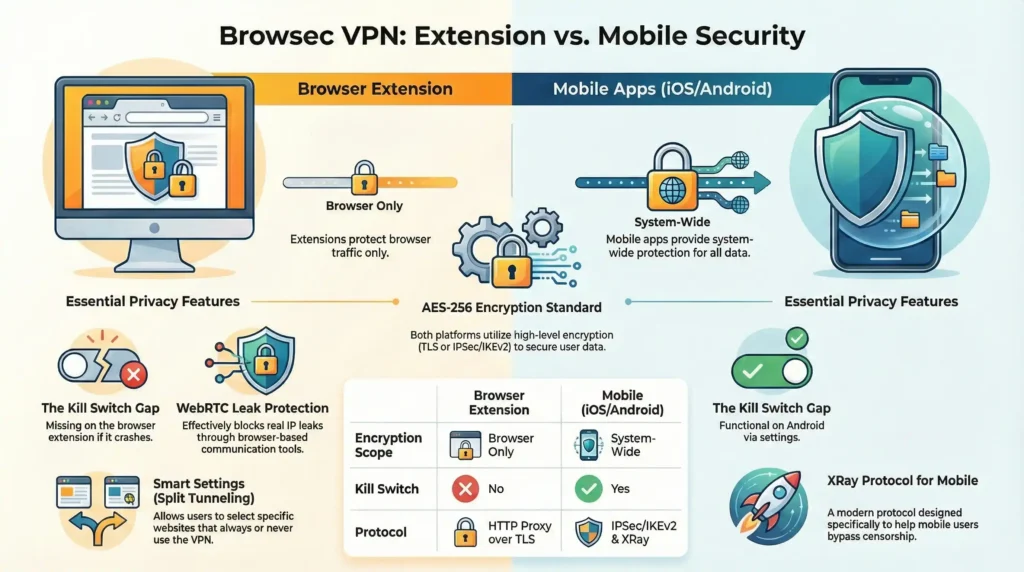
Understanding the security features of Browsec is essential for you to make a decision. Unlike a full-system VPN that protects every app (including the browsers) on your computer, Browsec primarily operates as a browser extension and offers light protection. You can check its technical architecture in the following:
1. Encryption Standards
- Browser Extension: Uses an HTTP Proxy over TLS. While this provides AES-256 encryption for your browser traffic, it does not encrypt data from other applications like Discord, Slack, or Windows Updates.
- iOS/Android Apps: These are more robust, utilizing IPSec/IKEv2 and the XRay protocol (a modern protocol designed to bypass censorship). These provide system-wide encryption on your mobile device.
2. IP & DNS Leak Protection
In our 2026 testing, Browsec effectively masked the user’s IP address. It includes WebRTC leak blocking within the extension settings, which is crucial for preventing your real location from leaking through browser-based communication tools.
3. Kill Switch
Kill Switch is a vital safety feature that cuts your internet if the VPN fails. It can effectively prevent your IP address from leaking to the ISP.
- Mobile: Browsec offers a functional kill switch on Android via the “Always-On VPN” settings.
- Browser: The extension lacks a true system-level kill switch. If the extension crashes, your browser will revert to your ISP connection without warning.
4. Split Tunneling
Browsec features “Smart Settings,” which allow you to select specific websites that should always (or never) use the VPN. This is a helpful light version of split tunneling.
Browsec Privacy Risks: Jurisdiction and Logging
Where is Browsec VPN Based? – The Russia Factor
The headquarters of a VPN can sometimes affect its security. Browsec is based in Russia, which raises concerns of data sharing risks.
- Legal Implications: Russia has some of the most intrusive data retention laws in the world. The government requires VPN providers to register with regulators and comply with state censorship.
- Surveillance: While Russia isn’t part of the Five Eyes alliance, its domestic surveillance capabilities (SORM) are extensive. Being based here makes it legally difficult for any company to fully resist government data requests.
Does Browsec Keep Logs?
The Browsec is claimed to follow a strict No-Logs Policy. But the fact is that their privacy document contains loopholes.
- Aggregated Data: They admit to collecting aggregated usage data, which they claim does not identify you.
- The Audit Gap: Unlike premium competitors, Browsec has never undergone an independent third-party security audit. In the VPN world of 2026, a trust me policy is rarely enough for high-stakes privacy.
Performance vs. Safety: Is the Free Version Enough?
Speed Limits
The free version is heavily throttled. You can expect speeds around 10 Mbps, which is sufficient for reading news but will struggle with 4K streaming or high-speed downloads.
Malware & Adware Risks
One bright spot is that Browsec is consistently malware-free. Scans via VirusTotal confirm that the installers and extensions do not contain hidden trackers or viruses. However, free users will encounter frequent upsell prompts to upgrade to Premium.
Browser Extension Limitations
Many users mistakenly believe that turning on the Browsec extension protects their entire PC. It does not. Your torrent client, email app, and system background processes remain exposed to your ISP.
Browsec VPN Pros and Cons
By checking the pros and cons of Browsec VPN, you can easily understand how it protects your privacy and what it lacks.
| Pros | Cons |
| Easy setup: One-click activation. | High-risk jurisdiction: Based in Russia. |
| Reliable Unblocking: Works for Netflix & YouTube. | No Desktop App: Limited to browsers and mobile. |
| No Malware: Clean, safe installation. | Vague Privacy Policy: No independent audits. |
| Strong Encryption: AES-256 standards. | No P2P Support: Torrenting is not supported. |
Dos and Don’ts of Using Browsec VPN
- Dons: Unblocking a YouTube video, accessing geo-blocked news sites, or adding a layer of encryption to public Wi-Fi for casual browsing.
- Don’ts: Torrenting (P2P), online banking, whistleblowing, or accessing sensitive political content where your identity must be 100% protected.
A Better Alternative to Browsec VPN
As Browsec VPN does not provide full protection on your device, the Russian jurisdiction can be a dealbreaker too. Then you can consider an alternative tool to enhance your online security. BearVPN is recommended as a standard premium VPN and the best alternative to Browsec. It is a powerful service that safeguards your online privacy by hiding your real location and encrypting your traffic data. It’s available to use on Windows, Mac, iOS, and Android devices, which ensures overall protection on your computer and phone.

What Are the Benefits of Using BearVPN?
- Global Servers: You can easily and safely connect to 2000+ servers in more than 50 locations worldwide.
- Strict No-logs Privacy: Your traffic will be strictly encrypted without being tracked by the ISPs.
- Kill Switch: No more worries about VPN connection drops. The Kill Switch feature will disconnect you immediately to avoid data exposure.
- Unlimited Data: You can enjoy unlimited data on up to 10 devices simultaneously, thus ensuring a smooth streaming speed.
With BearVPN, you will get full device encryption when browsing online.
Steps to Get Connected in BearVPN
Step 1. Download and install BearVPN on a supported device.
Step 2. Open the BearVPN app and connect to a server.

Step 3. Once connected, go to the browser and visit your target pages. Or you can use BearVPN to keep your app data private.
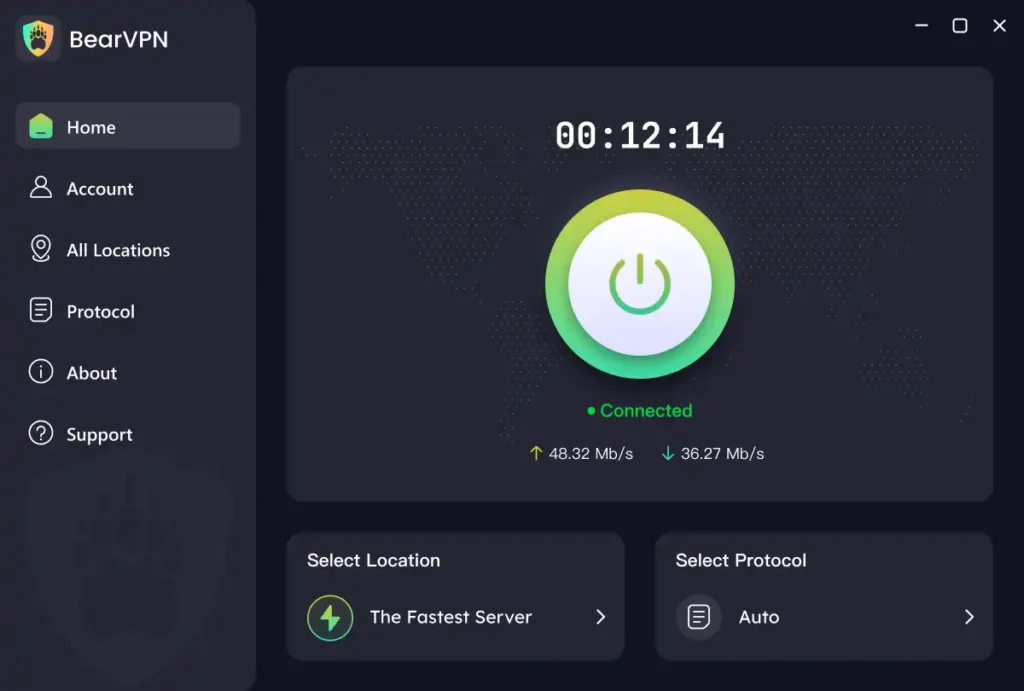
Note: Always make sure that there is no cached data in your browser or app before accessing any content online.
Final Verdict
Is Browsec VPN safe? Yes, it’s widely considered a safe and convenient tool for budget users. However, it’s not a privacy tool for full device encryption. Browsec is safe for low-stakes usage, such as bypassing a school filter or watching a regional video, but it falls short for serious privacy needs due to its Russian jurisdiction and unverified logging claims.
For full-device protection and a court-proven privacy policy, we recommend upgrading to a dedicated premium service like BearVPN that offers a system-wide kill switch and audited security. It protects not only the browser tasks, but also provides an overall safeguard for apps and systems. Try BearVPN now and secure your privacy on all devices hassle-free!
FAQ: Common Questions About Browsec Safety
1. Is Browsec VPN really free?
Yes, it offers a free plan with unlimited data, but you are restricted to 4 server locations and slower connection speeds. The free plan is mostly used for bypassing regional restrictions and secure public network connections.
2. Does Browsec hide my IP address effectively?
Yes, it masks your IP address for browser traffic and includes WebRTC leak protection to prevent accidental exposure. It doesn’t hide your IP when using the apps.
3. Can Browsec be trusted with banking data?
It’s not recommended to use Browsec VPN when accessing your banking data due to its basic encryption technology. A full-system VPN like BearVPN with an audited no-logs policy is more reliable for sensitive financial transactions.
4. Does Browsec sell user data?
No, there is no public evidence of Browsec selling data. However, some tests show that their policy allows for the collection of aggregated info for service monitoring. There are data leakage risks of using Browsec VPN.
5. Which country is Browsec VPN based in?
Browsec VPN is headquartered in Russia, which presents a high risk for users concerned about government surveillance. That’s one of the reasons why users seek an alternative service for real data encryption online.
6. How to use Browsec VPN in Firefox?
To use Browsec VPN in Firefox, you can download it from the Firefox Add-ons site. Click the globe icon in your toolbar, toggle the switch on, and select a server location from the list. Then you can use it to encrypt your connection and mask your IP address for secure browsing.