Key Takeaways:
- What is a Filter Breaker for Android? It is a specialized tool, typically a VPN or Proxy, used to bypass network restrictions, firewalls, and government censorship on Android devices.
- Top Recommendation: BearVPN is considered the most reliable filter breaker for Android in 2026, offering specialized SLProxy and SCProxy protocols to bypass even the strictest deep packet inspection (DPI) and firewalls.
- Core Benefit: More than just unblocking content, a high-quality filter breaker for Android, like BearVPN, secures your connection with AES-256 encryption to prevent ISP tracking, government surveillance, and cyber threats.
- Safety Concerns: It’s safe and legal to use a filter breaker on Android devices. But you should always use it for privacy protection and accessing content legally.
What is a Filter Breaker and Why Do You Need One on Android?
A Filter Breaker is a colloquial term for software that bypasses internet censorship on Android devices. While technically functioning as VPNs or proxies, they are specifically marketed and designed to bypass government-imposed firewalls in regions with heavy internet restrictions, such as Iran, India, and Russia. Besides, it can help bypass geo-blocking on streaming services like Netflix, Hulu, or HBO Max that restrict content based on your IP address due to licensing agreements.
Before choosing a proper filter breaker for Android, it’s better to understand what it is, how it works, and the risks involved.
1. How It Works
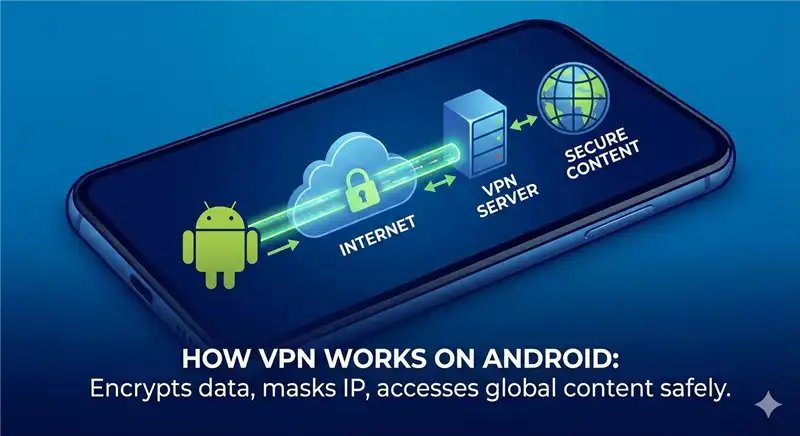
A filter breaker acts as a middleman between your Android device and the internet.
- The Block: Normally, when you try to open a blocked app (like WhatsApp, Telegram, etc) or website, your local Internet Service Provider sees the request and blocks it.
- The Break: The filter breaker creates an encrypted tunnel. Instead of connecting to the blocked app or website directly, your phone sends encrypted data to a server in a different country.
- The Result: The ISPs cannot read the encrypted data, so they let it pass. The server abroad decrypts your request, fetches the content from your target app/website, and sends it back to you.
2. Common Types of Android Filter Breakers
- Standard VPN Apps: Services like BearVPN that route all your phone’s traffic through a secure server.
- Specialized Anti-Censorship Tools: Apps designed to hide that you are using a VPN at all (obfuscation), making them harder for governments to block.
- App-Specific Proxies: Configurations often used inside apps like Telegram (MTProto proxies) that only unblock the specific app, leaving the rest of your phone’s internet connection normal.
3. The Android Advantage and Its Risks
Android’s open architecture makes it the ideal platform for powerful filter-breaking tools. However, this openness is a double-edged sword. The Google Play Store and third-party repositories are often flooded with so-called free filter breakers. The fact is, many of these apps are shady at best. They often lack proper encryption, leak your DNS data, or sell your browsing history to third-party advertisers to monetize their free service.
Recommended Choice: Using a professional tool like BearVPN ensures that while you are bypassing filters, your personal data remains locked behind military-grade encryption.
Best Filter Breaker for Android – BearVPN
As we have mentioned above, VPNs are considered the best filter breakers for Android to bypass IP blocks and access restricted content safely. Here we recommend BearVPN, a powerful tool that offers 2000+ servers all around the world. It allows you to break filters on Android anonymously. By connecting to a dedicated IP address, your real location will be masked so that the ISP won’t know what content you are visiting.

Steps to Break Filters on Android with BearVPN
Step 1. Download and Install BearVPN
Download BearVPN directly or search for it in the Google Play Store on your Android device.
Step 2. Sign in to Your Account
Open the BearVPN app and register an account with your email address.
Step 3. Connect to a High-Speed Global Server
Once logged in, you can go back to the BearVPN main screen and connect to a server. To break the filter on Android, you should connect to a server located in a supported country. e.g, if you want to access Netflix content, you can connect to a server in the US or the UK.

Step 4. Access Your Desired Content
When it is connected to BearVPN, you can clear the app cache or browser history first, then go to the target pages for secure browsing.
Why BearVPN is the Best Choice for Bypassing Filters on Android?
When choosing a filter breaker for Android in 2026, you need more than just a masked IP, but a tool that balances stealth, speed, and security. Here’s why BearVPN stands out:
1. Bypassing High-Censorship Firewalls
Many VPNs fail in restricted or high-pressure areas because their protocols are too obvious. BearVPN is optimized for these critical zones, using its proprietary proxy protocols to stay under the radar of state-level monitoring.
2. Strict No-Logs Policy
Unlike many free filter breakers that act as data harvesters, BearVPN adheres to a strict No-Logs policy. It doesn’t track, collect, or share any of your browsing history. In the event of a legal inquiry in a restricted zone, there is nothing to provide.
3. Optimized for Fast Streaming and Gaming
Breaking the filter can sometimes result in endless buffering. BearVPN provides 4K-level bandwidth reserves and specific optimization for streaming platforms and gaming apps. Whether you are a competitive gamer or a streaming enthusiast, its high-speed infrastructure ensures a lag-free experience.
4. Kill Switch and Leak Protection
A filter breaker is useless if it leaks your real identity the moment the connection flickers. BearVPN includes an integrated Kill Switch. If your VPN connection drops accidentally (even for a second), it will instantly halt all internet traffic, preventing your real IP address from being exposed to your ISPs and the filters you are trying to bypass.
Troubleshooting: What to Do If Your Android Filter Breaker is Blocked
While the filter breakers are used to bypass IP blocks, they can face challenges as network administrators update their blacklists. If you find yourself blocked, try the following steps to resolve:
1. Switch Protocols: If the standard connection is failing, go to settings and toggle to SCProxy. This provides a higher level of obfuscation that can often slip through updated firewalls.
2. Try Different Servers: Filters often target specific IP ranges. With over 2000 servers, BearVPN offers plenty of alternatives. Simply disconnect and choose a different city or country.
3. Clear Browser Cache: Sometimes your Android browser stores cookies or cache that inform a website you were previously blocked. Clearing your cache or using an Incognito window can solve this problem.
4. Check for Updates: Always keep your BearVPN app up to date. The developers constantly release patches to stay ahead of new censorship techniques.
Tips to Avoid the Security Risks of Low-quality Filter Breakers
To avoid restrictions on Android, some users choose low-quality, dangerous free filter breakers. These tools are mostly harmful and can leak your privacy.
| Risks | Details |
| Data Theft | Many free filter breakers sustain themselves by harvesting your personal data, such as contacts, browsing history, etc., and selling it to advertisers or third parties. |
| Malware | Cracked versions or unofficial filter breaker APKs found on Telegram channels or third-party stores often contain viruses that can steal banking passwords or spy on you. |
| Lack of Encryption | Some cheap filter breakers are just simple proxies. They change your location but do not encrypt your traffic, meaning the ISP or government can still potentially see what you are doing. |
| Battery Drain | Poorly optimized filter breakers prevent your phone from sleeping properly, causing massive battery drain and overheating. |
Final Thoughts
The internet should be a window to the world rather than a walled garden. However, some places have been cut off from the international scene due to various reasons. That’s why a filter breaker for Android is in demand. Whether you are a student trying to access educational resources, a digital nomad managing a crypto portfolio, or a survivor in a high-censorship zone, you deserve a secure and unfiltered experience.
While a filter breaker is common for Android devices, you should always avoid using malicious apps. BearVPN stands out as the best filter breaker for Android due to the stealth, speed, and 256-bit security you need to stay connected. Unlike an unauthorized filter, it doesn’t track, store, or sell your personal information. With BearVPN, you can definitely break the filters on Android to access restricted content, bypass IP blocks, and keep your data private. Try it on your Android now and say goodbye to any filters without effort.
FAQs About Filter Breakers for Android
1. Is using a filter breaker on Android legal?
In most countries, using a VPN for privacy and security is completely legal. However, the legal status is complex in restricted areas. For example, in the UAE, using a VPN to commit fraud or bypass VoIP restrictions can lead to legal issues. In India, new regulations have changed how logs are handled. That’s why privacy-focused providers often remove physical servers from such regions to protect users.
2. Will a filter breaker slow down my internet?
It depends on what filter breaker you choose. If you use a standard VPN app like BearVPN, your network speed will be optimized with smart servers. But if you choose an untrusted bypass tool, your Internet will be slowed down, and the traffic will not be encrypted.
3. Can a free filter breaker be trusted?
Generally, no. Free services often monetize by selling your data or serving intrusive ads. Such breakers can cause data leaks and lack technical support. Using a professional service like BearVPN is recommended for actual security and a no-logs guarantee.
4. Does an Android filter breaker work on mobile data (5G/4G)?
Yes, BearVPN is fully compatible with both Wi-Fi and mobile data networks. It is especially important to use it on public Wi-Fi hotspots, which are often unencrypted and prone to man-in-the-middle attacks.
5. Can I use a filter breaker for social media apps like Telegram or Instagram?
Yes, you can always use BearVPN to unblock social platforms and communication apps that are frequently targeted by regional filters or national bans.
![How to Break ChatGPT Filters in 2026 [Ultimate Guide]](/_next/image/?url=https%3A%2F%2Fcms.bearvpn.com%2Fwp-content%2Fuploads%2F2026%2F01%2Fhow-to-break-chatgpt-filters.webp&w=640&q=75)