You load into Call of Duty, ready for a quick match, and suddenly a full-screen prompt appears asking for your date of birth or even “Parental Consent Required.” For many players, this feels abrupt and confusing—especially when the warning says your account may be deleted if you don’t respond. This guide explains how Call of Duty age verification works, what happens if you ignore it, how to fix common “age verification not working” errors, and how to protect your privacy and connection safely along the way.
Why Call of Duty Is Asking You to Verify Your Age
Before you troubleshoot any “Call of Duty age verification not working” issues, it helps to understand why the system exists at all. Recent updates show Activision tightening its approach to online safety and regional regulations, especially for younger players, and age checks have become a standard part of that effort.
When you see an age verification prompt, Call of Duty is trying to classify your profile as an adult or minor account based on your date of birth. That classification affects which features you see, how your data is handled, and in some regions, whether parental consent is required. In some cases, the warning goes as far as saying your Call of Duty account may be deleted if you do not verify by a specific deadline, which is why it feels so serious.
At a high level, there are three main drivers: local laws that treat minors differently, a push for safer online environments, and the need for account-level decisions that apply consistently across all Call of Duty titles linked to your Activision profile.
How Call of Duty’s Age Verification System Works in Practice
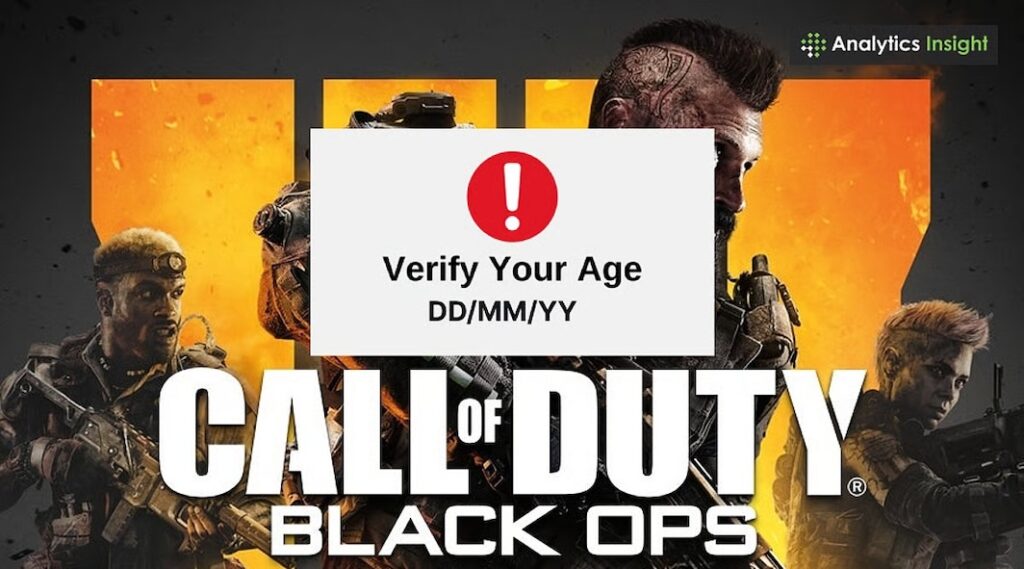
Understanding how Call of Duty’s age verification works reduces a lot of the stress around it. Rather than being a random pop-up, it is tied directly to your Activision account and the profile details saved there, including your date of birth.
In practical terms, most players fall into one of a few scenarios:
| Scenario | What You See | What It Means |
| Adult player with missing DOB | Prompt asking for the full date of birth | The system lacks age data and needs it to classify your account. |
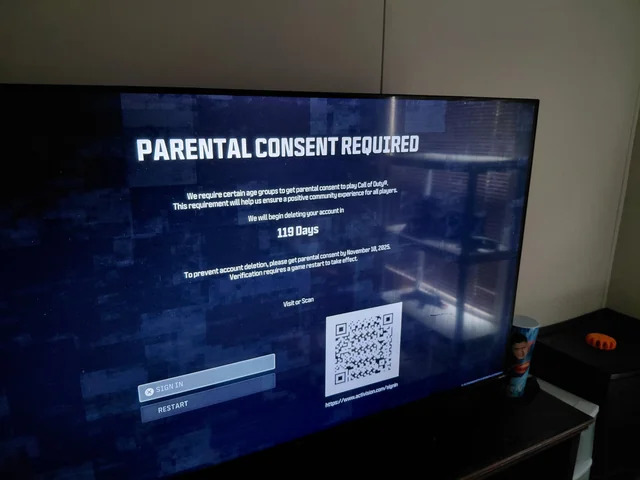
| Minor account with no parental consent | “Parental Consent Required” message | A parent or guardian must approve continued online play. |
| Cross-platform player | Age prompt appears on multiple devices and launchers | All platforms share the same Activision profile information. |
| Wrong or inconsistent DOB | Repeated prompts or unexpected restrictions | The stored date of birth conflicts with your actual situation. |
Once you enter your date of birth as an adult, that value is stored at the profile level and used by Warzone, current mainline titles, and any future Call of Duty releases linked to the same Activision account. If the date of birth indicates that you are underage for your region, additional protections are enabled, and “Parental Consent Required” may appear until a guardian completes the process.
Because everything hinges on the data in your Activision profile, switching platforms or launchers will not bypass age verification. Any real fix has to update the underlying account rather than relying on a specific console or PC launcher to solve the issue on its own.
What Happens If You Ignore Age Verification Warnings
It can be tempting to keep dismissing the pop-up and hope it disappears. Unfortunately, the current implementation of Call of Duty age verification is designed to escalate if you ignore it, especially when your profile is treated as a minor account.
From the system’s perspective, continued inaction looks like non-compliance. If an account appears to belong to an underage player and no parental consent is provided, or if required details are missing entirely, Activision has to treat it accordingly. Over time, that can lead to stronger actions against the account.
You can think of the risk curve like this:
- Short term – Repeated reminders to verify your age or complete parental consent.
- Medium term – Gradual restrictions on communication, social tools, or certain online features.
- Long term – Potential account disablement or deletion if mandatory checks are never completed.
For adult players, the bigger danger is leaving an incorrect or incomplete date of birth in place for too long. If the system believes you are younger than you are, it may apply unnecessary restrictions or keep showing “Parental Consent Required.” Fixing that gets harder the longer you wait, especially if your region only allows limited changes to date of birth on an Activision account.
If you see a message that your Call of Duty account may be deleted for failing to verify, you should treat it as a real deadline rather than an empty threat.
Common Call of Duty Age Verification Errors and How to Respond
Searches like “Call of Duty age verification not working,” “Warzone age verification error,” and “parental consent page not loading” show how many players hit snags during this process. Instead of trying random fixes, it helps to follow a simple troubleshooting flow and then apply solutions tailored to your specific error.
A straightforward starting flow looks like this:
- Confirm the account – Make sure you are signed into the correct Activision profile on both the game and the website.
- Use the website – Open the Activision or Call of Duty website in a browser and check your profile details there instead of relying only on in-game pop-ups.
- Rule out browser/network glitches – Try another browser, clear cache, temporarily disable script-blocking extensions, and test on a different network if possible.
- Check saved DOB – See what date of birth is already stored and whether it matches your real age.
- Escalate to support – If you are still blocked, gather screenshots and contact Activision support.
Once you have done that, you can map your situation to common patterns:
- Endless age verification loop
You enter your date of birth and the game appears to accept it, but the next session shows the same prompt. This usually means the update never fully reached your Activision profile. Updating your DOB directly on the website, then relaunching the game, is more reliable than depending on in-game prompts alone. - “Parental Consent Required” with no usable consent link
Sometimes the game shows a parental consent message but fails to provide a working path forward. In that case, sign into the account from a desktop browser, look for a dedicated parental consent or family section, and turn off aggressive content filters or script blockers that might break the page. - Wrong birthday was entered by mistake
If you accidentally select the wrong year, the system may treat you as underage and lock in that classification. Some regions support a one-time “change date of birth Activision account” request through official support, which may require documentation. The earlier you start that process, the better your chances of a smooth correction.
If you have carefully followed these steps and the Call of Duty age verification still does not complete, a detailed support ticket—with platform, region, timestamps, and screenshots—is the most realistic next move.
Where a VPN Fits In (and What It Can’t Do for Age Checks)
The moment players run into restrictions, VPNs quickly enter the conversation. It is important to be clear about how a VPN interacts with Call of Duty’s age verification, so you do not expect it to do something it simply cannot.
In short:
- A VPN cannot…
- Change the date of birth stored in your Activision profile.
- Make you legally older or bypass your region’s age rules.
- Remove the need for parental consent when your account is treated as underage.
- Change the date of birth stored in your Activision profile.
- A VPN can…
- Encrypt your traffic on unsafe networks so others on the same Wi-Fi cannot easily see or intercept your account credentials.
- Sometimes gives you a more stable path to Activision services, reducing timeouts when you submit forms or log in.
- Hide your real IP from other players, which can help reduce targeted harassment or IP-based attacks.
- Encrypt your traffic on unsafe networks so others on the same Wi-Fi cannot easily see or intercept your account credentials.
The right way to think about a VPN is as a connection-level safety net rather than a loophole in the age verification system. You still have to provide accurate information and follow official processes if parental consent is required. A VPN simply makes the network you use for those steps more private and resilient.
BearVPN for Call of Duty Players: Secure Connections and Stable Games
If you are already seeing age verification prompts and playing online regularly, your Call of Duty sessions depend on both network security and performance. Choosing a VPN that respects those realities is far more helpful than chasing shortcuts.
BearVPN is designed around everyday browsing and gaming rather than just occasional use. You can connect with a single tap, using a clean interface that stays out of the way while you focus on your matches. Apps are available for iOS, Android, Windows, and Mac, so you can secure the devices you use for account emails, Activision profile management, and actual gameplay with the same service.

From a privacy and safety perspective, BearVPN emphasizes:
- Encrypted tunnels and IP masking to keep your traffic shielded on shared or public networks.
- DNS leak protection and anti-tracking design to reduce the chance that your DNS queries or browsing patterns escape the tunnel.
- RAM-only servers and a strict no-logs approach, helping minimize long-term traces of your sessions.
For gaming and Call of Duty specifically, BearVPN focuses on staying fast and unobtrusive:
- High-speed connections and low latency for smoother Warzone matches, voice chat, and lobby transitions.
- Global server coverage so you can choose routes that feel stable for your ISP and region.
- Per-app VPN management (split tunneling) so you can route Call of Duty and Activision logins through the VPN while leaving non-critical apps on your normal connection.
Used this way, BearVPN supports the things you are already trying to do—keep your Call of Duty account secure, handle age-related changes over an encrypted connection, and maintain a stable gaming experience.
Pre-Verification Checklist for Your Call of Duty Account
Before you hit “Confirm” on the next age verification prompt, it is worth pausing for a quick reality check. A simple checklist can prevent common mistakes and help you avoid fake pages or misconfigurations.
Run through these points first:
- Check the domain – Make sure you are on an official Activision or Call of Duty site, not a look-alike URL.
- Confirm the profile – Verify that you are signed into the account that actually holds your Call of Duty progress.
- Review your date of birth – Enter a DOB that reflects your real age and complies with your region’s rules.
- Think about past errors – If you previously picked the wrong year, look up whether your region supports a one-time change request through official support.
- Secure the connection – When managing account details on shared or public networks, consider turning on a trusted VPN like BearVPN to encrypt the traffic.
These small checks only take a moment but can save you from fighting a misconfigured profile or dealing with an account that ends up restricted or deleted.
FAQs
1. Can I change my age on my Call of Duty / Activision account?
In many regions, you cannot freely edit your date of birth after it is set. Some players can submit a one-time “change date of birth Activision account” request through official support, which may require documentation and is not guaranteed.
2. Will my Call of Duty account really be deleted if I ignore age verification?
If you receive a warning that your account may be deleted for not completing verification, you should assume the system can act on it. The checks are there to enforce age-related rules, especially for minors, and long-term non-compliance can lead to losing access.
3. Why am I seeing “Parental Consent Required” when I’m actually an adult?
Most of the time, this means the stored date of birth on your Activision profile shows you as younger than you are. Fixing it generally requires updating that information through official channels rather than just telling support your real age.
4. Does a VPN let me bypass Call of Duty age verification or parental consent checks?
No. A VPN does not alter the personal data stored in your account and cannot make you legally older. Its role is to encrypt your connection and improve privacy while you work with Activision’s systems and play online.
5. What should I do if Call of Duty age verification is not working at all?
Sign into the Activision or Call of Duty website directly, check your profile data there, and try a different browser and network. If the issue persists after you have tried those steps, gather screenshots and submit a detailed ticket to Activision support.
Conclusion
Age verification in Call of Duty is more than a one-time pop-up—it is part of a wider push toward safer, more compliant online gaming. When you understand how Call of Duty age verification works, you can respond calmly, fix errors, and avoid unnecessary account risks. Combine accurate information, cautious browsing habits, and a secure, encrypted connection—potentially backed by a privacy-focused VPN such as BearVPN—and you put yourself in the best position to keep playing the game you enjoy without constant warnings or worries about your data.