Roblox is a global phenomenon, but nothing kills the vibe faster than hitting the “Verify Age” wall. You want to access Voice Chat or join exclusive 13+ experiences, but you are stuck staring at a screen asking for a government-issued passport or driver’s license.
For many players, this is a dealbreaker. Whether you don’t have an ID, don’t trust a gaming platform with your sensitive documents, or simply can’t get the verification system to work, you feel locked out of the full game.
Here is the secret Roblox doesn’t tell you: The requirement to upload an ID is often based on your location.
While there is no “magic button” to remove age checks entirely, there is a proven, legal workaround. By using a VPN to digitally relocate your device to regions with more lenient rules (like the USA or UK), you can often trigger the “Phone Verification” option—allowing you to unlock Voice Chat using just a mobile number, completely skipping the ID upload.
In this guide, we will show you exactly how to execute this “Region Switch” bypass, fix common “Verification Failed” errors, and explore legitimate alternatives like facial estimation.
Disclaimer: This guide is for educational and informational purposes only. We do not encourage violating Roblox’s Terms of Service or Community Standards. The methods described below are technical workarounds, and BearVPN is not responsible for any account actions (such as warnings or bans) that may result from their use. Proceed at your own risk.
What Is Roblox Age Verification and How Does It Work?
Roblox implemented age verification to protect its community, ensure compliance with evolving global safety laws (like the UK Online Safety Act), and provide access to age-appropriate content. The process is handled by Persona, a trusted third-party partner, and involves one of two primary methods:
1. Official ID Verification: Players aged 13 and up are prompted to upload a government-issued photo ID (passport, driver’s license, or national ID).
2. Facial Age Estimation: A newer method uses a selfie scan to estimate a user’s age without requiring an ID.
The process is designed to be quick, typically taking only a few minutes, though high traffic can cause delays.
The Technology Behind Persona: Facial Age Estimation
Currently, Roblox has partnered with Persona, a leading identity verification platform, to handle all age checks. In addition to government ID uploads, they’ve introduced Facial Age Estimation. This AI-driven technology analyzes your facial features through a real-time selfie to estimate your age without requiring a physical document.
If you are experiencing Roblox face scan bypass failures, it’s rarely a system bug. Common reasons for “Verification Failed” include:
- Poor Lighting: Shadows on the face prevent the AI from accurately mapping facial geometry.
- Device Permissions: Your browser or the Roblox app may not have permission to access the camera’s high-resolution mode.
- Biometric Inconsistency: If the selfie doesn’t match the “liveness check” (a test to see if you are a real human), the system will flag the attempt.
How to Bypass Roblox Age Verification Safely
Here’s the truth: there’s no official “bypass” that completely skips age verification. Roblox requires an ID for full access to voice chat and certain games. However, there are safe workarounds if you can’t or don’t want to use your ID.
1. Using a VPN
A VPN lets you connect to Roblox through secure servers in different regions, which can be useful if you experience access issues due to location-based restrictions or verification requirements.
BearVPN offers fast, private connections that help you stay secure while accessing Roblox from anywhere. It keeps your online activity encrypted and ensures your privacy throughout the verification process.
While many players search for a way to “hack” the biometric scan, the reality is that a VPN’s primary role in this process is Region Switching.
While a VPN won’t fake your face, it can help you access region-locked 17+ experiences that are restricted in countries like the Netherlands or South Korea.
In regions like the Netherlands or Belgium, certain Roblox features and 17+ games are heavily restricted due to local loot box and privacy laws. By using a high-speed gaming VPN to relocate your IP address to the UK or USA, you can change your library access and often trigger different verification options, such as the phone-only verification for Voice Chat, effectively skipping the mandatory ID wall.
Key features of BearVPN:
- Fast global servers: Connect to any region quickly with minimal lag.
- Strong privacy protections: No-logs policy, DNS leak protection, and powerful encryption keep your data secure.
- One-tap connection: Simple setup on iOS, Android, Windows, and macOS.
- Cross-device support: Protects your connection on phones, tablets, and desktops.
How to safely use a VPN:
1. Choose a Reliable VPN: Select a VPN service like BearVPN with a strong reputation for speed and privacy.
2. Connect to a Server: Connect to a server in a country where Roblox is known to allow phone number verification for voice chat (e.g., the United States or Canada).
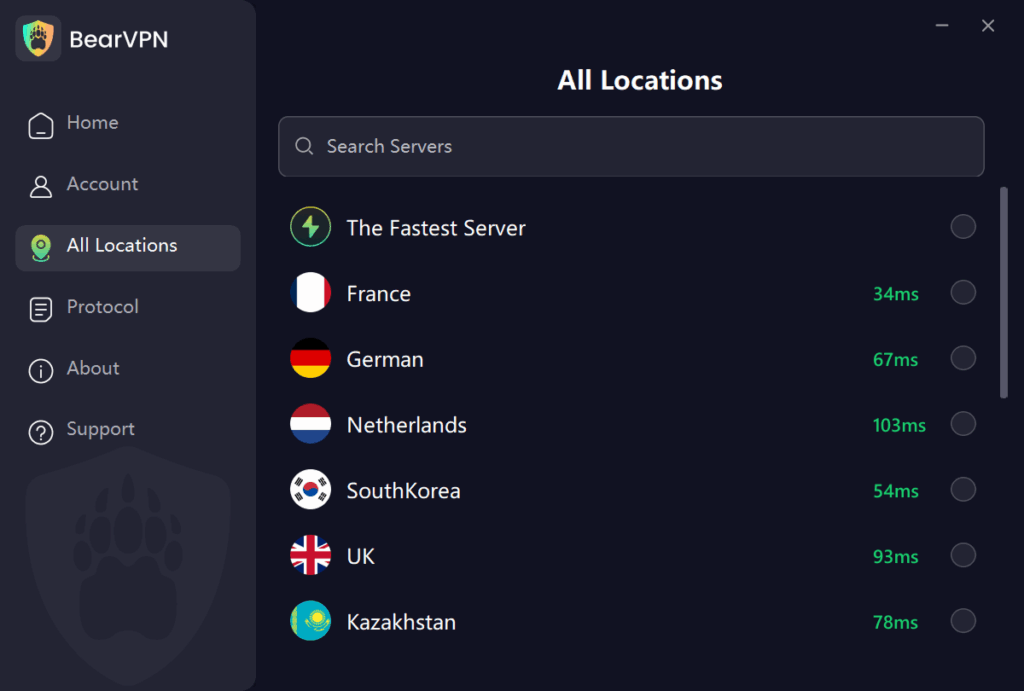
3. Complete Phone Verification: Log into Roblox from this new virtual location and complete the verification using a phone number.
Is It Legal to Use a VPN for Roblox?
Yes—using a Roblox VPN is legal in most countries. Millions of people use VPNs every day to protect privacy, unblock websites, or fix network issues.
However, there are two things you should know:
- Roblox Terms of Service – Roblox doesn’t explicitly ban VPN use, but if it detects unusual activity, your account may be flagged.
- Country Restrictions – In some regions, VPNs themselves may be restricted (e.g., UAE, China).
Related article: Roblox Banned Countries: Is It Blocked In Your Region?
2. Parental Consent
For users under 13, parental consent is a completely safe and official method. A parent can use their own verified account to grant a child access to age-appropriate features, such as voice chat, without having to share the child’s sensitive ID information. This is a key safety feature being promoted by Roblox in response to new regulations.
Other Ways to Verify Age on Roblox
While the VPN + Phone method is the fastest way to get Voice Chat, Roblox offers other official verification tiers depending on whether you want Voice Chat (13+) or access to restricted 17+ adult experiences.
1. Official ID Submission
If you want to access 17+ Experiences, the VPN method is not enough. You must submit a government ID.
- How it works: You upload a photo of your driver’s license, passport, or national ID, followed by a selfie to prove ownership.
- Why use it: It is the only way to unlock 17+ content.
- Safety Note: This data is processed by Persona, an automated system, and Roblox claims your ID image is deleted shortly after verification.
2. Phone Verification
This is the “Bypass” method we prioritized earlier. For most users, verifying a phone number is sufficient to unlock Voice Chat and Spatial Voice features without handing over personal documents.
- The Trick: In many regions, this option is hidden. By using BearVPN to switch to a US/UK server, you can force this option to appear.
- Privacy Benefit: You only share a phone number, not your biometric data or home address found on an ID.
3. Facial Age Estimation
If you don’t have a phone number or an ID card, Roblox has a newer feature called “Video Selfie Verification.”
- How it works: You allow Roblox to access your camera to take a short video selfie. The AI estimates your age based on your facial features.
- The Benefit: You do not need to upload a passport or driver’s license.
- Accuracy: This method is generally accurate for users over 13 but may struggle if you look younger than your actual age. It grants access to Voice Chat but not 17+ experiences.
4. Credit Card Verification
For users under 13, parents can verify the child’s account to grant specific permissions.
- How it works: A parent creates a linked account and verifies their age using a credit card or their own ID.
- Why use it: It allows parents to control exactly what the child can access without the child needing their own documents.
Troubleshooting Roblox Age Verification Issues
It’s common to encounter issues during the verification process. Here’s how to fix them.
How to Fix “Roblox Age Verification Not Working”
- Unsupported Browser: Use a supported browser like Chrome, Firefox, or Edge.
- Clear Cache & Cookies: This can resolve many common login or system errors.
- Switch Devices: Try completing the verification on a different device, as PC often works more smoothly than a mobile app.
How to Fix “I Keep Getting “Verification Failed” on Roblox for Age”
- Check ID Type: Ensure your government-issued ID is a type supported by Persona in your country.
- Blurry Images: A common failure reason is a blurry or unclear photo. Resubmit your ID with a clear, well-lit image of the entire document.
- Poor Selfie: Make sure your selfie matches the photo on your ID. Take the picture in a well-lit area with no filters, hats, or glasses. The system uses a “liveness check” to ensure it’s a real person.
- Contact Support: If issues persist, contact Roblox Support for assistance.
Conclusion
Roblox’s age verification can feel frustrating, especially if you don’t have an ID or your verification keeps failing. While there’s no magic way to skip it completely, you can:
- Use a VPN to reduce regional issues,
- Try parental consent for under-13 accounts,
- Contact Roblox support if the process fails,
- Or troubleshoot errors with better images and supported browsers.
Remember: Avoid unsafe hacks that promise instant verification bypass—they put your privacy and account at risk.
By following the safe methods in this guide, you’ll have the best chance of enjoying Roblox without unnecessary roadblocks.
FAQ
1. How long does Roblox age verification take?
Usually, the process takes just a few minutes. In some cases, it may take a few hours if the system is busy.
2. How safe is Roblox age verification?
Roblox uses a third-party verification provider that encrypts and secures your data. According to Roblox, IDs and photos are not stored permanently. While no system is 100% risk-free, it’s generally considered safe.
3. How to enable voice chat in Roblox without age verification?
Currently, Roblox requires a verified ID to enable voice chat. Any tool or hack claiming to bypass this is unsafe and could get your account banned.
4. Can you use a fake ID for Roblox age verification?
No. It’s illegal and can lead to immediate and permanent account bans. The verification system is designed to detect fraudulent documents.