Key Takeaways
- In Australia, website blocking is usually targeted, most commonly court-ordered ISP blocks aimed at major piracy domains.
- Some restrictions are sector-specific, such as TEQSA-backed blocks on illegal academic cheating websites.
- “Blocked” often shows up as DNS/domain-level failure or an ISP notice page, and results can vary by ISP and changing domains.
- A VPN can improve privacy and connection reliability, but you should still follow local laws and the site’s terms.
- If you need secure access on public Wi-Fi, BearVPN offers features like Kill Switch and Auto Mode to help keep connections stable.
You don’t usually notice internet restrictions until a page refuses to load, a domain suddenly “doesn’t exist,” or your ISP redirects you to a block notice. In Australia, these issues are rarely random. They typically reflect a specific restriction method—often tied to court orders targeting piracy domains, or targeted enforcement in areas like academic cheating sites. This guide breaks down what blocked websites in Australia really mean, which categories are most affected, why blocks happen, and how to regain reliable access in a way that prioritizes security and compliance.
Overview of Internet Restrictions in Australia
Website blocking in Australia is less about broad, permanent censorship and more about targeted restrictions that flow through legal and regulatory channels. The most visible form is ISP-level blocking ordered by the Federal Court, particularly for copyright infringement sites under Australia’s Copyright Act framework.
In practice, your ability to reach a site may depend on your ISP and the domain you try. Blocks can be updated as sites rotate domains, and some restrictions affect “online locations” beyond a single website address. That’s why two people in different networks can see different results even in the same city.
Blocked Website Categories in Australia, With Real-World Examples
Not every restriction looks the same, and not every “blocked” experience is the government censoring content. It helps to group restrictions into categories, because each category tends to use different enforcement mechanisms—and you’ll troubleshoot them differently.
Below are common categories you’ll see mentioned in discussions about internet censorship in Australia, along with examples and how restrictions typically show up for you.
Common categories you may encounter
- Piracy streaming & torrent indexing: Often subject to court-ordered ISP blocks, and the targets change as domains change.
- Academic cheating services: Targeted enforcement, with published lists of blocked domains.
- Age-restricted material access: Not always “blocked,” but increasingly governed by compliance obligations and age assurance expectations in specific contexts.
- Fraud, malware, and scam infrastructure: Often restricted by providers or security services, sometimes without public lists.
- Platform-level restrictions (not ISP blocks): For example, social media account enforcement or policy-driven access limits—these can feel like “blocked,” but the mechanism is different.
What Are Popular Websites Blocked in Australia
A list of blocked websites in Australia is tricky because domains change, blocks can be time-limited, and enforcement can be updated through new court orders or protocols. The best approach is to treat any list as representative, not exhaustive, and note the restriction type and why it happens.
The table below includes well-known examples that have been commonly discussed or targeted in Australia, plus one category where Australia provides an official, ongoing list.
| Website / App | Status | Type of Restriction | Notes |
| The Pirate Bay (various domains) | Often blocked/varies by ISP | Court-ordered ISP blocking (copyright) | Domains frequently change; blocks are often updated via court processes. |
| 1337x (various domains) | Often blocked/varies by ISP | Court-ordered ISP blocking (copyright) | Commonly discussed under torrent sites blocked in Australia, mirror domains may appear. |
| YTS / YIFY-style domains | Often blocked/varies by ISP | Court-ordered ISP blocking (copyright) | A frequent target category for rightsholders; exact domains evolve. |
| Putlocker-style streaming clones | Often blocked/varies by ISP | Court-ordered ISP blocking (copyright) | Many sites share the same “brand” across rotating domains. |
| IPTV piracy portals (various) | Often blocked/varies by ISP | Court-ordered ISP blocking (copyright) | Australian court actions have covered IPTV-related “online locations” in multiple cases over time. |
| Illegal academic cheating sites (many domains) | Blocked (official list) | Regulator + ISP blocking protocols | TEQSA publishes an alphabetized list of blocked illegal cheating websites. |
How to read this table: If a site is described as “varies by ISP,” it means the restriction is typically implemented by providers in response to legal or regulatory action, and what you see can differ depending on the network and the exact domain.
Why Some Websites Are Blocked in Australia
When you understand the “why,” you’ll also understand what a sensible next step looks like—whether that’s verifying you’re seeing a court-ordered block, resolving a network-level issue, or simply realizing the website has moved or changed domains.
Here are the most common drivers behind restricted websites in Australia.
1) Court-ordered blocking to reduce copyright infringement
Australia’s Federal Court can order ISPs to block access to certain online locations involved in copyright infringement, including piracy, streaming, and torrent indexing services. Specifically, the July 2025 Federal Court decision (Roadshow Films v Telstra [2025] FCA 744) ordered the blocking of 35 major piracy sites and 47 domain names, including popular platforms like HiAnime and 123Movies. This is commonly discussed in connection with section 115A of the Copyright Act and has been used for years, with updated injunctions targeting new domains.
From your perspective, this often shows up as a domain not resolving, timing out, or redirecting to an ISP notice page explaining access is blocked.
2) Enforcement against illegal academic cheating services
Australia also targets commercial academic cheating services. TEQSA has publicly reported ongoing blocking efforts and maintains a list of blocked illegal cheating websites. As of November 11, 2025, TEQSA has successfully blocked a total of 555 illegal cheating websites under protocols with major ISPs. This list is regularly updated to protect the integrity of higher education awards.
3) Age-restricted material compliance obligations
Some restrictions aren’t “this site is banned,” but rather “access may be subject to stronger controls.” Australia’s online safety framework includes industry codes and registered requirements in areas related to age-restricted material, affecting how certain services manage access.
If you see prompts or gating where there used to be none, it may reflect compliance shifts rather than an ISP block.
4) Security and fraud prevention
Sometimes the “block” is driven by risk controls: malware distribution, phishing, scam infrastructure, or suspicious redirects. In those cases, you might be blocked by a DNS resolver, a browser security layer, or network-level filters—not a court order.
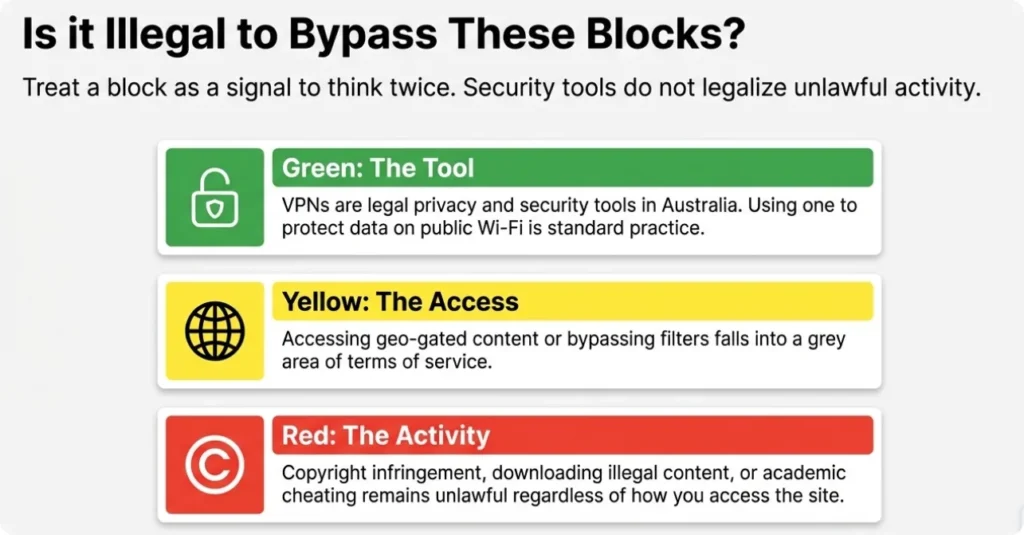
Is Visiting Banned Sites Illegal in Australia?
It’s easy to collapse everything into one question—“Is it illegal?”—but in practice, you’ll get a clearer answer by separating (1) how access is restricted from (2) what the content or activity involves.
A court-ordered ISP block typically reflects a legal determination about the site’s purpose (for example, large-scale infringement). That doesn’t mean every click is automatically treated the same. Still, it does mean you should treat the risk profile as higher—especially if you’re downloading, uploading, redistributing, or using services that violate copyright law or platform terms.
On the VPN side, VPNs are widely regarded as legitimate privacy and security tools in many jurisdictions, but their legality can still hinge on how they’re used. If you’re using a secure connection to protect your data on public Wi-Fi or to maintain privacy while traveling, that’s very different from using it to facilitate unlawful activity.
A practical rule: If a site is blocked for reasons tied to infringement or harmful content, don’t treat “I can reach it” as “it’s safe or lawful.” Treat it as a signal to think twice.
How to Access Blocked Websites in Australia Safely and Reliably
If you’re trying to access a site and it’s not loading, you want a response that’s both practical and sensible. The goal isn’t to “beat” systems—it’s to understand what’s happening and restore access in a way that protects your security and stays within legal boundaries.
Start by identifying whether you’re dealing with a temporary technical issue, a provider-level restriction, or a site that has simply changed. Then choose the lightest-weight fix that matches your situation.
First, confirm what kind of block you’re seeing
- ISP notice page or consistent failure across browsers: more likely a provider restriction (often court-ordered).
- Works on mobile data but not on home Wi-Fi: could be ISP-level, DNS-related, or router filtering.
- Only fails on one device: more likely local settings, cached DNS, or security software
Safer, low-friction checks that don’t change your risk profile
- Try a different network (for example, a mobile hotspot) to confirm whether the issue is network-specific.
- Check whether the website has moved to a new official domain (many legitimate services do).
- If you rely on the site for work or study, look for an official status page or provider announcement rather than chasing mirrors.
When a secure connection helps: privacy, stability, and travel use-cases
If your main concern is privacy and connection safety—for example, you’re on public Wi-Fi, you’re traveling, or you want to reduce ISP-level tracking on ordinary browsing—using a reputable VPN can be a reasonable choice. In those situations, you’re not “unlocking content for its own sake”; you’re creating an encrypted tunnel that protects your traffic from passive monitoring and helps you maintain a consistent connection.
This is where BearVPN fits naturally for many people who land on “how to access blocked websites in Australia” and actually mean: “How do I browse normally, safely, and without random access issues—without putting my data at risk?”

What to look for in that scenario:
- Fast, modern protocols (like WireGuard) for smoother performance on everyday browsing and streaming.
- Kill Switch support so you don’t accidentally leak traffic if the connection drops on unstable networks.
- Clear privacy positioning (so you know what is and isn’t logged) and a straightforward app experience when you switch between home Wi-Fi and mobile networks.
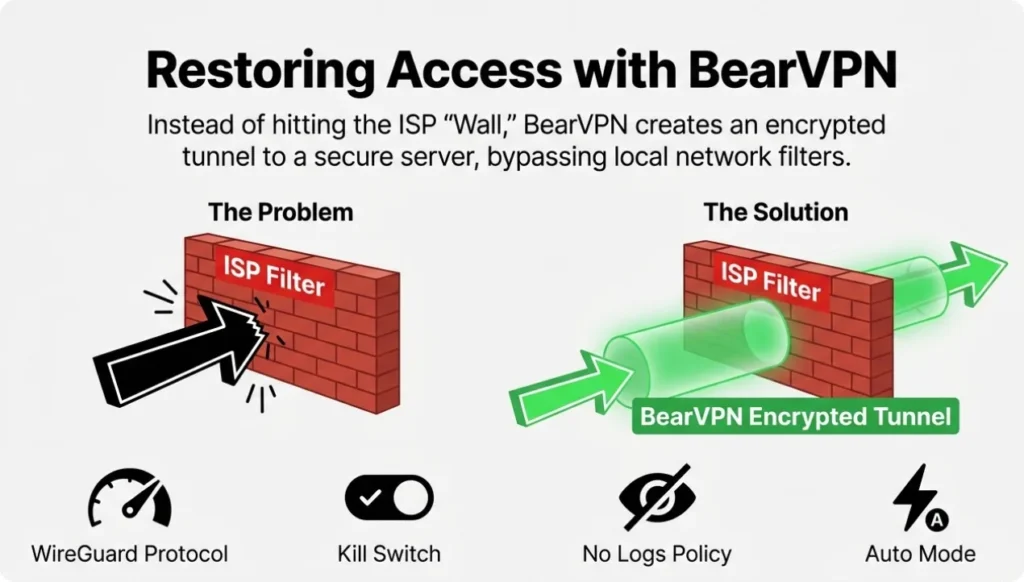
If you’re frequently switching networks—or you’ve noticed blocks or throttling behaviors that disrupt legitimate services—BearVPN is designed to keep your connection predictable while adding a meaningful layer of privacy protection, especially when you’re on shared or untrusted networks.
How to Use BearVPN to Unblock a Website
If a site won’t load because of ISP-level restrictions or network filtering, a VPN can help by routing your traffic through an encrypted tunnel to a different network path. The key is to keep it simple: connect reliably, avoid leaks, and test access without turning it into a complicated setup.
Step 1: Download and install BearVPN on your device.
Pro tip: If the download page feels slow or intermittently fails on your home network, install BearVPN using a mobile hotspot first. Mobile and fixed-line routes can behave differently, and this can help you get the app set up without fighting the same network restrictions.
Step 2: Open BearVPN and create your account with a secure email.
Before you connect, go to Settings and enable the Kill Switch. If your VPN connection drops (for example, during a network handoff or brief ISP disruption), the Kill Switch helps ensure your real IP address isn’t exposed mid-session.
Step 3: Pick a server close to Australia to reduce ping and improve stability.
For most users, nearby regions deliver better latency for streaming and clearer VoIP calls than far-away locations. If you don’t want to manually test servers, use Auto Mode—it selects the fastest available option based on your current network conditions.
Step 4: Connect, then refresh the site and retest.
Once you’re connected, reload the page. If it still doesn’t open, switch to another nearby server and try again—some blocks or routing issues affect specific paths more than others.
Conclusion
When you run into blocked websites in Australia, you’re usually seeing targeted restrictions—most often court-ordered ISP blocks for copyright infringement, plus specific enforcement areas like illegal academic cheating sites. Your best move is to identify the restriction type first, then choose a response that protects your privacy and keeps you on the right side of the law. If your real goal is safer, more reliable browsing—especially on public Wi-Fi—a reputable VPN like BearVPN can help you maintain a stable, encrypted connection without turning your everyday internet use into guesswork.
FAQs
1. Is a VPN legal in Australia?
In general, using a VPN as a privacy and security tool is widely understood as legitimate. The legal and account risk usually comes from what you do with the connection (for example, infringement or illegal content), not from the encryption tool itself.
2. Why do ISPs block websites in Australia?
The most common driver is a court order requiring ISPs to block access to specific online locations—often tied to copyright infringement. Other blocking efforts can be sector-specific, such as TEQSA’s work to disrupt illegal academic cheating services.
3. Where can you find an official list of blocked websites in Australia?
For many piracy-related blocks, there isn’t a single official master list that stays current because domains change frequently. However, TEQSA maintains an official, alphabetized list of blocked illegal academic cheating websites, which is one of the clearest public lists available.
4. Will a VPN affect Australian banking or local apps?
It can. Some banks and services flag logins from unusual IP locations or require extra verification. If you use a VPN, pick a stable server location, and be ready for a one-time security check. If a banking app refuses to log in, disconnecting the VPN for that session is usually the simplest fix.
References
- TEQSA — Blocked illegal cheating websites (official list)
- TEQSA — Websites blocked to protect students and academic integrity (news release)
- eSafety Commissioner — Online Safety Codes and Standards (Age-Restricted Material Codes)
- ABC News — Federal Court orders ISPs to block updated piracy domains (reporting)
- Jones Day— Background on s 115A site-blocking injunctions
![How to Bypass OmeTV Ban [Safe & Workable]](/_next/image/?url=https%3A%2F%2Fcms.bearvpn.com%2Fwp-content%2Fuploads%2F2026%2F02%2Fhow-to-bypass-ometv-ban.webp&w=640&q=75)