You can reach the dark web through Tor, but Tor alone doesn’t magically remove risk. What it does well is hide your destination from your ISP and hide your IP from the sites you visit. What it doesn’t do is protect you from sloppy mistakes, malware, account tracing, or leaks outside the browser. A VPN can help in specific situations—especially on public Wi-Fi or when you want an extra privacy layer—but it can also add complexity and false confidence. This guide shows you when a VPN actually helps, what features matter most, and how to set things up so you reduce exposure instead of creating new problems.
Do You Need a VPN for Dark Web Browsing?
Before you pick the “best VPN for the dark web,” you should decide whether you need one at all—and why. Your goal isn’t to stack tools for the sake of it; it’s to reduce the specific risks you face, like network snooping, accidental leaks, or unstable connections.
A quick reality check helps: “dark web” usually refers to .onion sites accessed via Tor, while “deep web” refers to content not indexed by search engines (such as private portals or logged-in pages). Tor is the entry point; a VPN is optional and situational. Tor’s own documentation also notes that using a VPN with Tor is generally not recommended unless you’re an advanced user who can configure things safely.
A VPN can be useful when:
- You’re on public Wi-Fi and want to encrypt your traffic before anything else happens.
- You want to hide Tor usage from your ISP (they may still see “a VPN,” but not Tor directly).
- Your network blocks or throttles Tor traffic.
A VPN may be unnecessary (or counterproductive) when:
- You assume it makes you “fully anonymous.”
- You don’t understand how Tor circuits work, and you rely on a VPN as a shortcut.
- You’re in a high-risk situation where the VPN itself becomes a new trust point.
VPN + Tor Explained: Tor Over VPN vs VPN Over Tor
It’s easy to read “use a VPN with Tor” and treat it like a universal rule. In practice, there are different setups, and each changes what your ISP, your VPN provider, and Tor relays can see. That’s why this section matters more than any “top 10 VPNs” list.
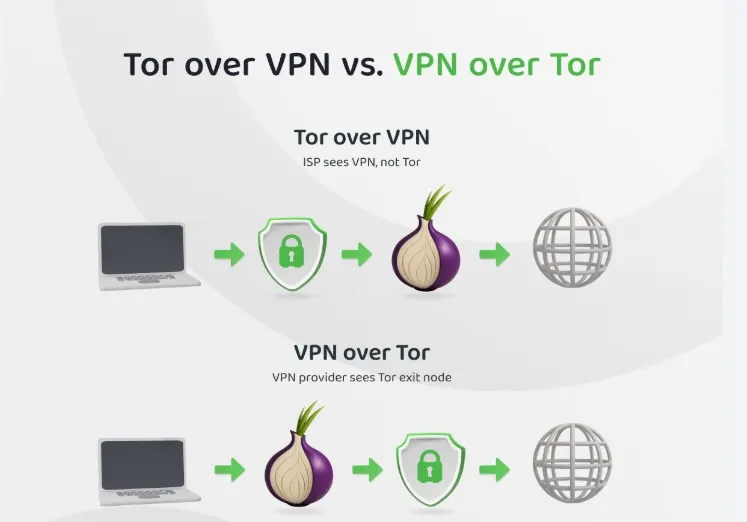
Think of it like routing: you’re deciding where the VPN sits—before Tor or after Tor. Most everyday users only deal with one of these realistically (Tor over VPN) because it’s simpler. The other (VPN over Tor) is harder to configure and easier to mess up, so it’s usually not the default recommendation.
Comparison:
| Setup | What it looks like | Main benefit | Main downside | Best for |
| Tor only | Tor Browser → Tor network → .onion/site | Fewer moving parts | ISP can see Tor usage | Low to moderate risk browsing |
| Tor over VPN | VPN → Tor Browser → Tor network | ISP sees VPN, not Tor | VPN becomes a trust point | Public Wi-Fi, Tor throttling, basic privacy |
| VPN over Tor | Tor Browser → Tor network → VPN | Exit traffic is hidden from the destination | Complex setup, can backfire | Advanced users with specific needs |
One important takeaway: a VPN doesn’t “upgrade” Tor into guaranteed anonymity. It mainly changes who can observe which parts of your traffic, and it can reduce accidental exposure (like IP leaks) if it’s built well and configured correctly.
What to Look for in the Best VPN for the Dark Web
Once you’re clear on why you want a VPN, the selection criteria become straightforward. You’re not shopping for a “streaming VPN” here—you’re prioritizing leak prevention, reliability, and predictable behavior when connections drop.
Use this checklist as your filter. It’s intentionally practical: it focuses on the features that reduce real-world mistakes during dark web browsing, not marketing buzzwords.
Must-have features
- Kill switch: cuts internet traffic if the VPN drops, so you don’t accidentally browse outside the tunnel.
- DNS leak protection: prevents your DNS requests from exposing what you’re doing to your local network or ISP.
- Clear no-logs policy: you want minimal retained data, stated plainly—not vague “diagnostic logs” language.
- Modern protocols & stable performance: stability matters because reconnect loops can create leaks and user error.
- Obfuscation (optional but valuable): helps when VPN traffic is blocked or heavily restricted.
Nice-to-have features
- Split tunneling: keep Tor browsing isolated while letting other apps use normal routing.
- Double VPN / multi-hop: adds another hop, but can also add latency—use only if you understand the trade-off.
- Dedicated IP: not essential for Tor, but can help in specific workflows where stability matters.
Best VPNs for the Dark Web
A “best VPN for dark web browsing” roundup is only useful if it’s tied to the checklist above. The point isn’t to overwhelm you with 15 options—it’s to show you a few solid categories: privacy-first choices, ease-of-use choices, and a strong all-around option you can set up without drama.
Below is a quick comparison designed for dark web use (Tor + VPN scenarios), not for streaming or gaming.
| VPN | Best at | Why it’s relevant for dark web use | Watch-outs |
| BearVPN | Practical privacy features | Kill switch + DNS leak protection + no-logs positioning; also offers obfuscation/split tunneling/double VPN options | Like any VPN, it becomes a trust point—use it for specific reasons, not “extra anonymity.” |
| Proton VPN | Privacy-focused ecosystem | Strong privacy positioning; often discussed in Tor-over-VPN context | Feature sets vary by plan; learn what you’re actually enabling |
| Mullvad | Minimal sign-up footprint | Known for privacy-minded account handling | Smaller “mainstream” feature set in some apps |
| NordVPN / Surfshark / ExpressVPN (typical top-tier picks) | Big networks + mature apps | Usually strong stability and mainstream protections (kill switch, leak protection, etc.) | Don’t pick based on hype—verify the exact privacy/logging statements you’re comfortable with |
If your main goal is a safe, low-friction setup for Tor over VPN, pick something that makes leak prevention hard to mess up. That’s where the combination of kill switch + DNS leak protection + stable apps matters more than anything.
Best VPN for Dark Web Browsing: Why BearVPN Works Well in Real Use
You don’t need a VPN that tries to do everything. You need one that reduces your odds of making a mistake when you’re already using Tor, which is slower, more sensitive to network instability, and easier to “break” through poor habits.

BearVPN’s value for dark web browsing is simplest when you map features to situations:
1) You’re on public Wi-Fi and want fewer “surprise exposures.”
A reliable kill switch matters here. If the VPN drops for a moment, you don’t want your device to quietly switch back to your normal connection while Tor is still open. BearVPN highlights kill switch support as part of its feature set.
2) You want to reduce leak risks that aren’t “inside Tor.”
Tor handles routing in the browser, but your system can still leak info in other ways. DNS leak protection is a common baseline for privacy use cases, and BearVPN explicitly positions DNS leak protection as a core feature.
3) You need flexibility without turning the setup into a science project.
Features like split tunneling let you keep Tor traffic in a controlled lane while allowing normal browsing or app traffic to behave normally. Obfuscation can help if your network is hostile to VPN traffic. BearVPN lists both.
4) You want “privacy defaults” that fit how you actually browse.
A stated no-logs policy won’t automatically make you anonymous, but it does reduce the amount of data you’re trusting a provider not to retain. BearVPN presents a no-logs posture in its feature messaging.
If you use BearVPN with Tor, the healthiest mindset is: the VPN is for network-layer privacy and leak reduction (especially on unstable or public networks), while Tor is for routing and onion access. Treat them as complementary tools with different jobs.
Step-by-Step: How to Use a VPN With Tor More Safely
The most common way people get exposed isn’t “someone cracked Tor.” It’s simple mistakes: logging into real accounts, downloading files that phone home, changing Tor defaults, or letting a connection drop and continuing to browse outside the tunnel. A good setup is mostly about reducing those foot-guns.
Follow this sequence to keep your process clean and repeatable—especially if you’re trying to figure out the best VPN for Tor Browser use without overcomplicating things.
Step 0: Avoid these high-risk mistakes (quick checklist)
- Don’t log into real-name accounts (email, social, shopping) while using Tor.
- Don’t download and open random files from onion sites.
- Don’t install extra browser extensions in Tor Browser.
- Don’t maximize the Tor window if you’re trying to reduce fingerprinting.
- Don’t assume a VPN makes you “safe” from scams or malware.
Step 1: Connect to your VPN first
- Turn on your VPN before opening Tor Browser.
- If your VPN has a kill switch, enable it now.
Step 2: Confirm leak protections are on
- Ensure DNS leak protection is enabled.
- If your VPN supports IPv6 leak handling, make sure it’s covered (or disable IPv6 if you know how and it’s appropriate for your device).
Step 3: Open Tor Browser and set your security level
- Use Tor Browser’s built-in security settings if you’re going to unfamiliar sites.
- Accept that safer settings may break some site functionality.
Step 4: Keep your browsing compartmentalized
- Use Tor for onion sites and sensitive browsing only.
- Use normal browsing (outside Tor) for everything else—separation reduces mistakes.
Step 5: Don’t add identity breadcrumbs
- Avoid logging into accounts tied to your real identity.
- Don’t reuse usernames, emails, or passwords across environments.
Step 6: Close cleanly
- When you’re done, close Tor Browser completely.
- Disconnect the VPN if you don’t need it, so you notice when you’re not protected.
A final note: Tor’s official guidance warns that combining Tor with a VPN can reduce anonymity if done incorrectly. If your goal is censorship circumvention rather than “extra privacy layers,” Tor bridges may be a better tool than a VPN in some environments.
Conclusion
Choosing the best VPN for the dark web isn’t about chasing the most famous brand—it’s about minimizing leaks, keeping your connection predictable, and avoiding the common mistakes that undo Tor’s protections. A VPN can help when you’re on public Wi-Fi, dealing with Tor blocking, or you want to hide Tor usage from your ISP, but it also adds a new trust point and extra complexity. If you want a practical option with core safety features like a kill switch and DNS leak protection, BearVPN is a strong choice to pair with a careful Tor workflow. Keep your habits clean, and you’ll get far more safety than any tool stack alone.
FAQs
1. Is it legal to browse the dark web?
In many places, using Tor Browser itself is legal. What’s illegal is illegal activity—regardless of whether it happens on the open web or on onion sites. If you’re unsure, treat this as a jurisdiction-specific question and don’t guess.
2. Can your ISP see that you’re using Tor?
If you use Tor alone, your ISP may see you connecting to Tor relays (they can’t see the onion destination). If you connect to a VPN first, your ISP typically sees a VPN connection instead—though they can still tell you’re using a VPN.
3. Are free VPNs safe for dark web browsing?
Often, no. Free VPNs commonly come with limitations that matter here: unstable connections, weak leak protection, unclear logging practices, and incentives to monetize usage. For dark web browsing, reliability and leak prevention are not optional.
4. Does a “no-logs VPN” make you anonymous on the dark web?
No. It can reduce what the VPN retains, but anonymity depends on your behavior, your threat model, and how many identifying signals you give away (accounts, downloads, fingerprints). A no-logs policy is a helpful baseline, not a magic shield.
5. Should you always use a VPN with Tor Browser?
Not always. Even Tor’s own documentation says it generally doesn’t recommend VPN + Tor unless you’re an advanced user who can configure things properly.
For most people, the better question is: what risk are you trying to reduce, and is a VPN the best tool for that?