Key Takeaways
- Government Blocks: Turkish ISPs such as Turkcell, Turk Telekom, and Vodafone aggressively use Deep Packet Inspection (DPI) to block standard VPN protocols like OpenVPN.
- Best Solution: To quickly solve the VPN not working issue, you must use a VPN like BearVPN or NordVPN that offers Obfuscated servers or Stealth Mode.
- Legal Status: Using a VPN is legal in Turkey for individuals, but accessing banned content, like restricted news or adult sites, remains a legal grey area.
- Common Fixes: If your VPN is stuck, check your network connection, switch to another protocol, and enable “NoBorders” or “Camouflage” modes in your app settings.
- Valid IP: To access Turkish banking or streaming from abroad, you need a VPN with virtual Turkish servers, as physical servers have largely been removed due to regulations.
If you are finding your VPN not working in Turkey, it is mostly not a bug on your device, but rather a result of one of the world’s most sophisticated internet censorship systems. Turkey’s Information and Communication Technologies Authority (BTK) mandates that local Internet Service Providers actively hunt down and block VPN traffic, according to the Turkey Minute’s report. In this case, a standard VPN connection that works in Europe or the US may fail instantly in Istanbul or Ankara.
Why did this happen, and how can you get a valid VPN IP address in Turkey? Relax, this guide analyzes the latest blocking methods used in 2024-2025 and provides a step-by-step technical guide to getting your VPN working again. Whether you are a tourist trying to access your social media, an expat needing to contact home, or a local resident trying to secure your data.
Why Is My VPN Not Working in Turkey?
Most of the time, your VPN fails to work in Turkey because the connection is being interrupted by the ISP. There are several causes for your VPN not working in Turkey:
1. Deep Packet Inspection (DPI)
This is the primary reason. Turkish ISPs use Deep Packet Inspection DPI to analyze the metadata of your internet traffic. Standard VPN protocols, such as OpenVPN, have a distinct digital fingerprint. When the ISP’s firewall detects this fingerprint, it immediately drops the packet, causing your connection to time out or fail.
2. Port Blocking
VPNs typically use specific communication ports. However, Turkish networks often shut these ports down entirely. If your VPN app is attempting to connect through a blocked port, it will become stuck in a spinning wheel.
3. IP Blacklisting
The BTK maintains a dynamic list of known VPN server IP addresses. If you are using a popular VPN server that thousands of others are using, it is likely already on a blacklist. This is why free VPNs rarely work in Turkey. Their limited server IPs are banned almost instantly.
4. Bandwidth Throttling
Sometimes the VPN connects, but the speed is too slow to load the webpages. This is mostly caused by bandwidth throttling. Under these circumstances, your ISP detects encrypted traffic and deliberately slows it down to discourage you from using it.
Is VPN Banned in Turkey?
No, VPN is not banned in Turkey. Individuals can use a VPN to access blocked content in Turkey. However, as the government actively blocks some VPN providers and services, you should always distinguish the differences between something being technically blocked and legally banned.
The Operational Ban
While the user is not criminalized from using a VPN, the technology is restricted. The government has ordered ISPs to block access to VPN websites and VPN connections. This means:
- You cannot easily download and install a VPN app from within Turkey (the websites are blocked).
- You cannot easily connect inside a VPN app (the protocols are blocked).
The Context Matters
Besides the technical restrictions, what you do with a VPN is subject to Turkish law. Using a VPN to access terrorist propaganda, insult the government, or access other illegal content is a crime. If you are using a VPN simply for privacy concerns or to watch Netflix, you are generally safe from legal repercussions.
Is It Legal to Use a VPN in Turkey?
Yes, it is legal to use a VPN in Turkey. There is no risk that you will be arrested by simply using a VPN to access restricted content in Turkey. However, as the environment is strict, you should always pay attention to your behavior when using a VPN.
- Business Use: Many Turkish businesses use VPNs daily to secure their corporate data. The government understands this necessity and does not ban the technology outright.
- Social Media: During political unrest or emergencies, the government often throttles social media, such as Twitter, Instagram, and Facebook. Using a VPN to bypass these temporary throttles is common practice among citizens and journalists.
- The Risk: Although it’s legal to use a VPN in Turkey, the risk lies in posting content. If you use a VPN to post content that violates Turkish law and you are identified, the fact that you used a VPN will not protect you from prosecution if your identity is revealed via other means.
What To Do If Your VPN Is Not Working in Turkey
If you are currently in Turkey and cannot connect, follow these steps in order. Do not skip the protocol adjustments, as they are the most critical fix.
Step 1: Enable Obfuscation / Stealth Mode
Standard VPN encryption looks like gibberish to a firewall, which makes it suspicious. Obfuscation wraps your VPN traffic in an outer layer that makes it look like regular HTTPS web browsing. Here’s how to enable obfuscation or stealth mode in popular VPN services.
- BearVPN: Go to the app settings and enable “Stealth Mode”.
- NordVPN: Enable the “Obfuscated Servers” option in the settings.
- Surfshark: Use the Camouflage Mode (enabled automatically on OpenVPN).
- ExpressVPN: Set the protocol to Automatic, which typically obfuscates traffic by default in restrictive regions.
Step 2: Switch Protocols Manually
Generally, a VPN is armed with multiple protocols. If the automatic one fails, you can try some other specific protocols in this order:
- WireGuard / NordLynx: It is newer, faster, and sometimes bypasses older DPI filters.
- OpenVPN TCP: It is slower than UDP but harder to block because it mimics regular HTTPS traffic (Port 443).
- IKEv2: Good for mobile devices, though often blocked.
Step 3: Use a Virtual Location
When you are trying to connect to a server, do not choose the one located in Turkey. It’s better to connect to a server in a nearby country with free internet laws, such as Bulgaria, Romania, or Greece. These are physically close but legally outside Turkish jurisdiction.
- Solution: Open your VPN app and look for locations labeled like Turkey (via Romania) or Virtual – Turkey. Do not connect to a server in specific Turkish cities unless your provider explicitly supports them via virtual routing.
Step 4: Change DNS Servers
Sometimes the VPN tunnel is established, but DNS requests fail, preventing websites from loading. Follow the steps:
- In your VPN settings, ensure Custom DNS is disabled.
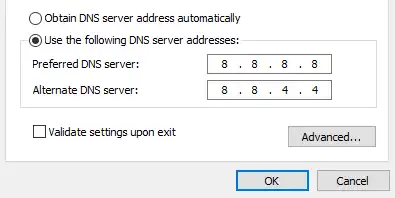
- Alternatively, if you are not using the VPN app but a manual setup, set your device’s DNS to Cloudflare (1.1.1.1) or Google (8.8.8.8) to bypass ISP DNS blocks.
- Restart your browser to apply the settings effectively.
Step 5. Use BearVPN as an Alternative
If you have tried the above settings and your VPN is still not working in Turkey, it’s recommended to try an alternative service. BearVPN is a powerful tool that works perfectly in Turkey. It provides 2000+ global servers from around 50 locations, thus ensuring a smooth and fast connection. Moreover, the advanced SLProxy and SCProxy protocols can help secure your connection greatly. With BearVPN, you can easily get connected to a valid Turkish IP address.

Steps to use BearVPN for Turkish servers:
Step 1. Download and install BearVPN on a supported device. It’s available to use on iOS, Android, Windows, and Mac.
Step 2. Open the BearVPN app. Then choose a Turkish server to connect to.

Step 3. If you want to access an app, you can close all background apps first. If you want to visit a specific website, it’s better to clear all browsing history in order not to be tracked by saved cookies.
Troubleshooting Common VPN Issues in Turkey
Issue 1: I can’t download the VPN app
If the VPN app you want to download is blocked in Turkey, you cannot download the installer. Then you can try the following fixes:
- For Mobile Users: Change your App Store / Play Store region to a different country to make VPN apps visible again.
- For Desktop Users: Ask a friend abroad to download the installer and email it to you or upload it to a cloud drive like Google Drive if it’s accessible.
Issue 2: Connected but no internet
Sometimes you are connected inside your VPN app, but pages won’t load. It means the handshake succeeded, but the data is blocked.
- Fix: You can disconnect immediately. Then switch to another protocol and reconnect. If that fails, enable the Split Tunneling feature and route only your browser through the VPN to see if it helps.
Issue 3: Streaming apps (Netflix/Disney) are blocked
If you are connected to a US server but Netflix detects a proxy. It means that Netflix has identified that your IP address belongs to the blocked ones.
- Fix: Clear your browser cache and cookies. Turkish ISPs often inject tracking cookies. You can also use the incognito mode or enable the stealth mode in your VPN.
Also read: Best VPN for Netflix
Issue 4: My eSIM isn’t working with VPN
Tourists using Airalo or Holafly often find their data cut out when the VPN is on. This happens because the roaming partner (local Turkish network) is blocking the VPN.
- Fix: You must use a VPN like BearVPN that supports TCP to prevent packet loss on unstable mobile networks.
Conclusion
The VPN not working in Turkey problem is a technical battle between government censorship and privacy technology. While the Turkish government has ramped up its efforts to block some VPN protocols via Deep Packet Inspection in previous years, it is still entirely possible to maintain a secure, free connection through VPN.
By using obfuscated servers, switching the protocols, changing the DNS settings, or using a virtual location, you are likely to solve part of the problems. If they don’t work, try a more reliable VPN like BearVPN to get a valid Turkish IP address and access restricted content. Try BearVPN now and unlock better virtual connections in Turkey!
FAQs About VPN Not Working in Turkey
1. Are VPNs restricted in Turkey?
Yes, but the restriction doesn’t refer to a ban. Turkey ISPs effectively block VPN connections using Deep Packet Inspection. You will need a high-quality VPN with obfuscation technology or stealth mode to regain access to Turkish servers.
2. How to connect to VPN in Turkey?
If you are traveling in Turkey, it’s better to download the VPN before arriving. In the app, enable Obfuscated Servers or NoBorders Mode. Connect to a server in a nearby country like Bulgaria or Greece. If you are living in Turkey, you can try BearVPN to get more Turkish servers.
3. Which VPN works in Turkey in 2026?
BearVPN is still working in Turkey. It consistently updates its server IPs and protocols to evade the blocks implemented by Turk Telekom and Turkcell.
4. What’s the best VPN to use in Turkey?
BearVPN can be the best one to use in Turkey due to its specific stealth mode. Its advanced protocols and No-logs privacy will also encrypt your traffic, making your browsing private and safe.
5. How to access restricted content in Turkey?
Connect to a VPN server outside Turkey, such as the UK, Greece, etc. This gives you a foreign IP address, bypassing local ISP censorship and allowing access to blocked sites in Turkey.