It is 2026, and Roblox has evolved far beyond a simple block-building platform. It is now a massive digital “metaverse” where 17+ experiences, high-fidelity social hubs, and even 21+ virtual lounges (in specific regions) dictate the pace of play. However, with these advanced features comes a more rigorous gatekeeper: Age Verification.
Nothing kills the vibe faster than trying to join a Voice Chat-enabled server or an exclusive 17+ horror game only to be met with the dreaded “Verification Failed” or a spinning loading icon that never ends. If you are struggling with Roblox age verification not working, you aren’t alone. Between AI-driven facial estimation and stricter regional regulations, the process has become a technical hurdle for many.
This guide provides a comprehensive deep dive into why verification fails and, more importantly, how to fix it in minutes.
Key Takeaways: What Changed in Roblox Age Verification (2026)
The verification landscape in 2026 is vastly different from the early 2020s. Roblox has tightened security to comply with global online safety acts. Here is what you need to know:
- Mandatory Social Features: You can no longer “opt-out” of verification if you want to use Spatial Voice (Voice Chat) or face-tracking animations.
- New Age Brackets: While “13+” used to be the primary milestone, Roblox now categorizes content into Under 9, 9+, 13+, 17+, and the newly introduced 21+ for specific verified social spaces.
- AI Facial Age Estimation: Roblox now uses highly advanced AI to estimate your age via your front camera before even asking for an ID.
- Persona Integration: The third-party service, Persona, has updated its “liveness detection,” making it much harder to use photos of IDs or bypass checks with emulators.
- Stricter Filtering: If your account region doesn’t match your ID’s issuing country, the system may auto-flag the attempt as fraudulent.
How Roblox Age Verification Works (Step-by-Step)
Before we fix the errors, let’s look at the “ideal” flow. Understanding where the process breaks requires knowing how it’s supposed to look.
Step 1. The Trigger: You navigate to Settings > Account Info and click “Verify My Age.”
Step 2. The Handshake: Roblox generates a unique session token and a QR code.
Step 3. The Transition: You scan the QR code with your smartphone. This moves the session from the Roblox app/website to a secure browser environment hosted by Persona.
Step 4. Method Choice:
- Facial Age Estimation: A quick camera scan where AI analyzes your features.
- Government ID Upload: Taking a high-res photo of a Passport, Driver’s License, or National ID.
Step 5. Liveness Check: The system asks you to move your head or look at specific colors on the screen to prove you aren’t a static image.
Step 6. The Verdict: AI and third-party databases cross-reference the data. If successful, a “Pass” token is sent back to Roblox, and your account is updated instantly.
Why failures typically occur mid-process
Most users experience failures at Step 3 (the QR code leads to a blank screen) or Step 5 (the AI fails to recognize the face or ID). These are usually caused by session timeouts—if you take longer than 5 minutes to complete the steps, the token expires for security reasons.
Why Roblox Age Verification Fails (Complete Breakdown)
Basic Issues (Most Common)
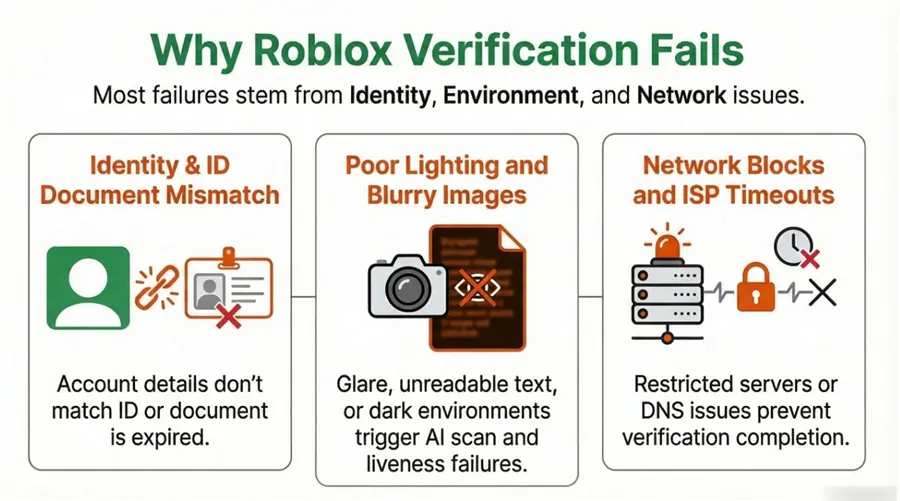
- Mismatched Info: If your Roblox account says you were born in 2005, but your ID says 2008, the system will instantly reject you for “inconsistent data.”
- Expired ID: The AI is trained to look for expiration dates. If your license expired yesterday, it’s a no-go.
- Blurry Images: Camera glare is the #1 enemy. If the “Machine Readable Zone” (the text at the bottom of a passport) isn’t legible, the AI can’t verify the document’s authenticity.
Advanced Causes (2026-Specific)
- AI Estimation Error: The current AI facial estimation has a margin of error of approximately $\pm 1.4$ years. If you are 17 and the AI thinks you look 15.5, it may force you to provide a physical ID instead of allowing the “Face Only” bypass.
- Liveness Detection Failure: If you are in a dark room, the AI can’t see the “micro-expressions” required to prove you are a human. It might flag you as a “deepfake” or a high-resolution photo.
- Cache Conflicts: If you’ve tried to verify multiple accounts on the same device, old session cookies can “pollute” the new request, leading to an immediate “Something went wrong” error.
Network & Regional Restrictions
- ISP Blocking: Some Internet Service Providers in regions like the Middle East (MENA) or parts of Southeast Asia block the specific API endpoints used by Persona to prevent data outflow.
- DNS Timeouts: If your DNS is slow, the “handshake” between Roblox and Persona will time out before the camera even opens.
Why Roblox Is So Strict Now (Behind the System)
You might be wondering, “Why is this so much harder than it used to be?” Roblox isn’t just being difficult; they are building a “walled garden.”
- 17+ Content Safety: To allow more “mature” games (with gore, romance, or gambling themes), Roblox must legally prove to regulators that minors cannot access them.
- Bot Prevention: Verification is the ultimate “CAPTCHA.” It prevents bad actors from creating thousands of bot accounts to inflate game stats or scam players.
- Legal Compliance: Laws like the UK’s Online Safety Act and various US state laws now require platforms to have “highly effective” age assurance.
Verification isn’t just a “feature” anymore; it is a filtering system designed to protect Roblox from massive legal fines.
Step-by-Step Fixes for Roblox Verification Errors
Fix #1 – Clear Cache & Restart App
This simple step resolves many “blank screen” or “session expired” issues caused by corrupted data.
Android/iOS: Settings → Apps → Roblox → Storage → Clear Cache (avoid “Clear Data” unless necessary)
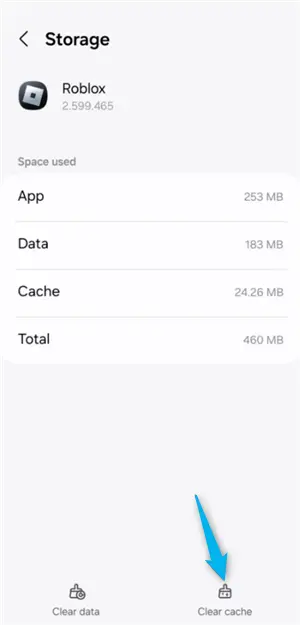
Browser: Press Ctrl + Shift + Delete → clear cookies (last 24 hours)
Extra Tip: Fully close the app (don’t leave it in the background) and restart your device
👉 Why it works: Removes outdated session tokens that can block new verification requests.
Fix 2. Optimize Your Environment
Verification AI depends heavily on clear facial detection.
- Lighting: Face a natural light source (window or soft front light)
- Avoid backlight: Light behind you creates shadows → AI can’t detect depth
- Background: Plain wall works best; avoid clutter or moving objects
- Remove obstructions: Glasses (glare), hats, masks, heavy makeup
👉 Pro Tip: Hold your phone at eye level and keep your face centered during the scan.
Fix 3. Use a Valid Government ID
If facial estimation fails, ID verification is required.
- Supported IDs: Passport (best), Driver’s License, National ID
- Not supported: Student cards, birth certificates, unofficial documents
- Check validity: ID must be unexpired and clearly readable
👉 Pro Tip: Place your ID on a dark, matte surface and avoid flash to reduce glare.
👉 Why it works: AI needs sharp contrast + readable text to validate authenticity.
Fix 4. Fix Device & Browser Issues
Low-quality hardware often causes hidden failures.
- Use a better camera: Switch to a smartphone if your webcam is low resolution
- Clean your lens: Smudges can blur images
- Update browser: Use the latest Chrome or Safari for proper camera permissions
- Grant permissions: Ensure camera access is enabled
Extra Tip: Avoid older or low-end devices with weak front cameras.
Fix 5. Resolve Network Errors (Critical)
If you see “Session Expired” or “Connection Error,” your network is likely the issue.
- Switch network: Try mobile data instead of Wi-Fi
- Change DNS: Google: 8.8.8.8, Cloudflare: 1.1.1.1
- Retry in a stable connection: Avoid public or restricted networks
Why it works: Ensures your device can reach verification servers without interruption.
Fix Network Blocks with a VPN (When It Actually Helps)
In many cases, the “Roblox age verification not working” error isn’t your fault—it’s your internet’s fault. This is where a VPN becomes an essential tool.
Verification requires a “three-way handshake” between Your Device, Roblox Servers, and Persona Servers. If your ISP has high packet loss or is throttling connections to international verification databases, the session will drop.
How BearVPN Improves Verification Success
BearVPN is specifically optimized for gaming and secure authentication. Here’s how it helps:
- Bypasses ISP Throttling: If your provider slows down “unrecognized” API traffic, BearVPN encrypts it, allowing it to pass through at full speed.
- Global Routing: If the local Persona server in your region is down, BearVPN can route your request through a US or UK server where the infrastructure is more stable.
- Reduced Latency: By providing a direct path to major data centers, BearVPN prevents the “Session Timeout” errors caused by laggy connections.
Why BearVPN Is the Best Choice for Roblox Players
If you are a serious Roblox player, especially one involved in the developer community or 17+ social circles, a stable connection is non-negotiable.
- 2000+ Servers: Connect to any region to match your account settings.
- Gaming-Optimized: Low ping and high stability, perfect for the high-bandwidth requirements of 2026 Roblox.
- Privacy First: BearVPN’s no-logs policy ensures your verification sessions remain private.
- Multi-Device: Verify on your phone, then play on your PC—all under one protected connection.
When a VPN Can Cause Verification to Fail
While a VPN is a solution, using it incorrectly can lead to a flag.
- IP Mismatch: If your Roblox account is set to “Germany” but you connect to a “Japan” VPN server to verify, the system may think you are a hacker.
- Free VPNs: Never use a free VPN for verification. Their IPs are often blacklisted by Persona and Roblox because they are used by bots.
The Golden Rule: Connect to a high-quality server in the same country as your account/ID for the best results.
How Long Does Roblox Verification Take?
| Method | Typical Wait Time | Why does it take longer? |
| AI Facial Scan | 30 Seconds – 5 Minutes | Poor lighting or slow internet. |
| Passport/ID (Auto) | 2 – 10 Minutes | AI is processing the document data. |
| Manual Review | 24 – 48 Hours | Occurs if the AI is “unsure” and needs a human to look. |
If it has been more than 48 hours, your request likely failed silently. You will need to restart the process.
Retry Limits & Cooldowns (Important)
Roblox does not allow infinite attempts.
- 3 Failed Attempts: You may be locked out of verification for 24 hours.
- “Try Again Later” Error: This usually means your IP address has been flagged for “suspicious activity.”
- Recommendation: If you fail twice, stop. Clear your cache, connect to a stable BearVPN server, and try one last time with perfect lighting.
Common Roblox Verification Errors (2026 Table)
| Error Message | Likely Cause | Recommended Fix |
| Session Expired | Network timeout or slow upload. | Switch to Mobile Data or use BearVPN. |
| Couldn’t Verify Photos | Blurry ID or excessive glare. | Use a dark background and turn off flash. |
| Age Incorrect | AI thinks you look too young. | Use a physical Government ID instead. |
| Blank Screen | DNS blocking Persona API. | Change DNS to 1.1.1.1 or use a VPN. |
| Invalid Document | Unrecognized ID type. | Ensure it is a valid Gov ID (not a school ID). |
What You CANNOT Bypass
Despite what some “Roblox Hacks” videos might claim, there are no shortcuts in 2026.
- ID Requirement: If the AI determines your age is borderline, you must provide an ID.
- AI Liveness: You cannot hold up a photo of someone else. The system detects depth and movement.
- Fake IDs: Using a photoshopped ID is a fast track to a permanent account ban. Roblox’s partnership with Persona allows them to detect most digital alterations instantly.
Will Roblox Ban You for Verification Failure?
Generally, no. If the AI simply can’t read your ID or thinks you look younger than you are, you won’t be banned. You will simply be restricted to “Under 13” or “All Ages” content.
However, if you submit an ID that is clearly forged or belongs to a different person entirely, this is considered “Fraudulent Activity” and can result in your account being deleted.
Is It Safe to Verify Your Age on Roblox?
Privacy is a valid concern. In 2026, Roblox uses a “zero-knowledge” approach:
- Data Handling: Your ID is processed by Persona, a world-class identity provider used by banks.
- Encryption: Data is encrypted via AES-256 during transmission.
- Anonymity: Roblox does not actually see your ID. Persona simply sends a “Yes/No” signal to Roblox.
- Deletion: Persona claims to delete the raw ID data once the verification is finalized (unless legally required otherwise).
Conclusion
Roblox age verification is the key to unlocking the platform’s full potential. Whether you’re looking to dive into the latest 17+ horror experiences or simply want to chat with friends using Spatial Voice, a failed verification shouldn’t stand in your way.
Most issues are the result of a system and environment mismatch. By optimizing your lighting, ensuring your ID is valid, and using a stable network connection through BearVPN, you can bypass common errors and get back to the metaverse in no time.
FAQs
Is age verification mandatory in 2026?
Only if you want to access 17+ games, use Spatial Voice, or use advanced camera-tracking features. Standard “All Ages” games do not require it.
Can I verify without an ID?
In some regions, you can use Facial Age Estimation. However, if the AI estimates you are too close to the age limit, it will default to asking for an ID.
Why does the screen stay blank?
This is almost always a DNS or ISP block. The browser is trying to connect to withpersona.com, but the connection is being severed. Use a VPN to bypass this.
Does a VPN slow down Roblox?
High-quality VPNs like BearVPN often improve speeds by avoiding congested ISP routes.
Can I use a fake ID?
No. It is against the Terms of Service and is easily detected by 2026 AI technology.